How do I use the Anime Summer Lace-Up Knit Outfit template?
Choose the primary action to open PicX Studio with the available template settings. Review the model and format, personalize the creative direction, and generate when ready.
A vertical pastel anime portrait of a young woman in a mint lace-up summer knit top and jeans, useful for fashion illustration or character outfit generation.
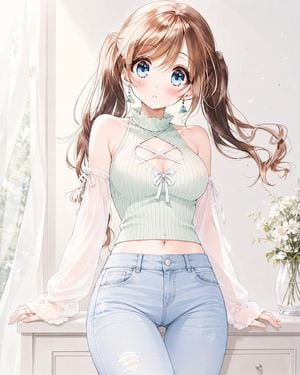
Create a polished anime-style portrait illustration of a cute young woman wearing a summery lace-up knit outfit. She has long flowing {argument name="hair color" default="light chestnut brown"} hair in loose twin ponytails with airy curled ends, soft side bangs, large sparkling {argument name="eye color" default="blue"} eyes, rosy cheeks, and a shy slightly parted-lips expression. Her outfit is a pale mint sleeveless ribbed summer knit halter crop top with a high ruffled mock neck, bare shoulders, a diamond-shaped chest cutout with white crisscross lacing, and a small white ribbon bow at the center; add sheer pale pink detachable puff sleeves tied at the upper arms with small bows, plus light blue high-waisted skinny jeans with subtle distressed rips. Include two visible dangling earrings, one on each ear, with small blue triangular charms. Pose her seated or leaning lightly on a white dresser with both hands resting near the edges, upper body centered, waist-up to upper-thigh framing. Background: a bright white room beside a softly glowing window with sheer curtains on the left, a white dresser surface, and a clear glass vase of small white flowers on the right. Use delicate linework, soft pastel colors, glossy highlights in the eyes and hair, gentle blush, luminous daylight, subtle sparkles, and a clean romantic shoujo anime aesthetic. Keep the composition vertical, high detail, elegant and wholesome, with no text, no watermark, and no extra characters.
Choose the primary action to open PicX Studio with the available template settings. Review the model and format, personalize the creative direction, and generate when ready.
Yes. You can change the subject, setting, lighting, mood, format, and available model controls before creating your image.
This template is free to open and customize. Generation usage is shown in PicX Studio before you create.
Start with GPT Image 2, which is the model associated with this template. You can compare another compatible model for a different finish.
Follow a topic to a crawlable collection of related PicX Studio templates.