How do I use the Neo-Urban Surrealist Portrait template?
Choose the primary action to open PicX Studio with the available template settings. Review the model and format, personalize the creative direction, and generate when ready.
An industrial-themed surrealist portrait prompt blending street art, fashion photography, and collage textures.
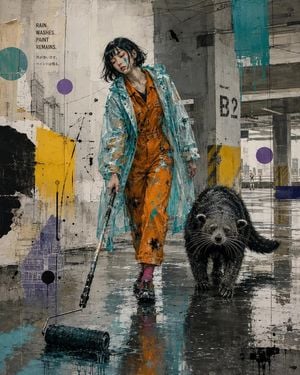
Create a raw neo-urban surrealist portrait in a rain-soaked industrial environment, blending fashion photography, street art, and contemporary mixed-media collage. A {argument name="subject" default="melancholic young woman"} in paint-splattered workwear and a translucent raincoat walks through an abandoned concrete structure, accompanied by an {argument name="animal companion" default="unusual animal companion"}. Wet reflective ground, oversized paint roller, dripping graffiti, torn posters, architectural sketches, abstract geometric shapes, ink splatters, layered textures, and distressed paper elements. Style inspired by underground gallery art, post-industrial aesthetics, editorial fashion, and urban decay. Muted concrete tones contrasted with {argument name="accent colors" default="vibrant teal, orange, purple, pink, and cyan"} accents. Dynamic composition, emotional storytelling, gritty realism, high-detail textures, expressive brush strokes, paint drips, collage overlays, hand-drawn diagrams, Japanese typography, environmental concept art, cinematic atmosphere, moody lighting, reflective puddles, depth and perspective, masterpiece quality. Visual Elements: • Industrial architecture and brutalist structures • Abstract circles, lines, technical sketches, and blueprint fragments • Paint splashes, graffiti marks, torn paper textures • Rare animal companion (binturong, axolotl, cassowary, raven, etc.) • Fashion-forward streetwear with artistic stains
Choose the primary action to open PicX Studio with the available template settings. Review the model and format, personalize the creative direction, and generate when ready.
Yes. You can change the subject, setting, lighting, mood, format, and available model controls before creating your image.
This template is free to open and customize. Generation usage is shown in PicX Studio before you create.
Start with GPT Image 2, which is the model associated with this template. You can compare another compatible model for a different finish.
Follow a topic to a crawlable collection of related PicX Studio templates.