How do I use the Slavic Folk Art Portrait template?
Choose the primary action to open PicX Studio with the available template settings. Review the model and format, personalize the creative direction, and generate when ready.
A painterly fine art prompt generating a highly detailed portrait of a Slavic woman in traditional costume with an autumn-themed wildflower wreath.
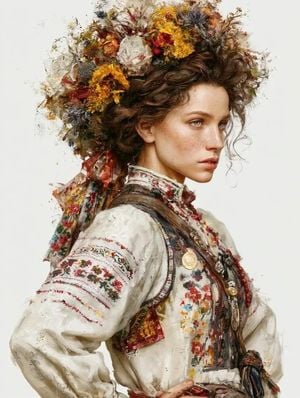
A single highly detailed fine art portrait of a {argument name="subject" default="young Slavic woman"} in traditional Eastern European folk costume, shown from the chest up in a graceful three-quarter profile with a calm, melancholic expression. She has pale freckled skin, soft green-blue eyes, defined cheekbones, naturally full lips, and loose wavy {argument name="hair color" default="chestnut-brown"} hair with delicate flyaway strands. Her head is crowned with an {argument name="headpiece" default="extravagant oversized wreath of wildflowers, dried flowers, wheat, thistles, leaves, and flowing embroidered ribbons"} in warm autumn tones of burnt orange, crimson, ochre, ivory, and muted gold. She wears an authentic embroidered white linen blouse with intricate red floral cross-stitch patterns, layered rustic vest, woven fabrics, traditional beads, antique medals, leather straps, and handcrafted folk accessories. Painterly oil-on-canvas aesthetic with expressive visible brushstrokes, textured impasto, watercolor splashes, ink splatter edges, and mixed-media illustration style. Soft diffused natural lighting, warm earthy color palette, museum-quality realism, elegant composition, minimal clean white background with artistic paint splashes fading into negative space, ultra-detailed fabric textures, botanical details, cinematic fine art portrait, masterpiece, highly detailed, 8K, award-winning illustration, no text, no watermark, no logo.
Choose the primary action to open PicX Studio with the available template settings. Review the model and format, personalize the creative direction, and generate when ready.
Yes. You can change the subject, setting, lighting, mood, format, and available model controls before creating your image.
This template is free to open and customize. Generation usage is shown in PicX Studio before you create.
Start with GPT Image 2, which is the model associated with this template. You can compare another compatible model for a different finish.
Follow a topic to a crawlable collection of related PicX Studio templates.