How do I use the Ethereal Editorial Studio Portrait template?
Choose the primary action to open PicX Studio with the available template settings. Review the model and format, personalize the creative direction, and generate when ready.
A sophisticated fine-art prompt for generating high-end fashion portraits with a light-painting effect.
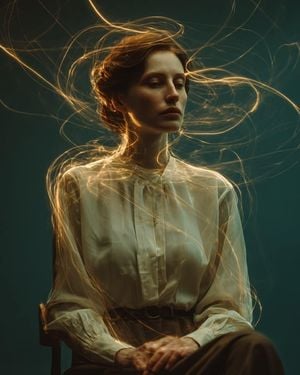
A cinematic fine-art portrait of a {argument name="subject" default="serene young woman"} seated on a minimalist wooden chair against a {argument name="background" default="deep teal seamless studio backdrop"}, wearing an {argument name="outfit" default="elegant ivory silk blouse with subtle tailoring and high-waisted trousers"}, calm introspective expression, soft gaze, timeless beauty, while glowing golden light trails orbit around her body and head like flowing energy, long-exposure light painting effect, ethereal luminous ribbons wrapping through the air in graceful spirals, delicate volumetric glow, magical yet realistic, subtle motion, sophisticated editorial fashion photography, dramatic Rembrandt lighting with warm rim light, rich teal and amber color contrast, moody atmosphere, minimal composition, luxurious fine-art styling, realistic skin texture, cinematic shadows, ultra-detailed fabric folds, dreamy ambiance, shallow depth of field, medium portrait framing, Leica SL2-S, 85mm Summilux lens, f/1.4, HDR, photorealistic, 8K, masterpiece, award-winning Vogue editorial, Roger Deakins × Tim Walker lighting, ultra-realistic, elegant, refined, high dynamic range, soft bloom, premium color grading.
Choose the primary action to open PicX Studio with the available template settings. Review the model and format, personalize the creative direction, and generate when ready.
Yes. You can change the subject, setting, lighting, mood, format, and available model controls before creating your image.
This template is free to open and customize. Generation usage is shown in PicX Studio before you create.
Start with GPT Image 2, which is the model associated with this template. You can compare another compatible model for a different finish.
Follow a topic to a crawlable collection of related PicX Studio templates.