How do I use the Anime Character with Doodle Collage template?
Choose the primary action to open PicX Studio with the available template settings. Review the model and format, personalize the creative direction, and generate when ready.
A detailed prompt for creating a stylized anime illustration of a young woman set against a playful, hand-drawn black-and-white doodle collage.
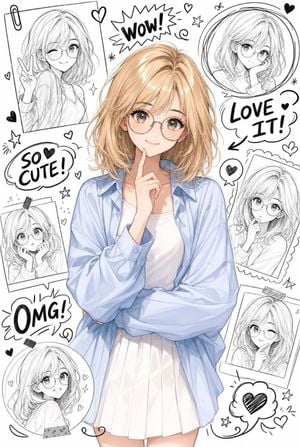
A cute anime-inspired young woman with {argument name="hair style" default="shoulder-length blonde hair"}, soft side-swept bangs, round eyeglasses, and a {argument name="expression" default="gentle smile"}. She is posing thoughtfully with one finger resting on her chin, wearing a {argument name="outfit" default="light blue oversized shirt over a white top and a white pleated skirt"}. The character stands in the center as the main focus. Behind her is a creative black-and-white doodle collage featuring multiple sketch-style portraits of herself in different frames and poses. Hand-drawn hearts, stars, arrows, sparkles, swirls, and cute comic elements surround the sketches. Playful handwritten words like "WOW!", "LOVE IT!", "SO CUTE!", and "OMG!" appear throughout the background. Clean white backdrop, manga sketch aesthetic, mixed with detailed anime illustration, soft lighting, adorable expression, trendy social media sticker style, highly detailed, ultra cute, charming, youthful, whimsical composition, masterpiece quality.
Choose the primary action to open PicX Studio with the available template settings. Review the model and format, personalize the creative direction, and generate when ready.
Yes. You can change the subject, setting, lighting, mood, format, and available model controls before creating your image.
This template is free to open and customize. Generation usage is shown in PicX Studio before you create.
Start with GPT Image 2, which is the model associated with this template. You can compare another compatible model for a different finish.
Follow a topic to a crawlable collection of related PicX Studio templates.