How do I use the Anime Fashion Editorial Portrait template?
Choose the primary action to open PicX Studio with the available template settings. Review the model and format, personalize the creative direction, and generate when ready.
An ultra-detailed anime-style portrait of a stylish woman sipping coffee, featuring clean cel shading and editorial aesthetic.
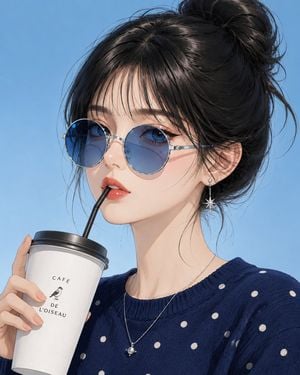
Create an ultra-detailed anime fashion editorial portrait of a stylish young woman with flawless porcelain skin, {argument name="eye color" default="deep blue eyes"}, glossy coral lips, and {argument name="hair style" default="silky jet-black hair styled in a relaxed high messy bun with soft straight bangs and delicate face-framing strands"}. She wears round blue-tinted sunglasses, a {argument name="clothing" default="navy blue sweater with tiny white polka dots"}, a silver star-shaped dangling earring, and a minimalist silver necklace. She casually sips from a white takeaway café cup with a black straw while looking calmly toward the viewer. Use a soft sky-blue gradient background, diffused daylight-inspired studio lighting, clean cel shading, refined linework, subtle Korean-inspired beauty styling, minimal composition, premium editorial quality, and ultra-detailed 8K illustration.
Choose the primary action to open PicX Studio with the available template settings. Review the model and format, personalize the creative direction, and generate when ready.
Yes. You can change the subject, setting, lighting, mood, format, and available model controls before creating your image.
This template is free to open and customize. Generation usage is shown in PicX Studio before you create.
Start with GPT Image 2, which is the model associated with this template. You can compare another compatible model for a different finish.
Follow a topic to a crawlable collection of related PicX Studio templates.