How do I use the Classic Disney Style Tribal Portrait template?
Choose the primary action to open PicX Studio with the available template settings. Review the model and format, personalize the creative direction, and generate when ready.
Generates a hand-drawn 2D animated portrait in a nostalgic Disney aesthetic, featuring a woman in vibrant tribal attire with jungle surroundings.
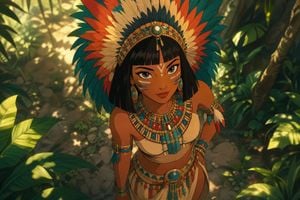
A beautiful, hand-drawn 2D animated portrait in the {argument name="style" default="classic Disney style"}, capturing a {argument name="subject" default="young woman"} with a strong, confident expression looking up toward the viewer from a high-angle perspective. She wears magnificent {argument name="outfit" default="traditional tribal attire"}, featuring a massive headdress of colorful, layered feathers, intricate beadwork necklaces and belts, and delicate feather accessories on her arm. Her face is adorned with beautiful tribal paint patterns, and her hair is styled in a clean, Egyptian-inspired bob. She stands amidst a lush, vibrant jungle background with soft, dappled sunlight filtering through the canopy, creating a soft, magical depth of field. The style features clean linework, smooth cel shading, and a nostalgic, cinematic feel. Aspect ratio 9:16.
Choose the primary action to open PicX Studio with the available template settings. Review the model and format, personalize the creative direction, and generate when ready.
Yes. You can change the subject, setting, lighting, mood, format, and available model controls before creating your image.
This template is free to open and customize. Generation usage is shown in PicX Studio before you create.
Start with GPT Image 2, which is the model associated with this template. You can compare another compatible model for a different finish.
Follow a topic to a crawlable collection of related PicX Studio templates.