How do I use the Cyberpunk Financial District Portrait template?
Choose the primary action to open PicX Studio with the available template settings. Review the model and format, personalize the creative direction, and generate when ready.
A cinematic prompt for generating a cyberpunk-themed portrait featuring a subject against a glowing stock market display with vibrant neon lighting and digital
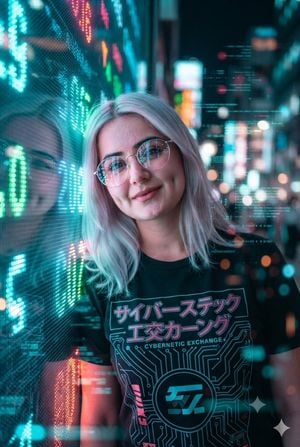
Using the uploaded image and without changing face, create a cinematic cyberpunk portrait of the {argument name="pose" default="subject leaning against a massive glowing LED stock market display"} in a futuristic financial district at night, wearing {argument name="outfit" default="clear round glasses and a casual graphic tee"}, illuminated by {argument name="lighting colors" default="vibrant neon cyan, magenta, emerald and orange lights"} with colorful reflections on the lenses, holographic data streams and digital bokeh surrounding the scene, shallow depth of field, ultra-realistic skin texture, soft platinum-blonde hair, high contrast lighting, glossy futuristic atmosphere, premium editorial fashion photography, razor-sharp focus, volumetric lighting, rich color grading, 8K hyper-realistic masterpiece, --ar 2:3 --style raw --v 7 --stylize 100.
Choose the primary action to open PicX Studio with the available template settings. Review the model and format, personalize the creative direction, and generate when ready.
Yes. You can change the subject, setting, lighting, mood, format, and available model controls before creating your image.
This template is free to open and customize. Generation usage is shown in PicX Studio before you create.
Start with GPT Image 2, which is the model associated with this template. You can compare another compatible model for a different finish.
Follow a topic to a crawlable collection of related PicX Studio templates.