How do I use the Equestrian Fashion Portrait template?
Choose the primary action to open PicX Studio with the available template settings. Review the model and format, personalize the creative direction, and generate when ready.
A photorealistic prompt for generating a scene of a stylish man riding a black horse, focusing on specific clothing details and facial preservation.
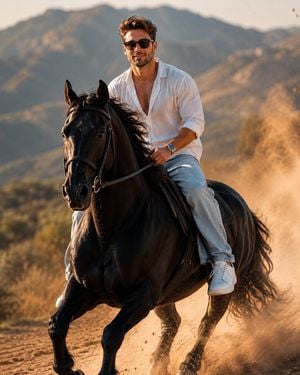
A SLIM FIT 5'7 YOUNG MAN RIDING HIS POWERFUL {argument name="horse color" default="BLACK"} HORSE, SITTING CONFIDENTLY IN THE SADDLE, HOLDING THE REINS FIRMLY, LEANING NATURALLY WITH THE HORSE'S MOTION. HE'S WEARING AN {argument name="shirt" default="OVERSIZED WHITE LINEN SHIRT"} WITH THE TOP BUTTONS OPEN, LIGHT BLUE BAGGY JEANS, AND CLEAN {argument name="footwear" default="WHITE NIKE AIR FORCE 1 SNEAKERS"}. A SILVER WRISTWATCH SHINES SUBTLY ON HIS WRIST, AND NARROW FRAME RECTANGULAR CLASSY SUNGLASSES COMPLETE HIS LOOK. HIS FACE IS FULLY VISIBLE AND PRESERVE 100 PERCENT FACE. THE SCENE CAPTURES DUST
Choose the primary action to open PicX Studio with the available template settings. Review the model and format, personalize the creative direction, and generate when ready.
Yes. You can change the subject, setting, lighting, mood, format, and available model controls before creating your image.
This template is free to open and customize. Generation usage is shown in PicX Studio before you create.
Start with GPT Image 2, which is the model associated with this template. You can compare another compatible model for a different finish.
Follow a topic to a crawlable collection of related PicX Studio templates.