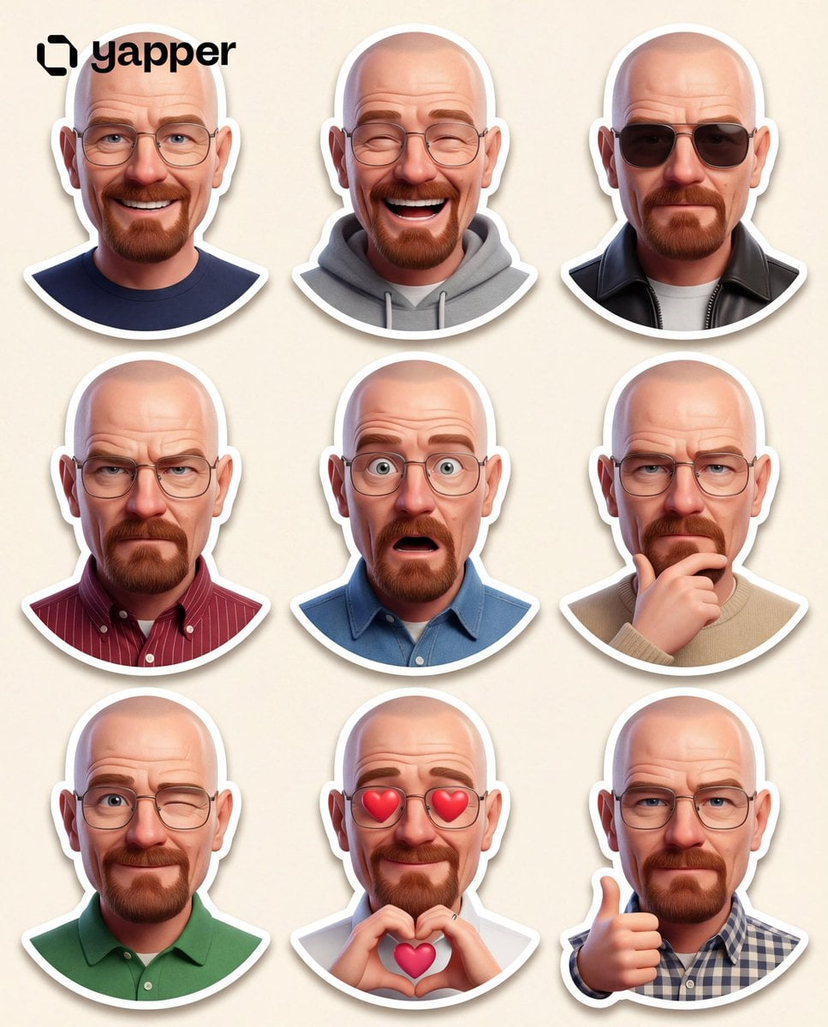
How do I use the Pixar Sticker Set 3x3 Grid of Emotions template?
Choose the primary action to open PicX Studio with the available template settings. Review the model and format, personalize the creative direction, and generate when ready.
A detailed JSON prompt for generating a 3x3 grid collage of Pixar-style 3D caricature stickers. Change the subject, setting, or lighting one variable at a time.

{"project_metadata": { "title": " Pixar Sticker Set", "output_format": "3x3 Grid Collage", "total_cells": 9, "target_aspect_ratio": "3:4", "rendering_engine": "Unreal Engine 5 / Octane Render Style" }, "global_character_assets": { "identity": " (Pixar-Style 3D Caricature)", "facial_base": "Reference based on facial structure and likeness", "hair_definition": " style, soft natural shine", "wardrobe": { "jacket": "Casual retro-inspired jacket", "details": "Soft fabric texture, slightly worn vintage feel", "undershirt": "Simple solid-color t-shirt" }, "anatomical_proportions": { "head_to_body_ratio": "1:3 (Chibi-influenced Pixar scale)", "eye_scale": "Exaggerated/Large for high readability", "skin_shader": "Subsurface scattering, warm light skin tone, smooth polished finish" } }, "grid_layout_definition": { "row_1": { "cell_1": { "emotion": "Surprised", "pose": "Raised eyebrows, eyes wide, mouth slightly open" }, "cell_2": { "emotion": "Annoyed", "pose": "Arms crossed, unimpressed stare" }, "cell_3": { "emotion": "Confused", "pose": "Head tilted, brows furrowed, puzzled look" } }, "row_2": { "cell_4": { "emotion": "Frustrated", "pose": "One hand rubbing forehead, tense expression" }, "cell_5": { "emotion": "Thoughtful", "pose": "Hand on chin, eyes looking upward" }, "cell_6": { "emotion": "Sarcastic", "pose": "Smirk with raised eyebrow, playful attitude" } }, "row_3": { "cell_7": { "emotion": "Worried", "pose": "Tense shoulders, concerned eyes" }, "cell_8": { "emotion": "Bored", "pose": "Chin resting on palm, half-lidded eyes" }, "cell_9": { "emotion": "Curious", "pose": "Leaning forward slightly, interested expression" } ] }, "environment_and_lighting": { "background": "Solid pure white, zero shadows, isolated for PNG extraction", "lighting_setup": "Three-point studio lighting, soft key light, subtle rim light", "negative_constraints": [ "No text", "No logos", "No background elements", "No speech bubbles", "No UI"}
Choose the primary action to open PicX Studio with the available template settings. Review the model and format, personalize the creative direction, and generate when ready.
Yes. You can change the subject, setting, lighting, mood, format, and available model controls before creating your image.
This template is free to open and customize. Generation usage is shown in PicX Studio before you create.
Start with Nano Banana 2, which is the model associated with this template. You can compare another compatible model for a different finish.
© 2026 PicX Studio. All rights reserved.

Follow a topic to a crawlable collection of related PicX Studio templates.
43,474 public templates available. Verified via the PicX Studio public templates API; refreshed hourly.
![Complete brand identity grid, 3x3 layout, nine tiles showing a full — [brand name], complete brand identity grid, 3x3 layout, nine tiles showing a full cohesive](https://images.meigen.ai/tweets/2016511852927438909/0.jpg)
![A trendy, high-end Sticker Sheet set — [BRAND NAME]. Act as a vector illustrator designing a trendy, high-end "Sticker Sheet" set.
THE TASK:
Deconstruct the bra](https://images.meigen.ai/tweets/2009717451710509473/0.jpg)











![Naive doodle-style subject illustration — A doodle-style {argument name="subject" default="[subject]"}, naive lines, humorous shape exaggeration](https://pbs.twimg.com/media/G6Wl2YxbsAARB2b.jpg)

















![Outdoor Christmas Decoration from Input Image — [AI指示:外観テーマ拡張]
提供された**[入力画像]**を分析してください。
テーマ抽出: [入力画像]から、主要な被写体、カラーパレット、および特定のモチーフ(例:星、キャンディケイン、特定のキ…](https://pbs.twimg.com/media/G9AJh1ZbcAAB0H0.jpg)