
E-commerce Product Review Script
A comprehensive multi-part framework prompt structured for direct marketing product showcases and health clinic review videos.
- Prompt included
- Model and format preset
- Free template
The prompt behind this video
Copy the exact prompt behind E-commerce Product Review Script, or open it in the studio and make it yours.
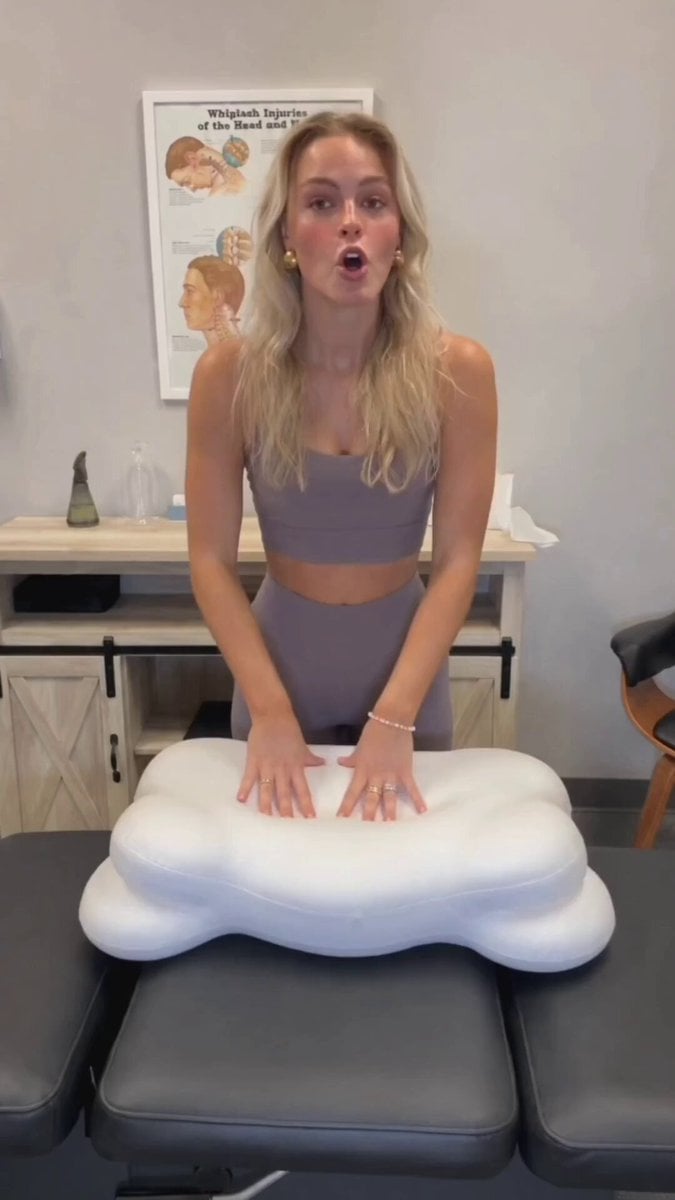
1. Basic Parameters This is a vertical short video for health & home product review and recommendation, with an aspect ratio of 9:16 and a total duration of 31 seconds. The video is in 4K ultra HD, 60fps, with photorealistic portrait quality. The overall style is natural and documentary-style, lit with warm soft white light, the frame is clear and grain-free, and all camera movements are smooth and stable. 2. Fixed Scene Setting The shooting scene is the interior of an American chiropractic clinic: the wall has a light gray matte finish, with an educational poster titled Whiplash Injuries of the Head and Neck (with head and neck anatomy illustrations) hung on the upper section of the wall. A light wood grain barn-door style storage cabinet with black metal hardware is placed against the wall, and on the countertop from left to right are a dark green cone-shaped decorative ornament, a transparent glass bottle, and a white tissue box with a blue logo. Half of an office chair with a black cushion and orange wooden legs is visible on the right side of the frame. The foreground is a dark gray leather three-section chiropractic treatment table. The entire environment is clean and tidy with even, soft lighting. 3. Fixed Character Setting The on-screen talent is a 25-28 year old Caucasian woman with medium-length wavy blonde hair and natural, healthy skin. She wears gold round vintage earrings, a thin pearl bracelet on her left hand, and two thin plain gold rings on her left middle and ring fingers. She is dressed in a taupe brushed sports camisole (with cross straps and a drop-shaped cutout on the back) paired with matching high-waist tight yoga leggings. She has a friendly and relaxed expression, speaks in a professional yet casual tone, and all her movements are natural and unforced. 4. Core Product Setting The core product showcased is a white ergonomic memory foam cervical pillow: it has a symmetrical cloud/plump bone shape, with curved raised support edges on the top and bottom ends, rounded bulges on the left and right sides, and a sunken central area that fits the curve of the head and neck. The pillowcase is made of skin-friendly knitted cotton with an invisible side zipper for easy removal and washing, and the inner core is slow-rebound memory foam that slowly regains its shape after being pressed, with sufficient support. 5. Storyboard Sequence From 0 to 4 seconds, the shot is a medium static shot: the woman stands behind the treatment table, places both hands flat on the cervical pillow in the center of the table, and speaks to the camera. She gently presses down on the pillow surface to demonstrate the slow-rebound support, then lifts the pillow to chest height with both hands to show its full front outline. The corresponding voiceover is: "Today I'm sharing this amazing cervical pillow I got recommended after my chiropractic adjustment, the support is incredible." From 4 to 5
How to use E-commerce Product Review Script in 3 steps
- 1
Open
The prompt is already in the box next to the preview, with the template's model and format selected.
- 2…a portrait of your subject in softgolden-hour light, 85mm…
Personalize
Edit the subject and creative details for your destination.
- 3Generate
Generate
Press Generate — your video is created in PicX Studio, so you can compare it with the original and refine one variable at a time.
More like this
Templates with the same subject, style or setup. Open one to see its prompt.
Realistic UGC Cleanser Review - Seedance 2.5

Natural Smartphone Vlogger Product Review

Sneaker Product Commercial
Multi Panel Storyboard Sheet

Skincare Product Commercial 3
Cinematic Portrait Study 3
Product UGC Commercial

Cinematic Portrait Study

Iced Coffee Dog Good-News Montage

Wireless Earbuds Product Review
Realistic UGC Product Review Video
Product Review UGC Prompt
Make it yours
E-commerce Product Review Script works as-is. These are the safest ways to change it without losing the look.
Change one field
Copy a single group, rewrite it, and generate again so you can see what that field is doing.
Keep the frame, change the subject
Hold the composition and light of E-commerce Product Review Script, then swap wardrobe, props or the person for a new take.
| If the result… | Why | Fix |
|---|---|---|
| The result drifts from the preview | Too many fields changed at once. | Reuse E-commerce Product Review Script as-is first, then change one group — subject, light, or setting. |
| The model over-stylizes the scene | The prose prompt leaves finish and camera underspecified. | Add one camera or lighting sentence and stay on Seedance 2.0. |
More Seedance 2.0 templates
Other prompts made for Seedance 2.0.

Comical Martial Arts Punch Scene

Maglev Train Action Sequence

Martial Arts Fight Sequence

Vintage Korean Arcade MiniDV Vlog

Mercedes 190 SL Luxury Ad

Amazon Civilization Discovery

Futuristic South Asian City Transformation

Cozy Luxury Cafe Commercial

Cyber Ronin Nanotech Transformation Video

Desert Courier and Sandstorm Leviathan Chase
More video prompts
Fresh picks from across the catalog.

Vintage Neo-Noir Road Film

Indian Village Zombie Chase Intercut

Lava Demon Kingdom Destruction

Advanced Character Consistency Prompt Strategy for Grok Imagine

Grok Imagine prompt: Flying staplers hit by lightning

Joseon Dynasty Historical Documentary

Cinematic Mage Battle Storyboard

Cinematic Descent on a Brutalist Rooftop

Cinematic Star Cruiser Orbital Shipyard

Grok Imagine Video Prompt: Horse Riding on a Storm
Browse template categories
E-commerce Product Review Script questions
How do I use the E-commerce Product Review Script template?
Add your photo if the template asks for one, edit the prompt if you like — the template's model and format are already selected — and press Generate. Your version opens in PicX Studio.
Can I customize the E-commerce Product Review Script template?
Yes. You can change the subject, setting, lighting, mood, format, and available model controls before creating your video.
Is the E-commerce Product Review Script template free?
Opening and editing this template is free. Generating uses credits, shown on the Generate button when you are signed in.
Which AI model should I use?
Start with Seedance 2.0, which is the model associated with this template. You can compare another compatible model for a different finish.
Looking for something else? Browse all templates.

Your photo, any look
Thousands of ready templates for every top image and video model, from one credit balance.