How do I use the Contemporary Watercolor Woman Portrait template?
Choose the primary action to open PicX Studio with the available template settings. Review the model and format, personalize the creative direction, and generate when ready.
Generates a luminous mixed-media watercolor portrait of a young woman with flowing dark hair, expressive eyes, and colorful abstract brush accents.
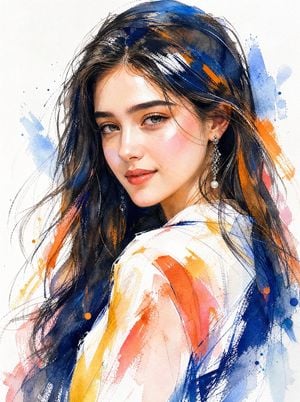
Create a stylized contemporary watercolor and mixed-media portrait of {argument name="subject" default="a young woman"} in close-up three-quarter view, turned slightly over one shoulder and softly looking toward the viewer. She has elegant feminine features, long flowing {argument name="hair color" default="dark black-blue hair"}, expressive almond-shaped hazel-gray eyes, defined brows, a delicate nose, rosy cheeks, and a subtle glossy smile. Add ornate dangling pearl earrings and a loose white blouse or robe visible at the shoulder. Use a bright white paper background with visible watercolor texture, ink sketch lines, dry-brush strokes, splatters, and layered washes. The hair should be rendered with deep navy, black, cobalt blue, and warm brown highlights, with energetic loose strands. Surround and partially overlay the figure with abstract painterly accents in {argument name="accent colors" default="cobalt blue, orange, coral pink, and golden yellow"}, including broad diagonal brush swipes, transparent washes, small paint droplets, and expressive scratchy linework. Keep the face highly detailed and luminous while the clothing and background remain loose, gestural, and semi-abstract. Use soft natural lighting, glowing skin highlights, high-fashion editorial beauty styling, modern watercolor illustration aesthetics, no text, no border, no watermark.
Choose the primary action to open PicX Studio with the available template settings. Review the model and format, personalize the creative direction, and generate when ready.
Yes. You can change the subject, setting, lighting, mood, format, and available model controls before creating your image.
This template is free to open and customize. Generation usage is shown in PicX Studio before you create.
Start with GPT Image 2, which is the model associated with this template. You can compare another compatible model for a different finish.
Follow a topic to a crawlable collection of related PicX Studio templates.