
Retro Sunlit Record Room Portrait
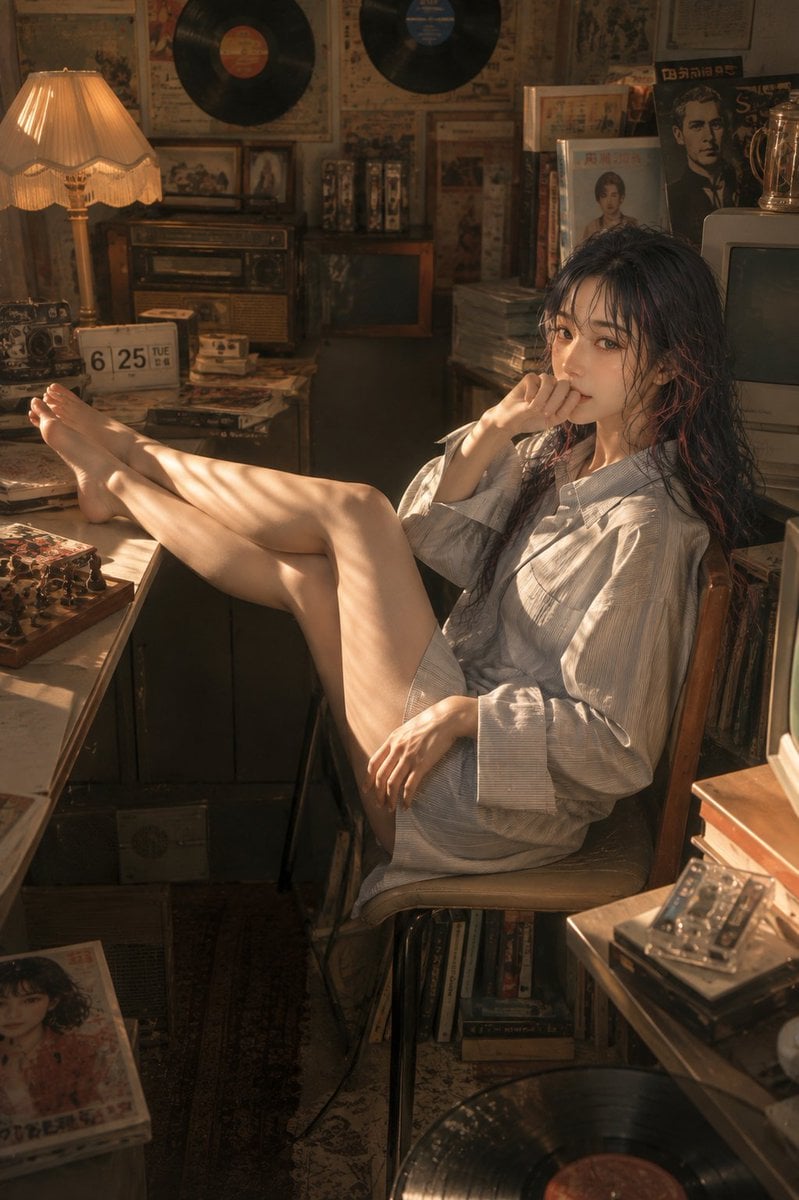
Generates a photorealistic intimate portrait of a relaxed woman in a warm, cluttered vintage music room.
- Prompt included
- Model and format preset
- Free template
The prompt behind this image
Copy the exact prompt behind Retro Sunlit Record Room Portrait, or open it in the studio and make it yours.
Create a vertical photorealistic cinematic portrait of a young East Asian woman in a cozy cluttered retro record-and-book room, with a lazy, slightly sensual mood. She has {argument name="hair color" default="long wet-looking black hair"}, natural dewy skin, delicate facial features, and a calm intimate gaze toward the camera. She sits sideways on a wooden chair, wearing an oversized pale gray striped button-up shirt as a loose shirt-dress with bare legs and bare feet; one leg is stretched across a desk toward the left foreground, the other bent, her right hand resting near her lips in a pensive pose and her left hand relaxed on her thigh. The room is packed with vintage objects: exactly 3 visible vinyl records, with 2 mounted high on the wall and 1 partially visible on the floor foreground; exactly 1 warm pleated table lamp glowing on the left; exactly 1 flip calendar on the desk showing “6 25 TUE”; exactly 1 old radio/cassette player; exactly 1 CRT television on the right; stacks of books, cassette tapes, magazines, framed pictures, old posters, and record sleeves surrounding her. Use {argument name="lighting style" default="golden late-afternoon sunlight through blinds"}, creating striped shadows across her legs, shirt, face, desk, and surrounding objects. The setting should feel nostalgic, dusty, intimate, and lived-in, with warm amber-brown tones, film grain, shallow depth of field, soft haze, realistic skin texture, detailed hair strands, and rich prop detail. Compose from a slightly high front angle in a 2:3 vertical frame, with the woman centered-right, her legs extending diagonally toward the left, foreground clutter framing the scene, and no added captions, logos, or modern objects.
How to use Retro Sunlit Record Room Portrait in 3 steps
- 1Upload ImagePNG, JPG or paste
Add your photo
Upload the photo the template builds on. The prompt, model and format are already set.
- 2…a portrait of your subject in softgolden-hour light, 85mm…
Personalize
Edit the subject and creative details for your destination.
- 3Generate
Generate
Press Generate — your image is created in PicX Studio, so you can compare it with the original and refine one variable at a time.
More like this
Templates with the same subject, style or setup. Open one to see its prompt.

Found Photograph: Us, 1970

80s Couple Studio Portrait

80s Bollywood Star

80s Golden Hour Cinema
Vinyl Record Spin Abstract
Sunlit Anime Bedroom Portrait
Sunlit Japanese Classroom Sailor Uniform Portrait

Two Tickets, One Night

If We Met in 1985

One Dance Before Midnight

Before We said Goodbye

Our Song was on a Cassette
Make it yours
Retro Sunlit Record Room Portrait works as-is. These are the safest ways to change it without losing the look.
Change one field
Copy a single group, rewrite it, and generate again so you can see what that field is doing.
Keep the frame, change the subject
Hold the composition and light of Retro Sunlit Record Room Portrait, then swap wardrobe, props or the person for a new take.
| If the result… | Why | Fix |
|---|---|---|
| The result drifts from the preview | Too many fields changed at once. | Reuse Retro Sunlit Record Room Portrait as-is first, then change one group — subject, light, or setting. |
| The model over-stylizes the scene | The prose prompt leaves finish and camera underspecified. | Add one camera or lighting sentence and stay on GPT Image 2. |
More GPT Image 2 templates
Other prompts made for GPT Image 2.

Six VTuber Japanese Logo Sheet

Realistic Portrait of Woman and Deer

The Vista Modular Condo Poster

AI Model Routing Comparison Infographic

2.5D Anime Art Board

Isometric Productivity Desk Scene

New York Double Exposure Poster

Four-Panel AI Landscape Comparison

Japanese Tatami Lifestyle Magazine Cover

NESCAFÉ Coffee Map Poster
More image prompts
Fresh picks from across the catalog.

Whimsical T-Rex Made of Pink Frosting

Japanese Katsudon Diet Thumbnail
Brands in 19th Century Prompt
Frank Miller Sin City Graphic Novel Style Transfer
Dating Sim UI Overlay Prompt
Cottagecore Shaved Ice Café Ad

Professional Designer Product Ad Redesign
Modern Sukeban Street Portrait
Anime Beauty Magazine Eyebrow Feature
Formulaic Prompt Structure for High Fashion
Browse template categories
Retro Sunlit Record Room Portrait questions
How do I use the Retro Sunlit Record Room Portrait template?
Add your photo if the template asks for one, edit the prompt if you like — the template's model and format are already selected — and press Generate. Your version opens in PicX Studio.
Can I customize the Retro Sunlit Record Room Portrait template?
Yes. You can change the subject, setting, lighting, mood, format, and available model controls before creating your image.
Is the Retro Sunlit Record Room Portrait template free?
Opening and editing this template is free. Generating uses credits, shown on the Generate button when you are signed in.
Which AI model should I use?
Start with GPT Image 2, which is the model associated with this template. You can compare another compatible model for a different finish.
Looking for something else? Browse all templates.

Your photo, any look
Thousands of ready templates for every top image and video model, from one credit balance.