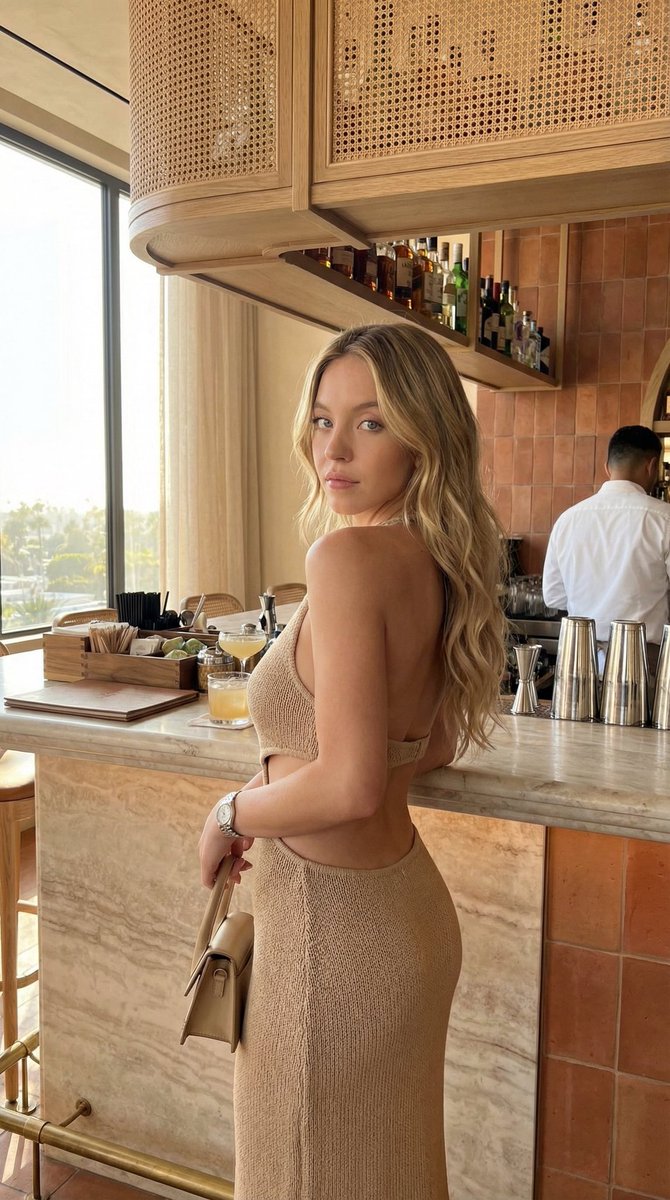
Chic Bar Lifestyle Photography Prompt
{
"lighting": { "source": "Natural daylight coming from a large window on the left", "quality": "Soft, warm, and diffused", "shadows": "Subtle, defining the woman's back and the bar structure", "direction": "Side lighting, casting soft shadows", "highlights": "On the woman's shoulder, hair, and the marble counter" }, "background": { "clutter": "Organized bar items, drinks on the counter", "setting": "Upscale bar or restaurant", "elements": "Marble counter, wooden bar stools, rattan overhead shelving, liquor bottles, glasses, a person in a white shirt in the background", "color_scheme": "Terracotta tiles, beige rattan, warm wood, gold accents" }, "typography": { "color": "", "present": false, "placement": "", "font_style": "", "text_content": "" }, "composition": { "framing": "Medium shot, over-the-shoulder perspective", "shot_type": "Portrait orientation, eye-level", "focal_point": "Woman's back and side profile", "leading_lines": "Bar counter and shelf guide the eye towards the subject", "depth_of_field": "Shallow, with the background slightly blurred", "rule_of_thirds": "Subject positioned on the left third line" }, "color_profile": { "contrast": "Moderate", "saturation": "Slightly muted, warm", "accent_colors": [ "#8B4513", "#FFD700", "#FFFFFF" ], "color_palette": "Warm, earthy tones", "dominant_colors": [ "#D2B48C", "#A0522D", "#F5F5DC" ] }, "technical_specs": { "iso": "400", "lens": "Standard or slightly wide-angle", "aperture": "f/2.8", "camera_type": "Smartphone or DSLR", "file_format": "JPEG", "shutter_speed": "1/60s", "image_resolution": "1080x1350" }, "subject_analysis": { "hair": "Long, dark brown, wavy, cascading down her back", "pose": "Standing, back to the camera, looking over her right shoulder", "attire": "Beige knitted two-piece set (backless top, long skirt with cutouts)", "skin_tone": "Tanned", "expression": "Neutral, looking towards the camera", "accessories": "Silver watch on left wrist, small beige handbag", "main_subject": "Woman, late 20s/early 30s" }, "artistic_elements": { "mood": "Relaxed, warm, chic", "style": "Lifestyle photography, candid feel", "texture": "Knitted fabric, marble, rattan, tile", "compositional_balance": "Balanced, with the subject on the left and the bar on the right" }, "generation_parameters": { "seed": "123456789", "model": "Stable Diffusion XL", "steps": "30", "prompt": "A medium shot photograph of a woman with long, dark hair, wearing a beige knitted backless top and skirt, standing at a marble bar and looking over her shoulder. The bar has rattan details, terracotta tiles, and natural light from a window. A person is in the background.", "cfg_scale": "7.5", "negative_prompt": "Dark, gloomy, messy"











![Naive doodle-style subject illustration — A doodle-style {argument name="subject" default="[subject]"}, naive lines, humorous shape exaggeration](https://pbs.twimg.com/media/G6Wl2YxbsAARB2b.jpg)