
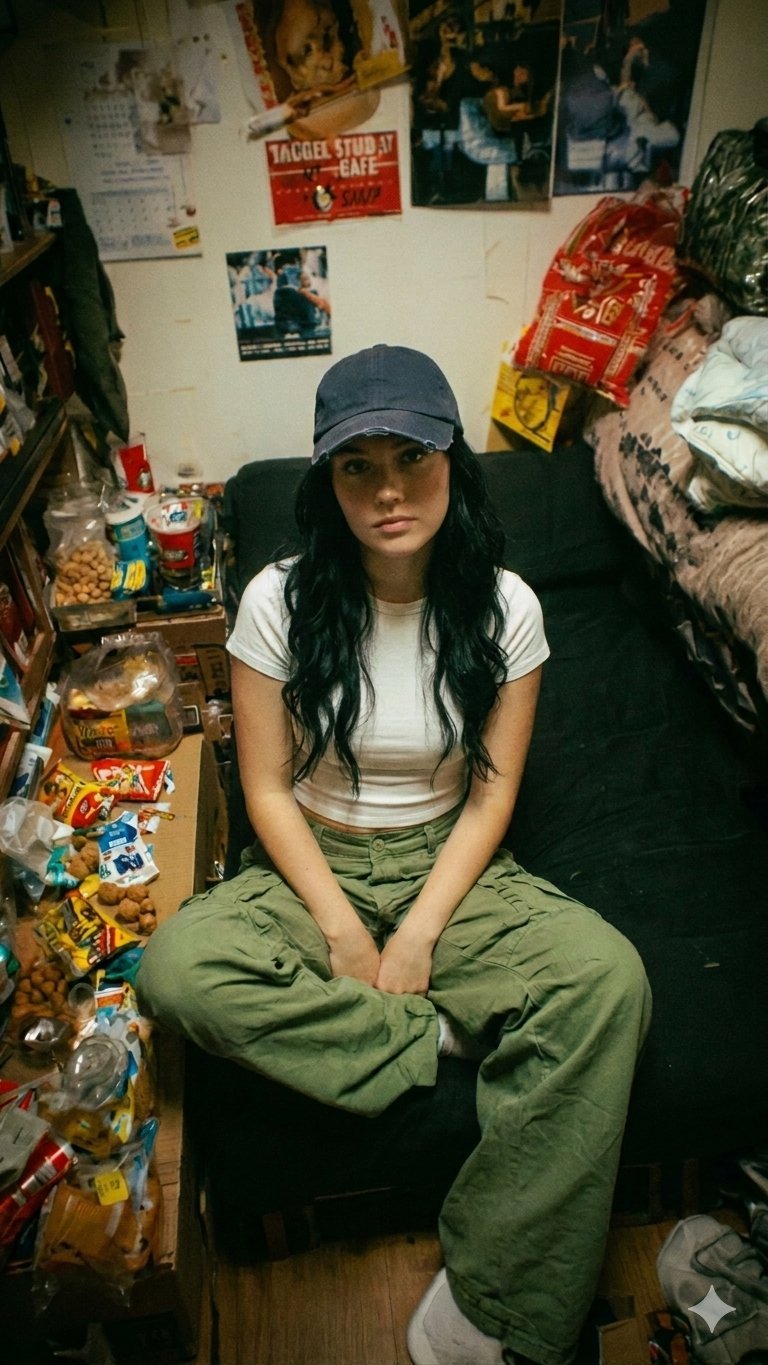
Nano Banana Pro Dorm Room Cinematic
Model: nano-banana-pro on Gemini Cinematic indie film still, moody warm lighting, cluttered dorm room
- Prompt included
- Model and format preset
- Free template
The prompt behind this image
Copy the exact prompt behind Nano Banana Pro Dorm Room Cinematic, or open it in the studio and make it yours.
A young woman sitting cross-legged on a black armchair in a small, cluttered dorm room. She has long wavy black hair, wearing a dark baseball cap, a fitted white t-shirt, and loose green cargo pants. Her expression is neutral, slightly tired or introspective, looking directly at the camera. The room is messy and packed with details: snacks, packaged food, and miscellaneous items scattered on a small table to the left; shelves filled with books and objects; a bed on the right with rumpled bedding and hanging bags. The wall behind her is covered with posters, photos, and notes, creating a chaotic, lived-in aesthetic. Lighting is warm and slightly dim, giving a cinematic, moody tone. The perspective is slightly elevated, looking down at her, with a centered composition. The overall vibe is raw, intimate, indie film still, realistic and unpolished.
How to use Nano Banana Pro Dorm Room Cinematic in 3 steps
- 1
Open
The prompt is already in the box next to the preview, with the template's model and format selected.
- 2…a portrait of your subject in softgolden-hour light, 85mm…
Personalize
Edit the subject and creative details for your destination.
- 3Generate
Generate
Press Generate — your image is created in PicX Studio, so you can compare it with the original and refine one variable at a time.
More like this
Templates with the same subject, style or setup. Open one to see its prompt.

Nano Banana 2

Nano Banana 2 Gourmet Ice Cream Commerci

Toddler Version of a Person in 3d Pixar

Ultra Detailed 3d Plush Cartoon Characte

Isometric Landmark Generation Using Nano

Nano Banana 2 Perspective Experiment

Gemini Nano Banana 2 Isometric 3d City D

Gemini Nano Banana 2
Ultra Realistic Ai Influencer Generator

Enchanted Forest Root Kiss Scene By Nano

Romantic Cinematic Still of a Couple in

Nano Banana Pro Photoreal Playful Couple
Make it yours
Nano Banana Pro Dorm Room Cinematic works as-is. These are the safest ways to change it without losing the look.
Change one field
Copy a single group, rewrite it, and generate again so you can see what that field is doing.
Keep the frame, change the subject
Hold the composition and light of 772-nano-banana-pro-dorm-room-cinematic, then swap wardrobe, props or the person for a new take.
| If the result… | Why | Fix |
|---|---|---|
| The result drifts from the preview | Too many fields changed at once. | Reuse 772-nano-banana-pro-dorm-room-cinematic as-is first, then change one group — subject, light, or setting. |
| The model over-stylizes the scene | The prose prompt leaves finish and camera underspecified. | Add one camera or lighting sentence and stay on Nano Banana Pro. |
More Nano Banana Pro templates
Other prompts made for Nano Banana Pro.


More image prompts
Fresh picks from across the catalog.
Board Game Scene with Multiple Characters Prompt

Anime PR Representative at Industrial Expo

Surrealist Luxury Vogue Cover
Santorini Breakfast Travel Flat Lay
Conceptual Fashion Shadow Portrait
Winter Fashion Editorial in Snowy Field
Zoomed Fake Pixel Art Grid Analysis

Mad Max Wasteland Survivor Film Still
Moody Woman Looking at Phone
Neon Pointillism Cyberpunk Illustration
Featured in prompt roundups
Hand-picked collections that include this template.
Browse template categories
Nano Banana Pro Dorm Room Cinematic questions
How do I use the 772-nano-banana-pro-dorm-room-cinematic template?
Add your photo if the template asks for one, edit the prompt if you like — the template's model and format are already selected — and press Generate. Your version opens in PicX Studio.
Can I customize the 772-nano-banana-pro-dorm-room-cinematic template?
Yes. You can change the subject, setting, lighting, mood, format, and available model controls before creating your image.
Is the 772-nano-banana-pro-dorm-room-cinematic template free?
Opening and editing this template is free. Generating uses credits, shown on the Generate button when you are signed in.
Which AI model should I use?
Start with Nano Banana Pro, which is the model associated with this template. You can compare another compatible model for a different finish.
Looking for something else? Browse all templates.

Your photo, any look
Thousands of ready templates for every top image and video model, from one credit balance.