
Starlight Shadow: Interaction with a Magical Shadow
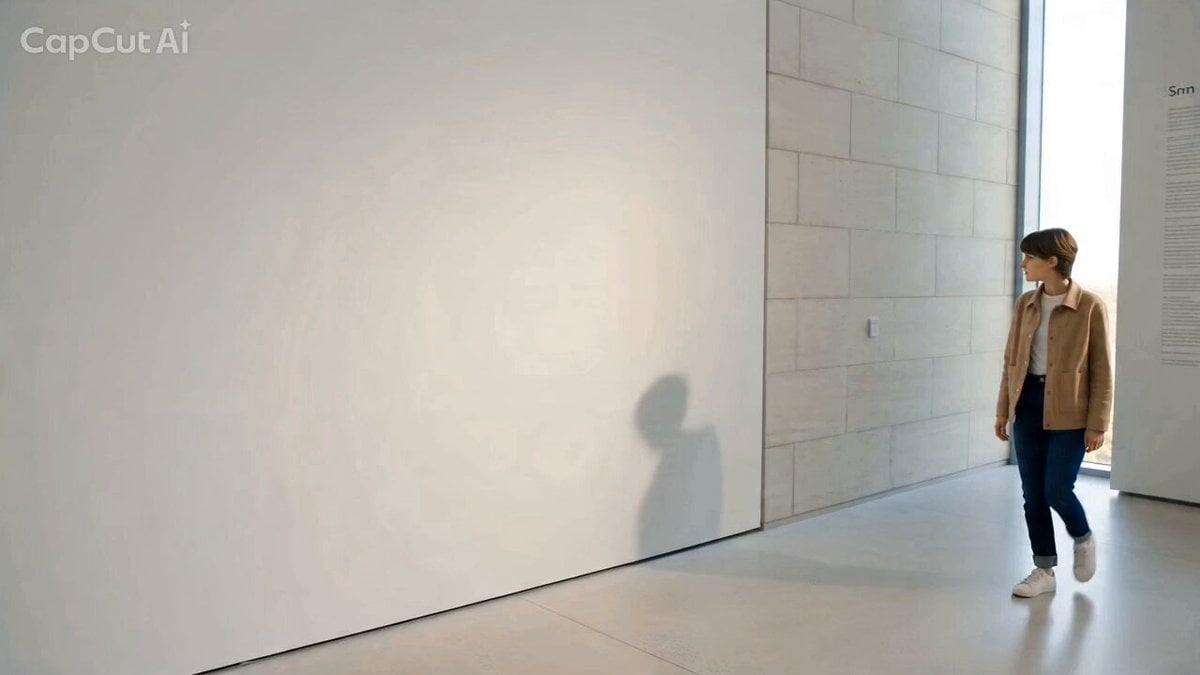
A detailed JSON-formatted prompt for Seedance 2.0, titled 'Starlight Shadow / 星屑のシルエット', describing a scene where a person's shadow detaches and performs an elegant dance.
- Prompt included
- Model and format preset
- Free template
The prompt behind this video
Copy the exact prompt behind Starlight Shadow: Interaction with a Magical Shadow, or open it in the studio and make it yours.
- Scene Id
- 4
- Title
- Starlight Shadow / 星屑のシルエット
- Duration
- 10s
- Visual Style
- Fantasy / High-End Commercial
- Prompt
- A person walks by a clean white wall in a bright, sunlit gallery. Their shadow follows them, but then gracefully stops and starts performing a rhythmic, elegant dance. The shadow is made of soft, shimmering dark-blue particles. As the person reaches out to high-five the wall, the shadow hand gently emerges into the 3D world as a translucent, glowing crystalline form, meeting the person's hand with a soft trail of light.
- Vfx Technical Details › Camera Work
- Smooth, cinematic tracking shot with a focus on the interaction point.
- Vfx Technical Details › Shadow FX
- Particle-based shadow simulation with soft edges and internal luminescence.
- Vfx Technical Details › Transition FX
- Seamless 2D-to-3D transition using a translucent glass shader and light trail effects.
- Vfx Technical Details › Lighting
- Bright, warm afternoon sunlight to contrast with the cool-toned magical shadow.
- Key Elements
- Independent dancing silhouette, Shimmering particle effects, Translucent crystalline 3D hand, Magical and inspiring atmosphere
Raw JSON
{
  "scene_id": 4,
  "title": "Starlight Shadow / 星屑のシルエット",
  "duration": "10s",
  "visual_style": "Fantasy / High-End Commercial",
  "prompt": "A person walks by a clean white wall in a bright, sunlit gallery. Their shadow follows them, but then gracefully stops and starts performing a rhythmic, elegant dance. The shadow is made of soft, shimmering dark-blue particles. As the person reaches out to high-five the wall, the shadow hand gently emerges into the 3D world as a translucent, glowing crystalline form, meeting the person's hand with a soft trail of light.",
  "vfx_technical_details": {
    "camera_work": "Smooth, cinematic tracking shot with a focus on the interaction point.",
    "shadow_FX": "Particle-based shadow simulation with soft edges and internal luminescence.",
    "transition_FX": "Seamless 2D-to-3D transition using a translucent glass shader and light trail effects.",
    "lighting": "Bright, warm afternoon sunlight to contrast with the cool-toned magical shadow."
  },
  "key_elements": [
    "Independent dancing silhouette",
    "Shimmering particle effects",
    "Translucent crystalline 3D hand",
    "Magical and inspiring atmosphere"
  ]
}How to use Starlight Shadow: Interaction with a Magical Shadow in 3 steps
- 1
Open
The prompt is already in the box next to the preview, with the template's model and format selected.
- 2…a portrait of your subject in softgolden-hour light, 85mm…
Personalize
Edit the subject and creative details for your destination.
- 3Generate
Generate
Press Generate — your video is created in PicX Studio, so you can compare it with the original and refine one variable at a time.
More like this
Templates with the same subject, style or setup. Open one to see its prompt.

Magical Room Transformation - Seedance 2.5
Emotional Breakdown and Fabric Interaction - Seedance 2.5
Hologram Interaction Scene Montage
Urban Xianxia Shadow Play Comedy

The Shadow Quit 3D Animation
Paper Cutout Hero Shadow Comedy
Celestial City Dragon Shadow Deception

Anime Drama Character Interaction Script
Magical Girl Anime Transformation Sequence
Futuristic Crystalline AI Creature Interaction
Epic Zodiac Starlight Battle
Magical Glowing Forest Portal Journey
Make it yours
Starlight Shadow: Interaction with a Magical Shadow works as-is. These are the safest ways to change it without losing the look.
Swap the light
One lighting change is enough to compare takes. Current light: “Bright, warm afternoon sunlight to contrast with the cool-toned magical shadow.”.
Change one field
Copy a single group, rewrite it, and generate again so you can see what that field is doing.
Keep the frame, change the subject
Hold the composition and light of Starlight Shadow: Interaction with a Magical Shadow, then swap wardrobe, props or the person for a new take.
| If the result… | Why | Fix |
|---|---|---|
| The result drifts from the preview | Too many fields changed at once. | Reuse Starlight Shadow: Interaction with a Magical Shadow as-is first, then change one group — subject, light, or setting. |
| Seedance 2.0 ignores part of the JSON | Some models flatten or skip nested keys. | Keep the same values and paste them as a short paragraph instead. |
More Seedance 2.0 templates
Other prompts made for Seedance 2.0.

Comical Martial Arts Punch Scene

Maglev Train Action Sequence

Martial Arts Fight Sequence

Wuxia Protection and Trust Script

Vintage Korean Arcade MiniDV Vlog

Mercedes 190 SL Luxury Ad

Rainy Night Supernatural Reverse Comedy Video Script

Amazon Civilization Discovery

Futuristic South Asian City Transformation

Cozy Luxury Cafe Commercial
More video prompts
Fresh picks from across the catalog.

Cinematic Chinese Ghost Romance Short Film
Multi-shot Creature Race Scene

Cyberpunk Samurai Tokyo Storm
3D Cartoon Anime Scene - School Comedy Style
1990s Horror Zombie Outbreak

Cinematic Espresso Preparation
2D Fighting Game Sequence Prompt

Advanced Character Consistency Prompt Strategy for Grok Imagine
Alana Future Message Video

Chibi Anime Hero and Robot Flight
Browse template categories
Starlight Shadow: Interaction with a Magical Shadow questions
How do I use the Starlight Shadow: Interaction with a Magical Shadow template?
Add your photo if the template asks for one, edit the prompt if you like — the template's model and format are already selected — and press Generate. Your version opens in PicX Studio.
Can I customize the Starlight Shadow: Interaction with a Magical Shadow template?
Yes. You can change the subject, setting, lighting, mood, format, and available model controls before creating your video.
Is the Starlight Shadow: Interaction with a Magical Shadow template free?
Opening and editing this template is free. Generating uses credits, shown on the Generate button when you are signed in.
Which AI model should I use?
Start with Seedance 2.0, which is the model associated with this template. You can compare another compatible model for a different finish.
Looking for something else? Browse all templates.

Your photo, any look
Thousands of ready templates for every top image and video model, from one credit balance.