How do I use the FACS Expression Portrait Matrix template?
Choose the primary action to open PicX Studio with the available template settings. Review the model and format, personalize the creative direction, and generate when ready.
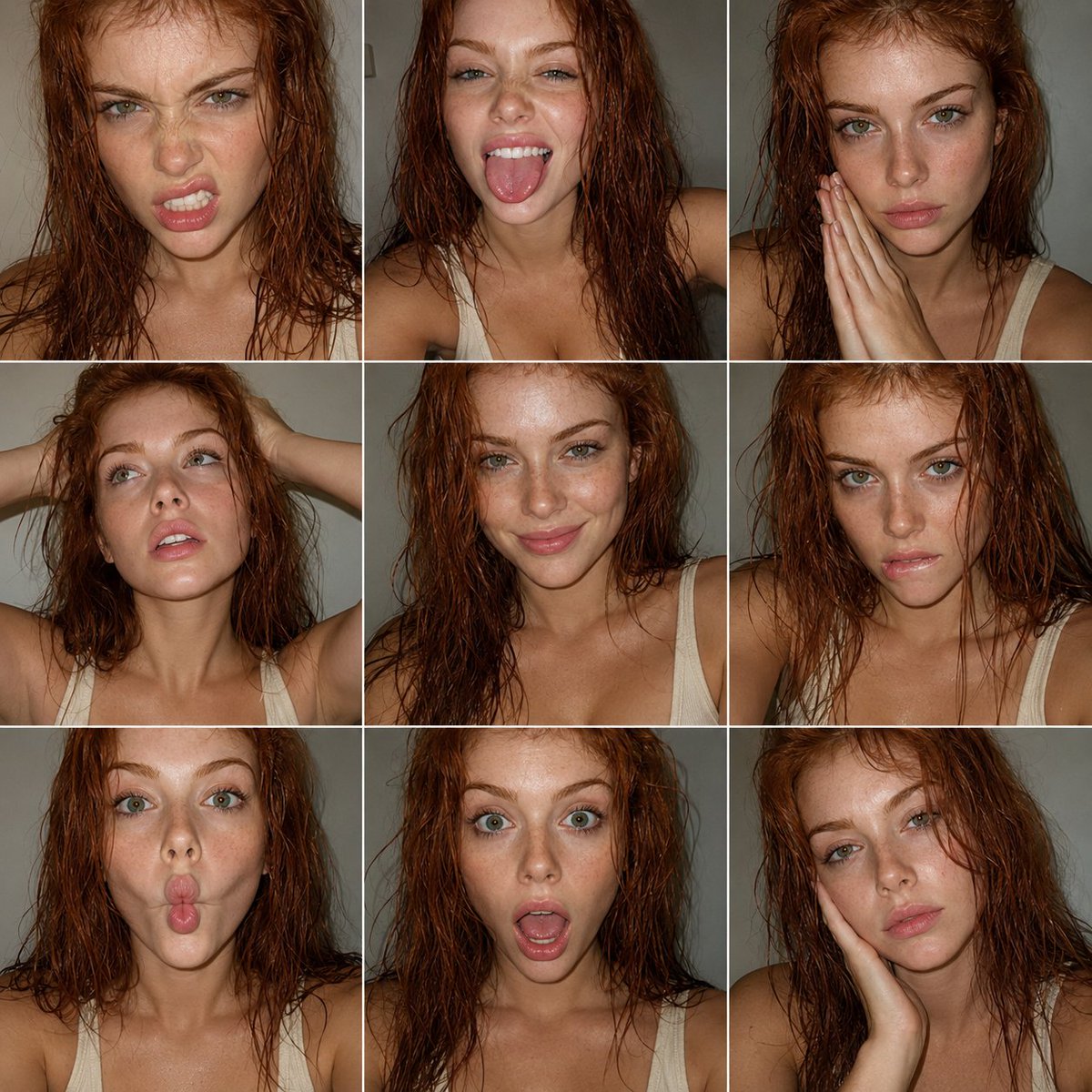
A technical JSON-structured prompt to generate a 3x3 grid of portraits using the Facial Action Coding System to ensure precise and consistent facial expressions. (free to use) — Free AI image template on PicX Studio.
{ "objective": "Create a 3x3 portrait collage inspired by expressive fashion photography, using FACS (Facial Action Coding System) to define each facial expression. The subject is an {argument name="subject" default="extremely beautiful redhead woman with green eyes"}, captured in candid smartphone-style colored photography", "aspect_ratio": "1:1", "composition": { "layout": "3x3 grid (9 equal portraits)", "framing": "tight head-and-shoulders portraits", "style": "clean grid with minimal spacing, similar framing across all panels", "consistency": "same subject, same lighting, slight variation in pose and angle" }, "subject": { "person": "adult woman", "appearance": { "hair": "natural red hair, slightly wet or textured", "eyes": "green eyes, highly expressive", "beauty": "extreme beauty, sharp yet soft features", "skin": "natural texture, not over-smoothed" }, "outfit": { "top": "{argument name="outfit" default="low-cut cream tank top"}", "style": "minimal, clean" } }, "facs_expressions": [ { "panel": 1, "action_units": ["AU4 (brow lowerer)", "AU9 (nose wrinkler)", "AU10 (upper lip raiser)"], "description": "slight snarl expression" }, { "panel": 2, "action_units": ["AU25 (lips part)", "AU26 (jaw drop)", "AU19 (tongue show)"], "description": "playful tongue out" }, { "panel": 3, "action_units": ["AU1 (inner brow raiser)", "AU2 (outer brow raiser)", "AU24 (lip pressor)"], "description": "soft serious look with hands together" }, { "panel": 4, "action_units": ["AU5 (upper lid raiser)", "AU25 (lips part)"], "description": "relaxed upward gaze with hands in hair" }, { "panel": 5, "action_units": ["AU12 (lip corner puller)", "AU6 (cheek raiser)"], "description": "subtle natural smile" }, { "panel": 6, "action_units": ["AU4 (brow lowerer)", "AU10 (upper lip raiser)", "AU25 (lips part)"], "description": "intense biting lip expression" }, { "panel": 7, "action_units": ["AU18 (lip pucker)", "AU22 (lip funneler)"], "description": "playful fish face" }, { "panel": 8, "action_units": ["AU25 (lips part)", "AU26 (jaw drop)", "AU5 (upper lid raiser)"], "description": "surprised open-mouth expression" }, { "panel": 9, "action_units": ["AU1 (inner brow raiser)", "AU15 (lip corner depressor)"], "description": "soft melancholic or tired expression with hand on face" } ], "visual_style": { "genre": "editorial portrait photography", "color": "full color (not black and white)", "quality": "smartphone candid", "texture": [ "visible grain", "natural skin imperfections", "slight noise" ], "color_tone": "neutral to slightly warm tones" }, "lighting": { "style": "direct flash or simple frontal lighting" } }
Use FACS Expression Portrait Matrix to plan an AI image around gpt-image-2 generation, themes such as en and gpt-image-2. Match the preview's composition first, then personalize the subject, setting, and mood for your own project.
Use the primary action to load the template settings in PicX Studio.
Adjust the subject and creative details for your destination.
Create the image, compare the result with the preview, and refine one variable at a time.
A continuous mix — similar concepts first, woven with same-model prompts and fresh picks from the catalog.
Choose the primary action to open PicX Studio with the available template settings. Review the model and format, personalize the creative direction, and generate when ready.
Yes. You can change the subject, setting, lighting, mood, format, and available model controls before creating your image.
This template is free to open and customize. Generation usage is shown in PicX Studio before you create.
Start with gpt-image-2, which is the model associated with this template. You can compare another compatible model for a different finish.
Follow a topic to a crawlable collection of related PicX Studio templates.
39,157 public templates available. Verified via the PicX Studio public templates API; refreshed hourly.
A continuous mix — similar concepts first, woven with same-model prompts and fresh picks from the catalog.