
Skincare Commercial Storyboard
Generates a 9-panel storyboard for a skincare commercial, focusing on product use, transformation, and airy visual flow.
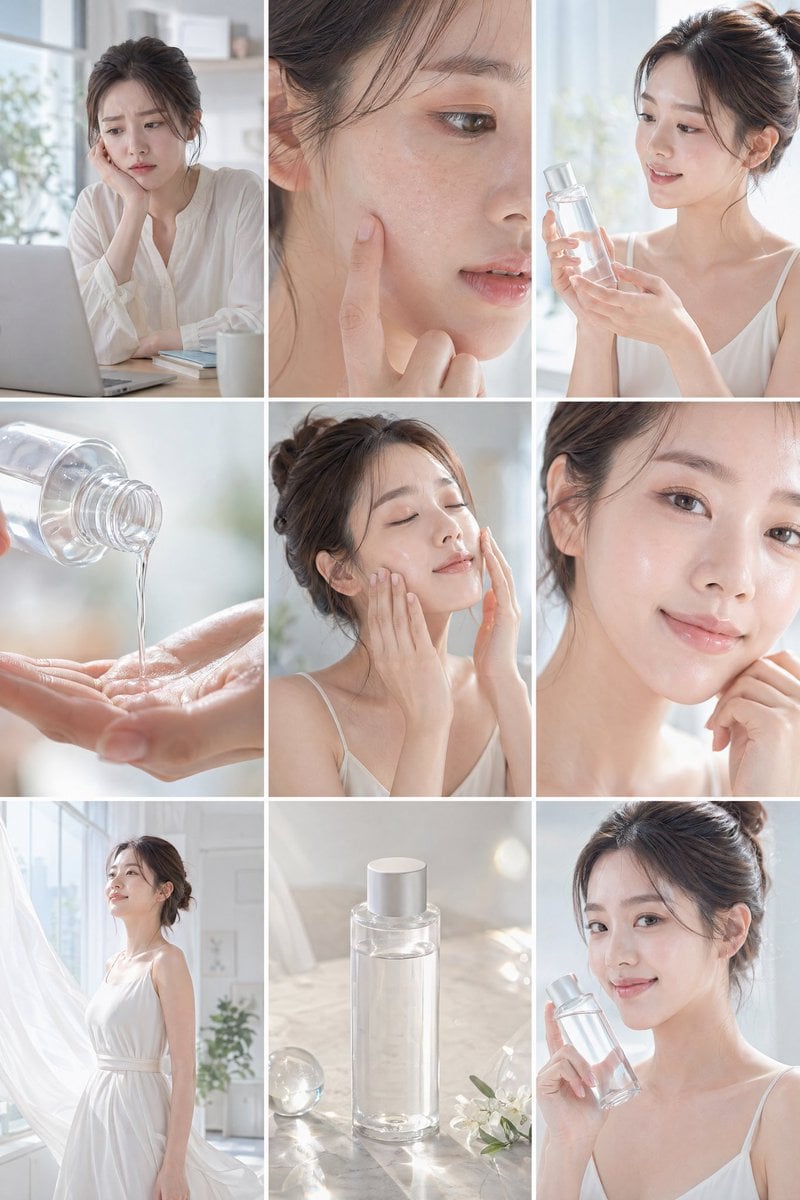
- Prompt included
- Model and format preset
- Free template
The prompt behind this image
Copy the exact prompt behind Skincare Commercial Storyboard, or open it in the studio and make it yours.
Create a clean, bright {argument name="product type" default="skincare commercial"} storyboard in a 16:9 layout with 9 panels. Use soft natural lighting, minimal aesthetic, and a fresh, airy mood with white and pastel tones. The {argument name="subject" default="main character is a young woman with soft makeup and styled hair"}, wearing light, elegant clothing. The setting is a modern, sunlit interior with large windows and a calm atmosphere. No text or subtitles anywhere. Show a clear story flow: she starts at her desk looking slightly tired or concerned, then a close-up of her face showing dry or dull skin. She discovers a clear skincare bottle and gently presents it. Show a close-up of the liquid pouring onto her hand, followed by her applying it to her face. After use, her skin looks hydrated, glowing, and smooth. Transition to her feeling confident and refreshed, walking in a bright, clean space with soft breeze and flowing elements. End with a calm product beauty shot on a minimal surface, then a final frame of her smiling softly at the camera while holding the product. Focus on natural expressions, glowing skin, and a transformation from dull to fresh. Include cinematic close-ups, soft focus, light reflections, and subtle sparkles to enhance the clean beauty feel. Keep everything elegant, minimal, and visually soothing with no branding text.
How to use Skincare Commercial Storyboard in 3 steps
- 1
Open
The prompt is already in the box next to the preview, with the template's model and format selected.
- 2…a portrait of your subject in softgolden-hour light, 85mm…
Personalize
Edit the subject and creative details for your destination.
- 3Generate
Generate
Press Generate — your image is created in PicX Studio, so you can compare it with the original and refine one variable at a time.
More like this
Templates with the same subject, style or setup. Open one to see its prompt.

Soft Shadow Studio Minimalist Product Shot

Minimalist Skincare Product Water Stone Still

Botanical Skincare Minimal Product Advertising
Soft Shadow Studio Minimalist Product Shot
Minimalist Skincare Product Water Stone Still

Goalmaster Youth Sports Poster
Round Tabletop Mirror Skincare Selfie

Headphones Lifestyle Nine Panel Grid

Cappuccino Bottle Splash Product Ad

FIFA-Inspired — World Cup Final Goal Net Commercial
Luxury Skincare Ad Storyboard
Luxury Skincare Commercial Photography: Lumière Nectar
Make it yours
Skincare Commercial Storyboard works as-is. These are the safest ways to change it without losing the look.
Change one field
Copy a single group, rewrite it, and generate again so you can see what that field is doing.
Keep the frame, change the subject
Hold the composition and light of Skincare Commercial Storyboard, then swap wardrobe, props or the person for a new take.
| If the result… | Why | Fix |
|---|---|---|
| The result drifts from the preview | Too many fields changed at once. | Reuse Skincare Commercial Storyboard as-is first, then change one group — subject, light, or setting. |
| The model over-stylizes the scene | The prose prompt leaves finish and camera underspecified. | Add one camera or lighting sentence and stay on GPT Image 2. |
More GPT Image 2 templates
Other prompts made for GPT Image 2.

Six VTuber Japanese Logo Sheet

Realistic Portrait of Woman and Deer

The Vista Modular Condo Poster

AI Model Routing Comparison Infographic

2.5D Anime Art Board

Isometric Productivity Desk Scene

New York Double Exposure Poster

Four-Panel AI Landscape Comparison

Japanese Tatami Lifestyle Magazine Cover

NESCAFÉ Coffee Map Poster
More image prompts
Fresh picks from across the catalog.
Topographic Relief Diorama of Classic Books
Elegant Blush Portrait with Headscarf
Layered Layout Style Prompt
Flat Vector Office Team Illustration
Coastal Lifestyle Portrait with Identity Preservation

Zootopia Style Snowman Building Scene

Kneeling Blue Armored Knight
Ultra-Realistic Luxury Cosmetic Product Photography Prompt
Cinematic Mermaid Portrait in Shallow Water
Realistic Desert Lifestyle Portrait
Browse template categories
Skincare Commercial Storyboard questions
How do I use the Skincare Commercial Storyboard template?
Add your photo if the template asks for one, edit the prompt if you like — the template's model and format are already selected — and press Generate. Your version opens in PicX Studio.
Can I customize the Skincare Commercial Storyboard template?
Yes. You can change the subject, setting, lighting, mood, format, and available model controls before creating your image.
Is the Skincare Commercial Storyboard template free?
Opening and editing this template is free. Generating uses credits, shown on the Generate button when you are signed in.
Which AI model should I use?
Start with GPT Image 2, which is the model associated with this template. You can compare another compatible model for a different finish.
Looking for something else? Browse all templates.

Your photo, any look
Thousands of ready templates for every top image and video model, from one credit balance.