
Kawaii Katsu Curry Food Photography
A structured JSON-style prompt for generating a playful yet realistic photo of Japanese katsu curry with kawaii doodle overlays.
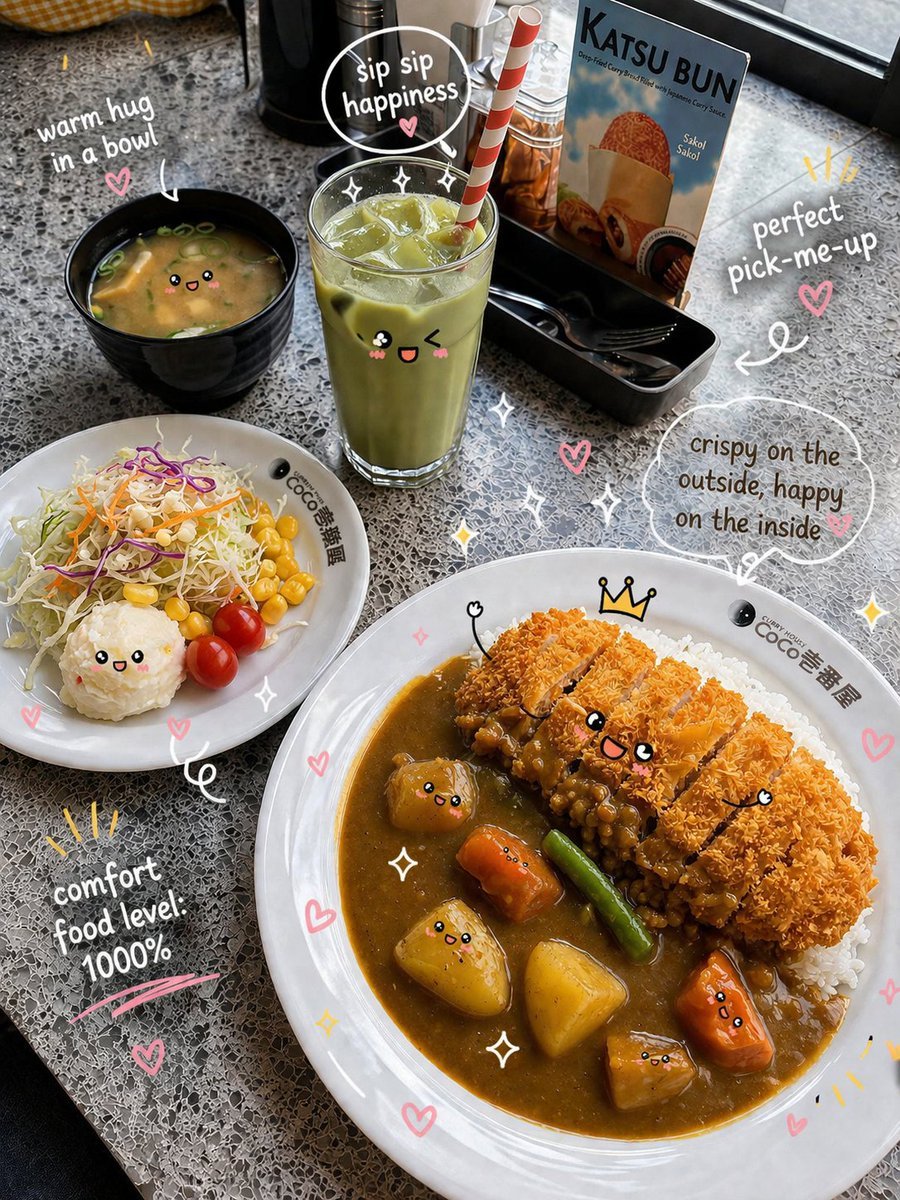
- Prompt included
- Model and format preset
- Free template
The prompt behind this image
Copy the exact prompt behind Kawaii Katsu Curry Food Photography, or open it in the studio and make it yours.
- Scene › Type
- food_photography
- Scene › Style
- playful kawaii cafe aesthetic with subtle realism
- Scene › Location
- cozy japanese curry restaurant table near window
- Scene › Surface
- light grey terrazzo tabletop
- Scene › Lighting › Type
- natural daylight
- Scene › Lighting › Direction
- side lighting from window
- Scene › Lighting › Quality
- soft, diffused, gentle highlights, minimal harsh shadows
- Composition › Camera Angle
- 45-degree top-down
- Composition › Framing
- hero plate centered slightly right, supporting elements surrounding
- Composition › Depth
- shallow depth of field, foreground crisp, background slightly softened
- Composition › Aspect Ratio
- 4:5
- Composition › Focus
- main dish (katsu curry) with secondary attention to drink and side salad
- Main Subject › Dish
- japanese katsu curry
- Main Subject › Details
- crispy golden breaded cutlet sliced evenly, rich brown curry sauce with visible vegetables (carrot, potato, green beans), steamed white rice base, slightly glossy sauce texture, crispy crumb texture highly detailed
- Main Subject › Plating
- white ceramic plate with minimal branding
- Main Subject › Style Overlay › Kawaii Faces
- true
- Main Subject › Style Overlay › Expressions
- cute smiling faces on curry pieces and vegetables
- Main Subject › Style Overlay › Extra Elements
- tiny crown on katsu, sparkles around dish
- Secondary Elements › 0 › Type
- drink
- Secondary Elements › 0 › Description
- iced matcha latte in tall glass
- Secondary Elements › 0 › Details
- ice cubes visible, striped straw, cute face overlay
- Secondary Elements › 1 › Type
- side_dish
- Secondary Elements › 1 › Description
- small salad bowl
- Secondary Elements › 1 › Details
- shredded cabbage, corn, cherry tomatoes, kawaii face accents
Raw JSON
{
  "scene": {
    "type": "food_photography",
    "style": "playful kawaii cafe aesthetic with subtle realism",
    "location": "cozy japanese curry restaurant table near window",
    "surface": "light grey terrazzo tabletop",
    "lighting": {
      "type": "natural daylight",
      "direction": "side lighting from window",
      "quality": "soft, diffused, gentle highlights, minimal harsh shadows"
    }
  },
  "composition": {
    "camera_angle": "45-degree top-down",
    "framing": "hero plate centered slightly right, supporting elements surrounding",
    "depth": "shallow depth of field, foreground crisp, background slightly softened",
    "aspect_ratio": "4:5",
    "focus": "main dish (katsu curry) with secondary attention to drink and side salad"
  },
  "main_subject": {
    "dish": "japanese katsu curry",
    "details": [
      "crispy golden breaded cutlet sliced evenly",
      "rich brown curry sauce with visible vegetables (carrot, potato, green beans)",
      "steamed white rice base",
      "slightly glossy sauce texture",
      "crispy crumb texture highly detailed"
    ],
    "plating": "white ceramic plate with minimal branding",
    "style_overlay": {
      "kawaii_faces": true,
      "expressions": "cute smiling faces on curry pieces and vegetables",
      "extra_elements": ["tiny crown on katsu", "sparkles around dish"]
    }
  },
  "secondary_elements": [
    {
      "type": "drink",
      "description": "iced matcha latte in tall glass",
      "details": ["ice cubes visible", "striped straw", "cute face overlay"]
    },
    {
      "type": "side_dish",
      "description": "small salad bowl",
      "details": ["shredded cabbage", "corn", "cherry tomatoes", "kawaii face accents"]
    },
    {
      "type": "soup",
      "description": "miso soup in black bowl",
      "details": ["tofu cubes", "green onions", "soft steam"]
    },
    {
      "type": "menu_prop",
      "description": "standing menu card with food image",
      "placement": "background right"
    }
  ],
  "graphic_overlay": {
    "style": "hand-drawn doodles",
    "elements": [
      "hearts",
      "sparkles",
      "speech bubbles",
      "arrows pointing to food"
    ],
    "text_phrases": [
      "sip sip happiness",
      "comfort food level 100%",
      "crispy outside, happy inside",
      "perfect pick-me-up"
    ],
    "font_style": "casual handwritten white ink with slight shadow"
  },
  "color_palette": {
    "primary": ["warm golden brown", "creamy white", "soft green"],
    "accent": ["pastel pink", "light yellow", "soft orange"],
    "mood": "warm, cozy, cheerful"
  },
  "rendering": {
    "quality": "ultra-detailed",
    "texture_focus": "crispy coating, glossy curry, glass reflections",
    "sharpness": "high",
    "noise": "minimal",
    "style_balance": "70% realistic, 30% stylized doodle overlay"
  }
}How to use Kawaii Katsu Curry Food Photography in 3 steps
- 1
Open
The prompt is already in the box next to the preview, with the template's model and format selected.
- 2…a portrait of your subject in softgolden-hour light, 85mm…
Personalize
Edit the subject and creative details for your destination.
- 3Generate
Generate
Press Generate — your image is created in PicX Studio, so you can compare it with the original and refine one variable at a time.
More like this
Templates with the same subject, style or setup. Open one to see its prompt.

Mirror Selfie Chibi Characters Pixar Style

Flower Petal Sunglasses Couture Portrait

Fashion Portrait Colored Smoke Studio

Mountain Valley Lifestyle Portrait

青蛇小青写真大片,绿色紧身蛇鳞裙,湿发红唇,妖娆妩媚

A double exposure, long exposure editorial photograph of a man Use image

Portrait of a young woman in her early 20s walking calmly on a beautiful

Artistic portrait of an elegant Asian woman wearing a black silk

A high-quality photo collage featuring the same person with identical

LIGHTING each element still lit by its original source, windows casting

A 3x3 grid storyboard contact sheet comprised of nine candid, cinematic

A high-definition cinematic portrait of a sophisticated woman sitting
Make it yours
Kawaii Katsu Curry Food Photography works as-is. These are the safest ways to change it without losing the look.
Swap the setting
Keep the rest of the prompt and replace the location block. The current setting is “cozy japanese curry restaurant table near window”.
Swap the light
One lighting change is enough to compare takes. Current light: “natural daylight”.
Change one field
Copy a single group, rewrite it, and generate again so you can see what that field is doing.
| If the result… | Why | Fix |
|---|---|---|
| The result drifts from the preview | Too many fields changed at once. | Reuse Kawaii Katsu Curry Food Photography as-is first, then change one group — subject, light, or setting. |
| GPT Image 2 ignores part of the JSON | Some models flatten or skip nested keys. | Keep the same values and paste them as a short paragraph instead. |
More GPT Image 2 templates
Other prompts made for GPT Image 2.

Six VTuber Japanese Logo Sheet

Realistic Portrait of Woman and Deer

The Vista Modular Condo Poster

AI Model Routing Comparison Infographic

2.5D Anime Art Board

Isometric Productivity Desk Scene

New York Double Exposure Poster

Four-Panel AI Landscape Comparison

Japanese Tatami Lifestyle Magazine Cover

NESCAFÉ Coffee Map Poster
More image prompts
Fresh picks from across the catalog.
Casual Studio Portrait with Identity Preservation Prompt

Grunge Collage Fashion Portrait
Schoolgirl and Toilet Paper Creature
Barcelona Fans Stadium Broadcast Photo
Pastel Retro Seaside Car

Corporate Cyberpunk Mascot Portrait Prompt
Animation Style - Framer Motion

Colossal Male Model Skyscraper Artwork
Sharpening and Text Insertion Prompt
90s Japanese Izakaya Snapshot
Browse template categories
Kawaii Katsu Curry Food Photography questions
How do I use the Kawaii Katsu Curry Food Photography template?
Add your photo if the template asks for one, edit the prompt if you like — the template's model and format are already selected — and press Generate. Your version opens in PicX Studio.
Can I customize the Kawaii Katsu Curry Food Photography template?
Yes. You can change the subject, setting, lighting, mood, format, and available model controls before creating your image.
Is the Kawaii Katsu Curry Food Photography template free?
Opening and editing this template is free. Generating uses credits, shown on the Generate button when you are signed in.
Which AI model should I use?
Start with GPT Image 2, which is the model associated with this template. You can compare another compatible model for a different finish.
Looking for something else? Browse all templates.

Your photo, any look
Thousands of ready templates for every top image and video model, from one credit balance.