How do I use the Convex Mirror Neon Street Selfie template?
Edit the prompt in the box under the preview — the template's model and format are already selected — and press Generate. Your version appears right on this page.
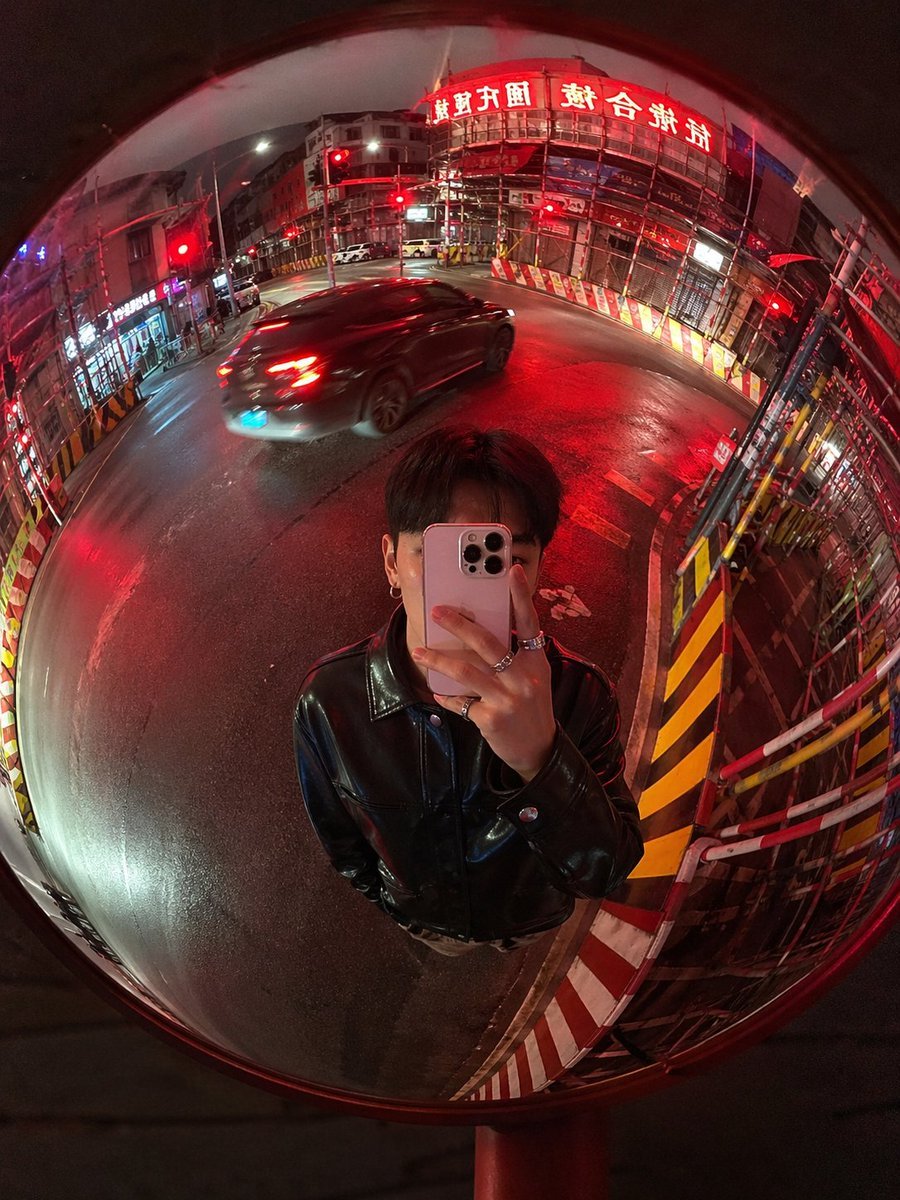
This prompt generates a realistic fisheye-style night street selfie reflected in a roadside convex mirror, ideal for cinematic urban photography and neon city mood images.

This template uses your photo — add one with the + button.
A hyper-realistic nighttime street photo seen entirely through a large circular roadside convex traffic mirror, shot in a vertical 3:4 composition with a strong fisheye lens look and pronounced dome-mirror distortion. The black rim of the mirror is fully visible and the whole circular reflection is filled with the surrounding city street, with roads, buildings, utility poles, wires, scaffolding, and signs bending dramatically toward the edges. At the lower center of the mirror reflection, a young woman is taking a mirror selfie from about the waist up, standing directly in front of the mirror and holding a {argument name="phone model" default="white iPhone 15 Pro Max"} in front of her face so the phone hides most facial features. She has straight dark hair around shoulder length, wears a {argument name="jacket style" default="black leather jacket"}, and has {argument name="accessory detail" default="silver rings"} on her fingers. The city scene is a quiet intersection at night with wet asphalt reflecting vivid red light. There are exactly 3 clearly visible red traffic lights in the reflection, and exactly 1 moving gray sedan crossing from right to left with slight motion blur and red neon reflections along its body. On the left side of the mirror reflection, dense metal construction scaffolding wraps the building facade, lit by a tall vertical red neon sign with white Japanese characters. Along the bottom edge and lower left, there are exactly 2 red-and-yellow striped road barriers curving with the mirror distortion. Street lamps and storefront lights recede into the background on the right side, while overhead cables and poles arc across the upper half of the image. Lighting is dominated by {argument name="lighting color" default="intense red neon and traffic lights"}, creating cinematic red highlights on the street, the car, the barriers, and the subject's jacket. Realistic urban Tokyo-like night atmosphere, candid yet stylish, crisp detail with slight grime and reflections on the mirror surface, high contrast, immersive convex mirror perspective.
A hyper-realistic nighttime street photo seen entirely through a large circular roadside convex traffic mirror, shot in a vertical 3:4 composition with a strong fisheye lens look and pronounced dome-mirror distortion. The black rim of the mirror is fully visible and the whole circular reflection is filled with the surrounding city street, with roads, buildings, utility poles, wires, scaffolding, and signs bending dramatically toward the edges. At the lower center of the mirror reflection, a young woman is taking a mirror selfie from about the waist up, standing directly in front of the mirror and holding a {argument name="phone model" default="white iPhone 15 Pro Max"} in front of her face so the phone hides most facial features. She has straight dark hair around shoulder length, wears a {argument name="jacket style" default="black leather jacket"}, and has {argument name="accessory detail" default="silver rings"} on her fingers. The city scene is a quiet intersection at night with wet asphalt reflecting vivid red light. There are exactly 3 clearly visible red traffic lights in the reflection, and exactly 1 moving gray sedan crossing from right to left with slight motion blur and red neon reflections along its body. On the left side of the mirror reflection, dense metal construction scaffolding wraps the building facade, lit by a tall vertical red neon sign with white Japanese characters. Along the bottom edge and lower left, there are exactly 2 red-and-yellow striped road barriers curving with the mirror distortion. Street lamps and storefront lights recede into the background on the right side, while overhead cables and poles arc across the upper half of the image. Lighting is dominated by {argument name="lighting color" default="intense red neon and traffic lights"}, creating cinematic red highlights on the street, the car, the barriers, and the subject's jacket. Realistic urban Tokyo-like night atmosphere, candid yet stylish, crisp detail with slight grime and reflections on the mirror surface, high contrast, immersive convex mirror perspective.
Edit the prompt in the box under the preview — the template's model and format are already selected — and press Generate. Your version appears right on this page.
Yes. You can change the subject, setting, lighting, mood, format, and available model controls before creating your image.
Opening and editing this template is free. Generating uses credits, shown on the Generate button when you are signed in.
Start with GPT Image 2, which is the model associated with this template. You can compare another compatible model for a different finish.
Follow a topic to a crawlable collection of related PicX Studio templates.