
Lifestyle Photo Dump Grid Collage
A prompt for a 3x3 grid collage capturing spontaneous and diverse moods of a girl in a Korean-inspired summer aesthetic.
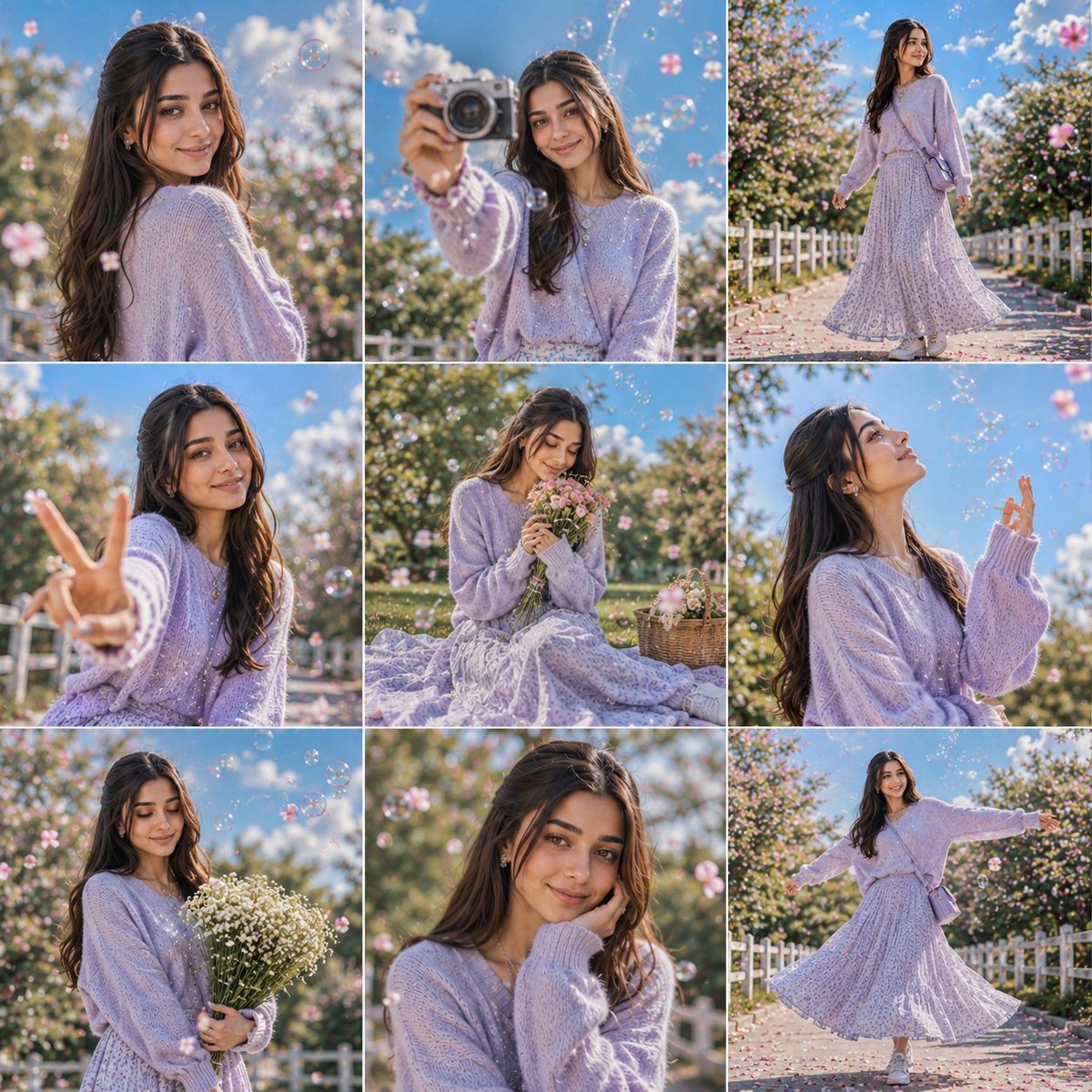
- Prompt included
- Model and format preset
- Free template
The prompt behind this image
Copy the exact prompt behind Lifestyle Photo Dump Grid Collage, or open it in the studio and make it yours.
A vibrant {argument name="format" default="3×3 grid photo collage"} containing nine completely unique and expressive moments of the same girl. Each frame naturally captures a different mood, gesture, expression, body language, and camera interaction, creating the feeling of a real lifestyle photo dump shared on Threads. The scene captures a beautiful summer day with a bright blue sky, fluffy clouds, and warm golden sunlight producing crisp natural shadows. Soft bokeh, sparkling highlights, floating flower petals, and soap bubbles reflecting sunlight create a dreamy atmosphere. The character wears a {argument name="clothing" default="soft pastel lavender oversized knitted sweater paired with a flowing ankle-length floral maxi skirt"}, layered silver necklaces, delicate accessories, and white sneakers. A gentle breeze creates natural movement in the hair and clothing. Every image should feel spontaneous and different, featuring a mix of candid smiles, playful interactions with the camera, thoughtful expressions, over-the-shoulder glances, hand gestures, movement shots, walking moments, sitting poses, looking upward, laughing naturally, holding flowers, interacting with bubbles, and editorial beauty portraits. No repeated poses or repeated expressions. The collage freely alternates between 35mm wide-angle full-body photography and 85mm close-up beauty portraits, combining low-angle shots, eye-level perspectives, top-down views, intimate close-ups, and dynamic lifestyle compositions. Beautiful {argument name="setting" default="flowering gardens, blooming trees, white fences, floating petals, dreamy sunshine"}, and soft pastel colors create a premium Korean spring-summer atmosphere. Rendered in ultra-realistic Korean editorial photography, luxury lifestyle magazine quality, premium social media campaign aesthetics, photorealistic skin texture, realistic fabric details, natural hair movement, cinematic depth of field, luxury color grading, highly shareable Threads aesthetic, youthful elegance, joyful memories, masterpiece composition, ultra-detailed 2K. The overall composition should feel like a collection of authentic happy memories captured throughout a perfect day, with every panel telling a different story while maintaining complete visual harmony. Negative Prompt: duplicate poses, repeated expressions, short skirt, mini skirt, cropped outfit, exposed legs, low quality, blurry face, bad anatomy, extra fingers, distorted hands, cartoon, illustration, watermark, logo, text, oversaturated colors, unrealistic proportions.
How to use Lifestyle Photo Dump Grid Collage in 3 steps
- 1
Open
The prompt is already in the box next to the preview, with the template's model and format selected.
- 2…a portrait of your subject in softgolden-hour light, 85mm…
Personalize
Edit the subject and creative details for your destination.
- 3Generate
Generate
Press Generate — your image is created in PicX Studio, so you can compare it with the original and refine one variable at a time.
More like this
Templates with the same subject, style or setup. Open one to see its prompt.

Minimalist Fashion Editorial Split Layout

Instagram Feed Grid

Miniature Self Portrait Collage
Candid Phone Gallery Photo Dump Collage
Japanese Absurd Lifestyle Ad Grid

A k.pop idol on the stage with mic

Paper Cut Finale Fireworks

Paper Cut Garden Maze

Paper Cut Rooftop Concert

Paper Cut Bicycle Coast

Paper Cut Castle Gate

Paper Cut Kitchen Chaos
Make it yours
Lifestyle Photo Dump Grid Collage works as-is. These are the safest ways to change it without losing the look.
Change one field
Copy a single group, rewrite it, and generate again so you can see what that field is doing.
Keep the frame, change the subject
Hold the composition and light of Lifestyle Photo Dump Grid Collage, then swap wardrobe, props or the person for a new take.
| If the result… | Why | Fix |
|---|---|---|
| The result drifts from the preview | Too many fields changed at once. | Reuse Lifestyle Photo Dump Grid Collage as-is first, then change one group — subject, light, or setting. |
| The model over-stylizes the scene | The prose prompt leaves finish and camera underspecified. | Add one camera or lighting sentence and stay on GPT Image 2. |
More GPT Image 2 templates
Other prompts made for GPT Image 2.

Six VTuber Japanese Logo Sheet

Realistic Portrait of Woman and Deer

The Vista Modular Condo Poster

AI Model Routing Comparison Infographic

2.5D Anime Art Board

Isometric Productivity Desk Scene

New York Double Exposure Poster

Four-Panel AI Landscape Comparison

Japanese Tatami Lifestyle Magazine Cover

NESCAFÉ Coffee Map Poster
More image prompts
Fresh picks from across the catalog.

Winter Fantasy Editorial with Emma Myers Lookalike
Minecraft Voxel Wedding Ceremony
Fashion Editorial Portrait on Modern Sofa Prompt

Cinematic Travel Storytelling Aesthetic Prompt
Japanese Romance App Ad Panels

Selfie with Night King on Game of Thrones Set
Pakistani Luxury Fashion Campaign
Editorial Photograph of Woman with Roses in Prague (JSON)

Photorealistic CGI Big Head Caricature
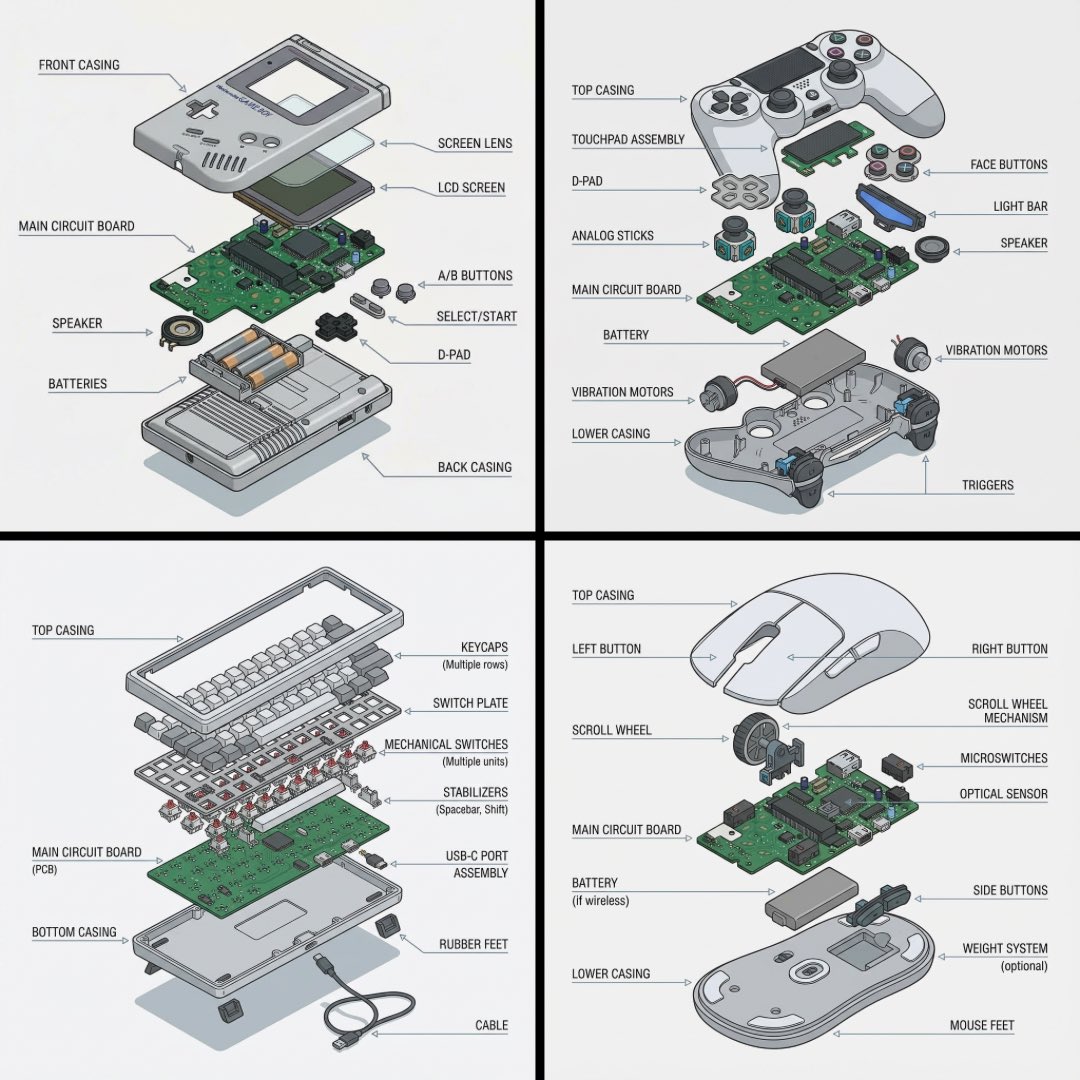
Technical exploded view diagram of a device
Browse template categories
Lifestyle Photo Dump Grid Collage questions
How do I use the Lifestyle Photo Dump Grid Collage template?
Add your photo if the template asks for one, edit the prompt if you like — the template's model and format are already selected — and press Generate. Your version opens in PicX Studio.
Can I customize the Lifestyle Photo Dump Grid Collage template?
Yes. You can change the subject, setting, lighting, mood, format, and available model controls before creating your image.
Is the Lifestyle Photo Dump Grid Collage template free?
Opening and editing this template is free. Generating uses credits, shown on the Generate button when you are signed in.
Which AI model should I use?
Start with GPT Image 2, which is the model associated with this template. You can compare another compatible model for a different finish.
Looking for something else? Browse all templates.

Your photo, any look
Thousands of ready templates for every top image and video model, from one credit balance.