
Fake Apple CEO Announcement Poster
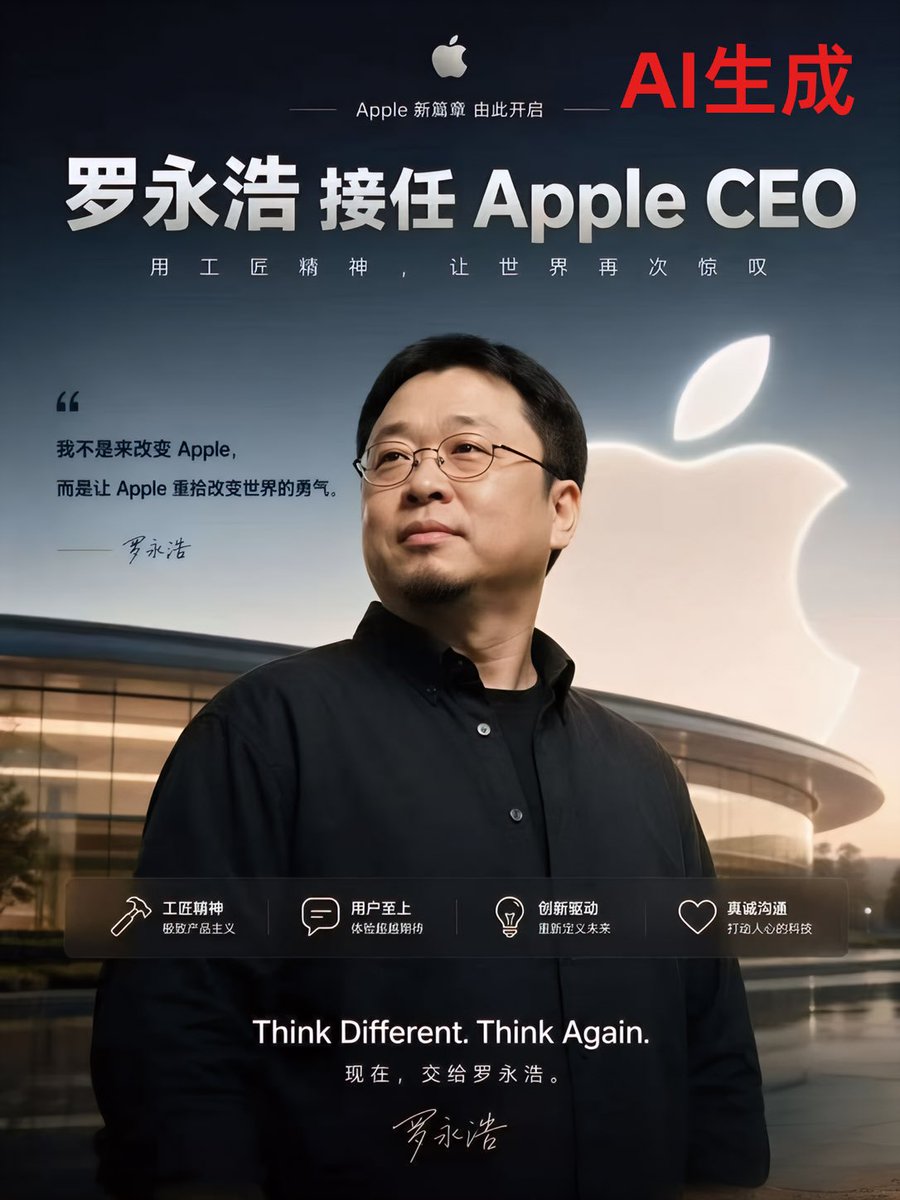
A photorealistic Chinese Apple-style corporate announcement poster designed for viral AI-generated tech satire or speculative branding visuals.
- Prompt included
- Model and format preset
- Free template
The prompt behind this image
Copy the exact prompt behind Fake Apple CEO Announcement Poster, or open it in the studio and make it yours.
A sleek, photorealistic Chinese tech-announcement poster in Apple advertising style, vertical 4:5 composition, with a dramatic dusk-to-night gradient sky in deep navy blue fading lighter near the horizon. Center the upper body of a middle-aged East Asian man in the foreground, wearing a minimalist black button-up shirt over a black undershirt, standing confidently with a calm executive posture in front of Apple Park’s curved glass architecture. His face is mostly front-facing and slightly turned, with short black hair and thin dark eyeglasses, styled like a serious corporate portrait. Behind him on the right side, place a large glowing white Apple logo floating against the sky. At the very top center, include a small white Apple logo with the Chinese line “Apple 新篇章 由此开启” in a refined thin sans-serif layout. In the top right corner, add large bold red Chinese text: “AI生成”. Across the upper-middle area, place a huge bold white Chinese headline: “罗永浩 接任 Apple CEO”. Directly below it, add a smaller spaced-out white Chinese slogan: “用 工 匠 精 神 , 让 世 界 再 次 惊 叹”. On the left middle area, add a quoted statement block in dark text with an oversized opening quotation mark, reading: “我不是来改变 Apple, 而是让 Apple 重拾改变世界的勇气。” and beneath it a handwritten-style signature “罗永浩”. Across the lower middle, overlay a translucent dark horizontal feature bar containing exactly 4 icon-and-text columns with thin white line icons: 1) a hammer icon with the title “工匠精神” and subtitle “极致产品主义”, 2) a speech bubble icon with the title “用户至上” and subtitle “体验细节控”, 3) a light bulb icon with the title “创新驱动” and subtitle “重新定义未来”, 4) a heart outline icon with the title “真诚沟通” and subtitle “打造人的科技”. At the very bottom center, add large white English text: “Think Different. Think Again.”, and below it smaller Chinese text: “现在,交给罗永浩。” with another handwritten signature underneath. Use luxury tech keynote poster aesthetics, cinematic soft lighting, glossy reflections on the building, high contrast, clean typography, premium Apple-inspired branding, polished commercial realism.
How to use Fake Apple CEO Announcement Poster in 3 steps
- 1Upload ImagePNG, JPG or paste
Add your photo
Upload the photo the template builds on. The prompt, model and format are already set.
- 2…a portrait of your subject in softgolden-hour light, 85mm…
Personalize
Edit the subject and creative details for your destination.
- 3Generate
Generate
Press Generate — your image is created in PicX Studio, so you can compare it with the original and refine one variable at a time.
More like this
Templates with the same subject, style or setup. Open one to see its prompt.
Apple-Style CEO Announcement Poster

Japan Travel Brochure Poster

Cartoon TV Show Poster Pack

Trendy Cafe Drink Promo Poster

Urban Fashion Editorial Collage Streetwear Poster

Premium Fashion Editorial Cover Layout System

Polo Ralph Lauren Luxury American Heritage Fashion Campaign

Monochrome Halftone Editorial Fashion Poster

Retro Mirror Luxury Fashion Campaign Poster

Luxury Fashion Campaign Typography Poster System

Premium Fashion Editorial Campaign Poster System

Ultra-Stylized High-Fashion Streetwear Poster
Make it yours
Fake Apple CEO Announcement Poster works as-is. These are the safest ways to change it without losing the look.
Change one field
Copy a single group, rewrite it, and generate again so you can see what that field is doing.
Keep the frame, change the subject
Hold the composition and light of Fake Apple CEO Announcement Poster, then swap wardrobe, props or the person for a new take.
| If the result… | Why | Fix |
|---|---|---|
| The result drifts from the preview | Too many fields changed at once. | Reuse Fake Apple CEO Announcement Poster as-is first, then change one group — subject, light, or setting. |
| The model over-stylizes the scene | The prose prompt leaves finish and camera underspecified. | Add one camera or lighting sentence and stay on GPT Image 2. |
More GPT Image 2 templates
Other prompts made for GPT Image 2.

Six VTuber Japanese Logo Sheet

Realistic Portrait of Woman and Deer

The Vista Modular Condo Poster

AI Model Routing Comparison Infographic

2.5D Anime Art Board

Isometric Productivity Desk Scene

New York Double Exposure Poster

Four-Panel AI Landscape Comparison

Japanese Tatami Lifestyle Magazine Cover

NESCAFÉ Coffee Map Poster
More image prompts
Fresh picks from across the catalog.

Sorrowful Night Cinematic Portrait

Found a Small Spring
Chiaroscuro Portrait of an Exhausted Artist

Ultrarrealista Retrato Profesional de Oficina 8K
Prompt: Create a cinematic stylized character ill
Photoreal Candid Street Romance in Istanbul Prompt

Nomadic Archer Cinematic Editorial Portrait
Photorealistic Cosplay of Alice: Madness Returns

Melancholic artistic concept

Prompt for Converting Subject into an Archangel
Browse template categories
Fake Apple CEO Announcement Poster questions
How do I use the Fake Apple CEO Announcement Poster template?
Add your photo if the template asks for one, edit the prompt if you like — the template's model and format are already selected — and press Generate. Your version opens in PicX Studio.
Can I customize the Fake Apple CEO Announcement Poster template?
Yes. You can change the subject, setting, lighting, mood, format, and available model controls before creating your image.
Is the Fake Apple CEO Announcement Poster template free?
Opening and editing this template is free. Generating uses credits, shown on the Generate button when you are signed in.
Which AI model should I use?
Start with GPT Image 2, which is the model associated with this template. You can compare another compatible model for a different finish.
Looking for something else? Browse all templates.

Your photo, any look
Thousands of ready templates for every top image and video model, from one credit balance.