
Spring School Romance Manga Page
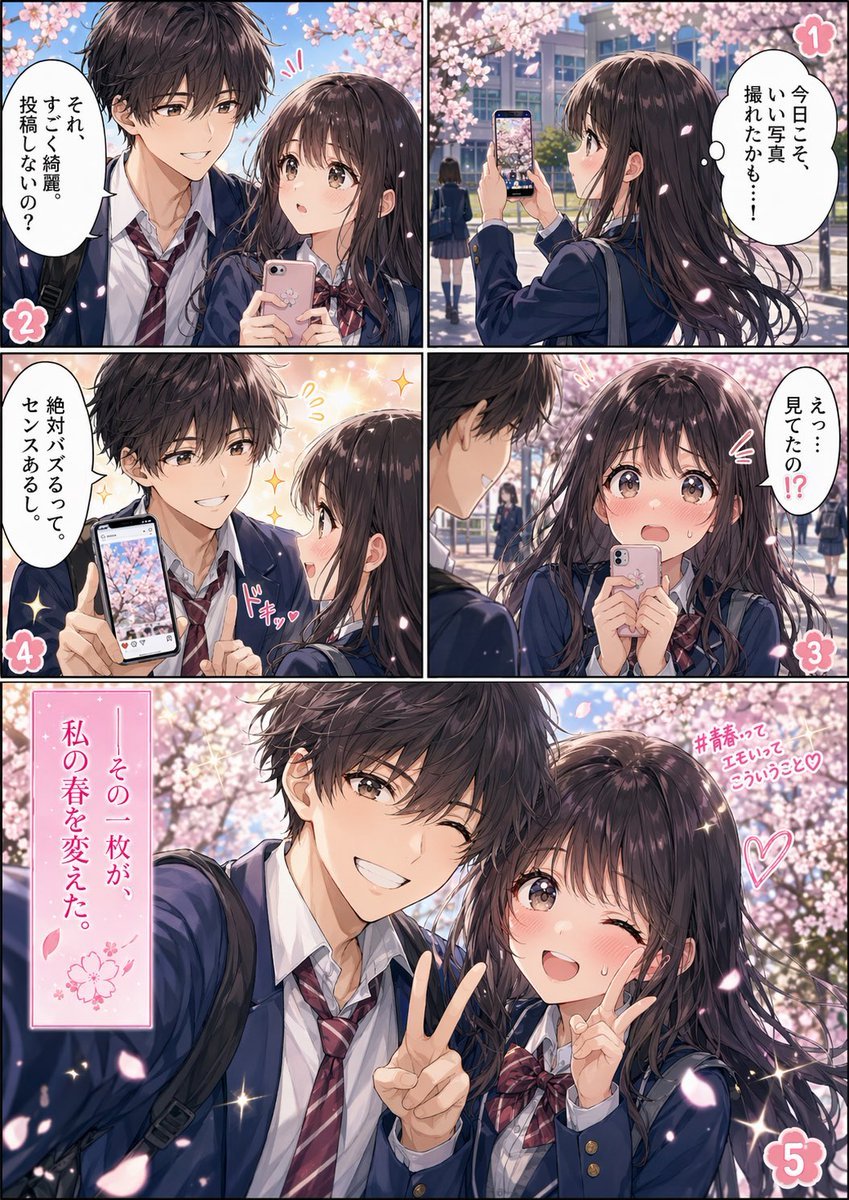
A polished five-panel full-color shoujo manga page showing a cherry-blossom school romance scene, ideal for comic storytelling, promotional posts, or manga-style social media visuals.
- Prompt included
- Model and format preset
- Free template
The prompt behind this image
Copy the exact prompt behind Spring School Romance Manga Page, or open it in the studio and make it yours.
- Type
- full-color shoujo manga page
- Style
- romantic anime illustration, glossy polished coloring, soft spring light, sparkling highlights, delicate linework, cinematic school-romance mood
- Format
- single page comic with 5 numbered panels
- Setting › Location
- Japanese high school campus walkway lined with cherry blossom trees
- Setting › Season
- spring sakura season
- Setting › Time
- daytime
- Setting › Atmosphere
- dreamy, youthful, sentimental, petals drifting through the air
- Characters › 0 › Role
- schoolgirl
- Characters › 0 › Appearance
- long dark brown hair with soft shine, large expressive eyes, slim build, navy school blazer, white shirt, red plaid ribbon bow, carrying a smartphone
- Characters › 1 › Role
- schoolboy
- Characters › 1 › Appearance
- messy dark brown hair, slim build, navy school blazer, white shirt, loosened red striped tie, school bag over shoulder
- Layout › Sections › 0 › Title
- 1
- Layout › Sections › 0 › Position
- top-right
- Layout › Sections › 0 › Count
- 1
- Layout › Sections › 0 › Labels
- girl notices a photo opportunity under the cherry blossoms and holds up her phone to take a picture
- Layout › Sections › 1 › Title
- 2
- Layout › Sections › 1 › Position
- top-left
- Layout › Sections › 1 › Count
- 1
- Layout › Sections › 1 › Labels
- close two-shot selfie setup, the girl holds a pink smartphone while the boy praises how beautiful she looks and suggests posting it
- Layout › Sections › 2 › Title
- 3
- Layout › Sections › 2 › Position
- middle-right
- Layout › Sections › 2 › Count
- 1
- Layout › Sections › 2 › Labels
- the girl reacts in surprise and embarrassment, holding her phone close to her face while asking if he saw it
- Layout › Sections › 3 › Title
- 4
Raw JSON
{"type":"full-color shoujo manga page","style":"romantic anime illustration, glossy polished coloring, soft spring light, sparkling highlights, delicate linework, cinematic school-romance mood","format":"single page comic with 5 numbered panels","setting":{"location":"Japanese high school campus walkway lined with cherry blossom trees","season":"spring sakura season","time":"daytime","atmosphere":"dreamy, youthful, sentimental, petals drifting through the air"},"characters":[{"role":"schoolgirl","appearance":"long dark brown hair with soft shine, large expressive eyes, slim build, navy school blazer, white shirt, red plaid ribbon bow, carrying a smartphone"},{"role":"schoolboy","appearance":"messy dark brown hair, slim build, navy school blazer, white shirt, loosened red striped tie, school bag over shoulder"}],"layout":{"sections":[{"title":"1","position":"top-right","count":1,"labels":["girl notices a photo opportunity under the cherry blossoms and holds up her phone to take a picture"]},{"title":"2","position":"top-left","count":1,"labels":["close two-shot selfie setup, the girl holds a pink smartphone while the boy praises how beautiful she looks and suggests posting it"]},{"title":"3","position":"middle-right","count":1,"labels":["the girl reacts in surprise and embarrassment, holding her phone close to her face while asking if he saw it"]},{"title":"4","position":"middle-left","count":1,"labels":["the boy confidently shows the phone screen with the cherry blossom photo and says it will definitely go viral because it has a strong sense of style"]},{"title":"5","position":"bottom full-width","count":1,"labels":["large romantic payoff shot of the two students posing together for a selfie beneath blooming sakura trees"]}],"centerpiece":"panel 5 is the largest panel spanning the full bottom width"},"props":{"count":4,"items":["pink smartphone in the girl's hand","smartphone screen displaying a cherry blossom photo","school bags","falling sakura petals"]},"text":{"speech_bubbles":["それ、すごく綺麗。投稿しないの?","今日こそ、いい写真、撮れたかも…!","えっ…見てたの!?","絶対バズるって。その、センスあるし。"],"caption_boxes":["その一枚が、私の春を変えた。"],"side_text":["#青春ってエモいってこういうこと♡"],"panel_numbers":["1","2","3","4","5"]},"composition":"Use black comic panel borders, 2 small panels across the top, 2 small panels across the middle, and 1 large wide panel at the bottom. Emphasize blush, shy romantic tension, fluttering petals, and sparkling shoujo effects. The final panel shows the boy extending his arm for a selfie while making a peace sign, and the girl standing close beside him also posing with a peace sign. Keep the background filled with soft-focus cherry blossoms and a school building in the distance.","color_palette":"pastel pink blossoms, navy uniforms, warm skin tones, bright spring blue sky, soft white sparkles","quality":"highly detailed, social-media-ready manga cover quality"}How to use Spring School Romance Manga Page in 3 steps
- 1Upload ImagePNG, JPG or paste
Add your photo
Upload the photo the template builds on. The prompt, model and format are already set.
- 2…a portrait of your subject in softgolden-hour light, 85mm…
Personalize
Edit the subject and creative details for your destination.
- 3Generate
Generate
Press Generate — your image is created in PicX Studio, so you can compare it with the original and refine one variable at a time.
More like this
Templates with the same subject, style or setup. Open one to see its prompt.










Make it yours
Spring School Romance Manga Page works as-is. These are the safest ways to change it without losing the look.
Swap the setting
Keep the rest of the prompt and replace the location block. The current setting is “Japanese high school campus walkway lined with cherry blossom trees”.
Change one field
Copy a single group, rewrite it, and generate again so you can see what that field is doing.
Keep the frame, change the subject
Hold the composition and light of Spring School Romance Manga Page, then swap wardrobe, props or the person for a new take.
| If the result… | Why | Fix |
|---|---|---|
| The result drifts from the preview | Too many fields changed at once. | Reuse Spring School Romance Manga Page as-is first, then change one group — subject, light, or setting. |
| GPT Image 2 ignores part of the JSON | Some models flatten or skip nested keys. | Keep the same values and paste them as a short paragraph instead. |
More GPT Image 2 templates
Other prompts made for GPT Image 2.

Six VTuber Japanese Logo Sheet

Realistic Portrait of Woman and Deer

The Vista Modular Condo Poster

AI Model Routing Comparison Infographic

2.5D Anime Art Board

Isometric Productivity Desk Scene

New York Double Exposure Poster

Four-Panel AI Landscape Comparison

Japanese Tatami Lifestyle Magazine Cover

NESCAFÉ Coffee Map Poster
More image prompts
Fresh picks from across the catalog.
Video Game Wiki Style Plunger

Hyper-photorealistic soda can product advertisement prompt
Fashion Portrait Collage
Ultra-Realistic Studio Portrait of Lady in Yellow Gown
Cinematic Storytelling Scene Generation Prompt
Hyper-Realistic Pencil Sketch Portrait Prompt
Dreamy Fairy Editorial Portrait in a Secret Garden
Photorealistic MacBook Desktop Selfie Scene

Pamplets
Dreamy Winter Portrait with Teddy Coat and Earmuffs
Browse template categories
Spring School Romance Manga Page questions
How do I use the Spring School Romance Manga Page template?
Add your photo if the template asks for one, edit the prompt if you like — the template's model and format are already selected — and press Generate. Your version opens in PicX Studio.
Can I customize the Spring School Romance Manga Page template?
Yes. You can change the subject, setting, lighting, mood, format, and available model controls before creating your image.
Is the Spring School Romance Manga Page template free?
Opening and editing this template is free. Generating uses credits, shown on the Generate button when you are signed in.
Which AI model should I use?
Start with GPT Image 2, which is the model associated with this template. You can compare another compatible model for a different finish.
Looking for something else? Browse all templates.

Your photo, any look
Thousands of ready templates for every top image and video model, from one credit balance.