
Anime Movie Pitch Document with Poster and Settei
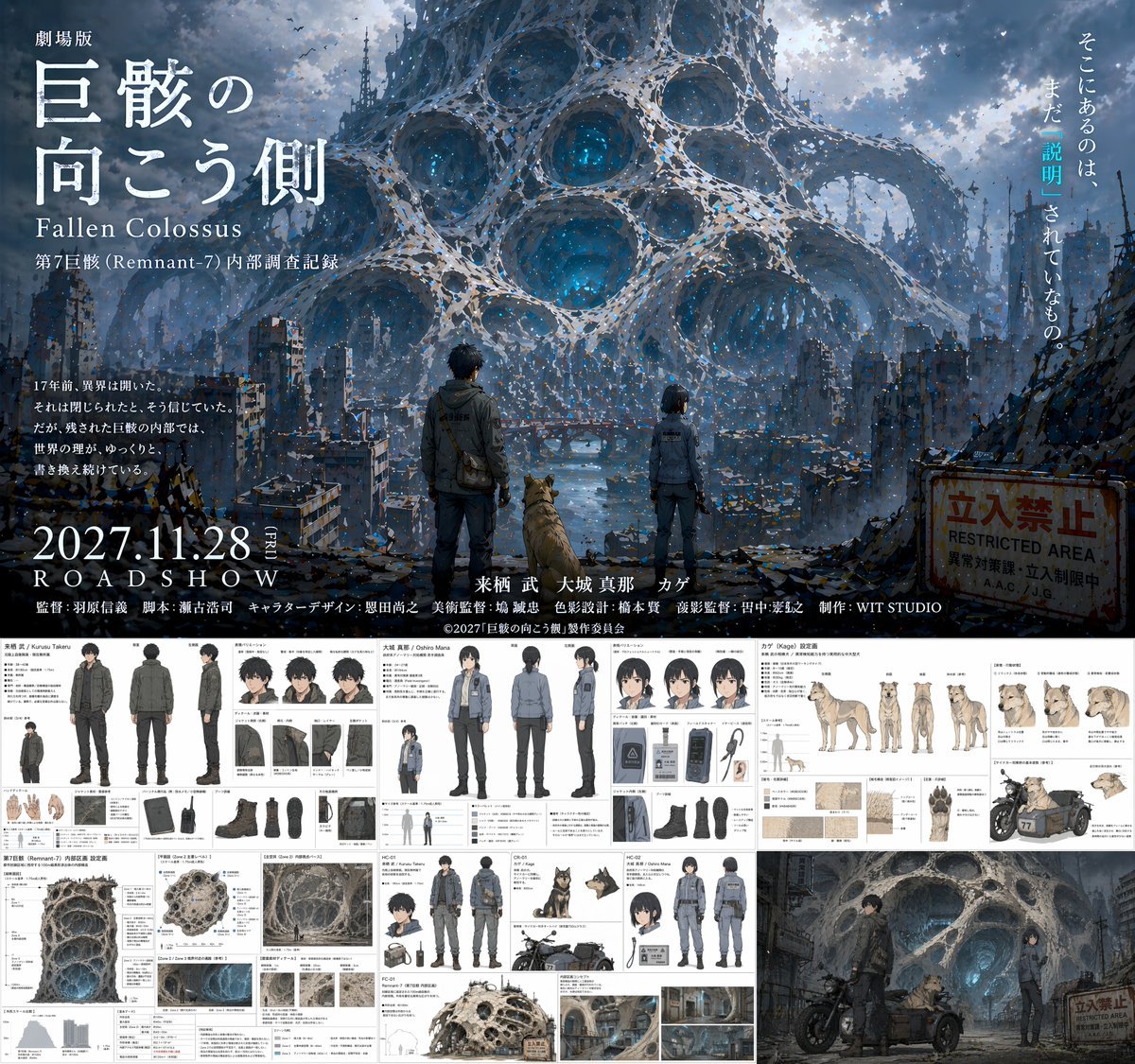
Generates a comprehensive anime production layout featuring a cinematic movie poster on top and detailed character, prop, and environment reference sheets below.
- Prompt included
- Model and format preset
- Free template
The prompt behind this image
Copy the exact prompt behind Anime Movie Pitch Document with Poster and Settei, or open it in the studio and make it yours.
- Type
- anime movie production pitch document
- Overall Layout
- split layout with a large cinematic movie poster on the top half and a grid of 5 detailed reference sheets on the bottom half
- Top Section › Type
- movie poster
- Top Section › Visual
- A man, a woman, and a dog standing on a ruined city street, facing away from the viewer, looking towards a colossal, porous, web-like alien structure dominating the sky. A rusty 'RESTRICTED AREA' sign is on the right.
- Top Section › Typography › Title
- {argument name="movie title" default="劇場版 巨骸の向こう側 Fallen Colossus"}
- Top Section › Typography › Release Date
- {argument name="release date" default="2027.11.28 ROADSHOW"}
- Top Section › Typography › Tagline
- そこにあるのは、まだ「説明」されていないもの。
- Top Section › Typography › Credits Studio
- {argument name="studio name" default="WIT STUDIO"}
- Bottom Sections › 0 › Title
- {argument name="male character name" default="来栖 武 / Kurusu Takeru"}
- Bottom Sections › 0 › Type
- character reference sheet
- Bottom Sections › 0 › Elements › Full Body Poses
- 3
- Bottom Sections › 0 › Elements › Expressions
- 3
- Bottom Sections › 0 › Elements › Detail Shots
- 8
- Bottom Sections › 0 › Elements › Description
- Male protagonist in dark tactical jacket and cargo pants. Includes front, back, and side full-body views, headshots, and detailed callouts for gloves, boots, backpack, and radio.
- Bottom Sections › 1 › Title
- {argument name="female character name" default="大城 真那 / Oshiro Mana"}
- Bottom Sections › 1 › Type
- character reference sheet
- Bottom Sections › 1 › Elements › Full Body Poses
- 3
- Bottom Sections › 1 › Elements › Expressions
- 3
- Bottom Sections › 1 › Elements › Detail Shots
- 6
- Bottom Sections › 1 › Elements › Description
- Female protagonist in grey tactical uniform. Includes front, back, and side full-body views, headshots, and detailed callouts for jacket, boots, ID badge, and pouch.
- Bottom Sections › 2 › Title
- カゲ (Kage) 設定画
- Bottom Sections › 2 › Type
- animal character reference sheet
- Bottom Sections › 2 › Elements › Full Body Poses
- 4
- Bottom Sections › 2 › Elements › Expressions
- 4
Raw JSON
{
  "type": "anime movie production pitch document",
  "overall_layout": "split layout with a large cinematic movie poster on the top half and a grid of 5 detailed reference sheets on the bottom half",
  "top_section": {
    "type": "movie poster",
    "visual": "A man, a woman, and a dog standing on a ruined city street, facing away from the viewer, looking towards a colossal, porous, web-like alien structure dominating the sky. A rusty 'RESTRICTED AREA' sign is on the right.",
    "typography": {
      "title": "{argument name=\"movie title\" default=\"劇場版 巨骸の向こう側 Fallen Colossus\"}",
      "release_date": "{argument name=\"release date\" default=\"2027.11.28 ROADSHOW\"}",
      "tagline": "そこにあるのは、まだ「説明」されていないもの。",
      "credits_studio": "{argument name=\"studio name\" default=\"WIT STUDIO\"}"
    }
  },
  "bottom_sections": [
    {
      "title": "{argument name=\"male character name\" default=\"来栖 武 / Kurusu Takeru\"}",
      "type": "character reference sheet",
      "elements": {
        "full_body_poses": 3,
        "expressions": 3,
        "detail_shots": 8,
        "description": "Male protagonist in dark tactical jacket and cargo pants. Includes front, back, and side full-body views, headshots, and detailed callouts for gloves, boots, backpack, and radio."
      }
    },
    {
      "title": "{argument name=\"female character name\" default=\"大城 真那 / Oshiro Mana\"}",
      "type": "character reference sheet",
      "elements": {
        "full_body_poses": 3,
        "expressions": 3,
        "detail_shots": 6,
        "description": "Female protagonist in grey tactical uniform. Includes front, back, and side full-body views, headshots, and detailed callouts for jacket, boots, ID badge, and pouch."
      }
    },
    {
      "title": "カゲ (Kage) 設定画",
      "type": "animal character reference sheet",
      "elements": {
        "full_body_poses": 4,
        "expressions": 4,
        "detail_shots": 5,
        "description": "Dog companion. Includes side, front, back, and angled full-body views, headshots, and detailed callouts for fur texture, paws, and a motorcycle sidecar."
      }
    },
    {
      "title": "第7巨骸 (Remnant-7) 内部区画 設定画",
      "type": "environment and vehicle reference sheet",
      "elements": {
        "large_diagrams": 1,
        "environment_thumbnails": 4,
        "vehicle_designs": 1,
        "description": "Cross-section of the porous alien structure, smaller environment thumbnails, and a motorcycle design featuring the characters."
      }
    },
    {
      "title": "Concept Art",
      "type": "scene illustration",
      "elements": {
        "characters": 3,
        "vehicles": 1,
        "description": "The male character, female character, and dog with a motorcycle sidecar parked in front of the glowing, porous alien structure."
      }
    }
  ]
}How to use Anime Movie Pitch Document with Poster and Settei in 3 steps
- 1Upload ImagePNG, JPG or paste
Add your photo
Upload the photo the template builds on. The prompt, model and format are already set.
- 2…a portrait of your subject in softgolden-hour light, 85mm…
Personalize
Edit the subject and creative details for your destination.
- 3Generate
Generate
Press Generate — your image is created in PicX Studio, so you can compare it with the original and refine one variable at a time.
More like this
Templates with the same subject, style or setup. Open one to see its prompt.

Captain Tsubasa Anime World Cup Poster
Epic Anime Movie Poster from Photo
Retro Fake Anime Movie Poster
Horror Anime Movie Poster
Fictional Anime Movie Poster
Anime Shrine Maiden Movie Poster
Anime Ensemble Movie Poster
Anime Movie Poster Layout
Anime Sakura Movie Poster
Anime Theatrical Movie Poster

Gpt2 Youtube Thumbnail Wuxia Movie Character Posters

Gpt2 Youtube Thumbnail Anime Music Bootcamp Promo Poster
Make it yours
Anime Movie Pitch Document with Poster and Settei works as-is. These are the safest ways to change it without losing the look.
Swap the setting
Keep the rest of the prompt and replace the location block. The current setting is “4”.
Change one field
Copy a single group, rewrite it, and generate again so you can see what that field is doing.
Keep the frame, change the subject
Hold the composition and light of Anime Movie Pitch Document with Poster and Settei, then swap wardrobe, props or the person for a new take.
| If the result… | Why | Fix |
|---|---|---|
| The result drifts from the preview | Too many fields changed at once. | Reuse Anime Movie Pitch Document with Poster and Settei as-is first, then change one group — subject, light, or setting. |
| GPT Image 2 ignores part of the JSON | Some models flatten or skip nested keys. | Keep the same values and paste them as a short paragraph instead. |
More GPT Image 2 templates
Other prompts made for GPT Image 2.

Six VTuber Japanese Logo Sheet

Realistic Portrait of Woman and Deer

The Vista Modular Condo Poster

AI Model Routing Comparison Infographic

2.5D Anime Art Board

Isometric Productivity Desk Scene

New York Double Exposure Poster

Four-Panel AI Landscape Comparison

Japanese Tatami Lifestyle Magazine Cover

NESCAFÉ Coffee Map Poster
More image prompts
Fresh picks from across the catalog.
High-Resolution Photorealistic Studio Fashion Portrait for New Year 2026

Douyin Live Stream Screenshot
LZA

Hyper-detailed photorealistic image generation prompt for a young woman in Christmas pajamas
Action Storyboard Simplification
Cat Groom Garden Wedding Portrait
High-End Fashion Magazine Editorial Photo of a Japanese Male Model
Formal Boardroom Portrait AI Prompt
Double Exposure Fashion Portrait
Anime Lion Costume Safari Study
Browse template categories
Anime Movie Pitch Document with Poster and Settei questions
How do I use the Anime Movie Pitch Document with Poster and Settei template?
Add your photo if the template asks for one, edit the prompt if you like — the template's model and format are already selected — and press Generate. Your version opens in PicX Studio.
Can I customize the Anime Movie Pitch Document with Poster and Settei template?
Yes. You can change the subject, setting, lighting, mood, format, and available model controls before creating your image.
Is the Anime Movie Pitch Document with Poster and Settei template free?
Opening and editing this template is free. Generating uses credits, shown on the Generate button when you are signed in.
Which AI model should I use?
Start with GPT Image 2, which is the model associated with this template. You can compare another compatible model for a different finish.
Looking for something else? Browse all templates.

Your photo, any look
Thousands of ready templates for every top image and video model, from one credit balance.