How do I use the Necromancer Pixel Art Comparison template?
Choose the primary action to open PicX Studio with the available template settings. Review the model and format, personalize the creative direction, and generate when ready.
Generates a side-by-side dark fantasy necromancer sprite comparison showing a soft mixel version and a sharper pixelated version for pixel-art workflow demonstrations. Change the subject, setting, or lighting one variable at a time.
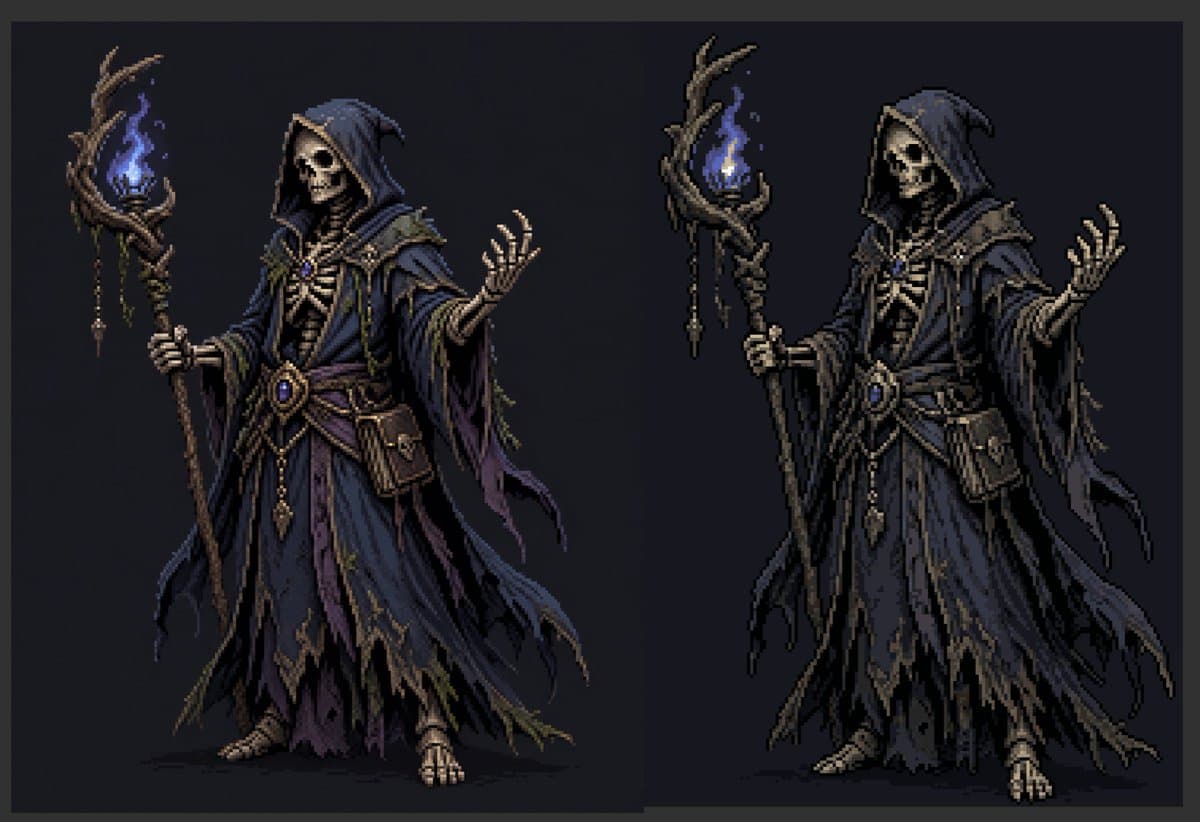
Create a dark fantasy pixel-art character comparison on a wide horizontal canvas with a charcoal-black background and a subtle dark gray border. Show exactly 2 full-body necromancer figures side by side: the left figure is a softer near-pixel-art/mixel version, and the right figure is a crisper pixelated version with stronger black contours and clearer blocky edges. Both figures depict the same undead wizard: a hooded skeletal necromancer in layered, tattered robes, holding a twisted wooden staff topped with a blue ghost flame. The left figure has an obscured shadowy blank face under the hood, while the right figure has a visible skull face with hollow eye sockets and bared teeth. The character wears a deep {argument name="robe color" default="midnight blue and muted purple"} hooded robe with ragged hems, layered sleeves, torn trailing cloth strips, bone-like chest armor, a rope-and-leather belt, dangling gold ornaments, a central oval blue gemstone, small pouches, and exposed skeletal hands and feet. Each figure holds exactly 1 gnarled staff in the left hand; each staff has exactly 1 blue flame surrounded by twisted branches, with small hanging charms and bead-like ornaments. The right hand of each figure is raised in a spellcasting gesture with splayed skeletal fingers. Use a limited pixel-art palette, high contrast rim shadows, muted brown wood, bone ivory skeleton details, dark navy folds, and glowing electric-blue flame highlights. Keep the pose nearly identical between the 2 figures, centered vertically, with the left character slightly softer and painterly and the right character more sharply pixelated. No text, no labels, no watermark, no extra characters, no background scenery beyond the flat dark backdrop.
Choose the primary action to open PicX Studio with the available template settings. Review the model and format, personalize the creative direction, and generate when ready.
Yes. You can change the subject, setting, lighting, mood, format, and available model controls before creating your image.
This template is free to open and customize. Generation usage is shown in PicX Studio before you create.
Start with GPT Image 2, which is the model associated with this template. You can compare another compatible model for a different finish.
© 2026 PicX Studio. All rights reserved.

Follow a topic to a crawlable collection of related PicX Studio templates.
43,474 public templates available. Verified via the PicX Studio public templates API; refreshed hourly.













![Minimalist Flat Vector Travel Poster — Premium minimalist flat-vector travel poster for {argument name="city name" default="[CITY_NAME]"}, 3:4 vertical format.](https://cms-assets.youmind.com/media/1787917359711_3ug846_HQX205cbMAA6F6S-300x400.jpg)






















![One Piece Anime Character Portrait Template — [{argument name="角色名称" default="角色名称"}],One Piece动漫角色,深色长发,金色耳环,严肃自信表情
[姿势]:全身站立,双臂自然下垂,双腿并拢,行走姿态
[服…](https://pbs.twimg.com/media/G_eW3mtaYAAliaN.jpg)
![Neon Light High-Contrast Portrait Template — "Portrait of a {argument name="subject description" default="[subject description]"} in neon light, high contrast,](https://pbs.twimg.com/media/HB_Qv4WbUAAefYO.jpg)