
Four Anime Figures in Glass Display
A photorealistic 2-by-2 showcase of four ornate anime idol figurines displayed in warm-lit antique glass cabinets.
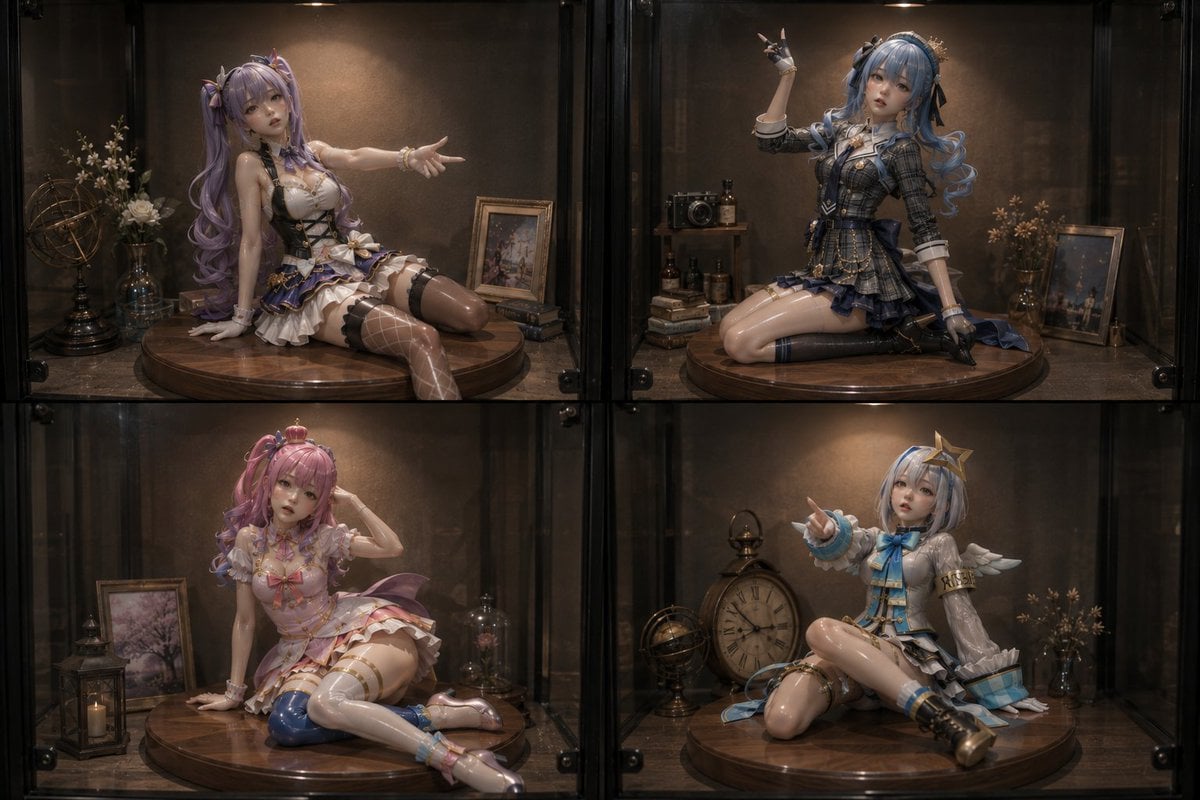
- Prompt included
- Model and format preset
- Free template
The prompt behind this image
Copy the exact prompt behind Four Anime Figures in Glass Display, or open it in the studio and make it yours.
Create a photorealistic product-display image of exactly 4 collectible anime idol figurines posed inside a dark glass display cabinet, arranged in a 2-by-2 grid with black metal dividers between the four compartments. Use a cinematic warm spotlight from above in each compartment, glossy reflections on the glass, shallow depth of field, and a premium museum-diorama look. Each figurine sits or kneels on a circular polished wooden pedestal, with a softly blurred doll-like face and highly detailed glossy resin skin, hair, clothing, ribbons, gloves, stockings, and metallic accessories. The overall theme is {argument name="display theme" default="luxury fantasy idol figures in antique glass cases"}. Include exactly 4 figurines: top left is a purple-haired twin-tail idol in a white, black, and lavender frilled stage outfit, seated sideways with one hand on the pedestal and the other arm extended outward, wearing thigh-high stockings and garter details; top right is a blue-haired curled-twin-tail idol in a dark navy plaid school-uniform-inspired outfit, kneeling on the pedestal with one arm raised in a peace-sign gesture, wearing gloves and layered ribbons; bottom left is a pink-haired pastel idol in a pale pink frilly dress, seated with one leg folded and one hand touching her head, with blue-and-pink stockings and delicate bows; bottom right is a short white-and-blue-haired idol in a white, silver, and cyan outfit with small wing-like shoulder details and a star hair ornament, seated cross-legged while pointing toward the viewer. Surround the figures with antique props inside the cases: framed art prints, small books, vintage cameras, glass bottles, dried flowers in vases, a brass armillary sphere, a lantern with a candle, and a large antique clock. Keep the environment dark brown and black with warm amber highlights, realistic glass reflections, subtle dust and scratches, and a high-end collectible photography style. Use {argument name="aspect ratio" default="3:2 horizontal"}, {argument name="lighting mood" default="warm moody cabinet spotlighting"}, {argument name="color palette" default="dark walnut, black metal, amber light, lavender, navy, pink, cyan"}, and {argument name="image realism" default="ultra-realistic resin figure photography"}. No text, no watermark, no extra figurines, no human hands, no packaging boxes.
How to use Four Anime Figures in Glass Display in 3 steps
- 1Upload ImagePNG, JPG or paste
Add your photo
Upload the photo the template builds on. The prompt, model and format are already set.
- 2…a portrait of your subject in softgolden-hour light, 85mm…
Personalize
Edit the subject and creative details for your destination.
- 3Generate
Generate
Press Generate — your image is created in PicX Studio, so you can compare it with the original and refine one variable at a time.
More like this
Templates with the same subject, style or setup. Open one to see its prompt.











Make it yours
Four Anime Figures in Glass Display works as-is. These are the safest ways to change it without losing the look.
Change one field
Copy a single group, rewrite it, and generate again so you can see what that field is doing.
Keep the frame, change the subject
Hold the composition and light of Four Anime Figures in Glass Display, then swap wardrobe, props or the person for a new take.
| If the result… | Why | Fix |
|---|---|---|
| The result drifts from the preview | Too many fields changed at once. | Reuse Four Anime Figures in Glass Display as-is first, then change one group — subject, light, or setting. |
| The model over-stylizes the scene | The prose prompt leaves finish and camera underspecified. | Add one camera or lighting sentence and stay on GPT Image 2. |
More GPT Image 2 templates
Other prompts made for GPT Image 2.

Six VTuber Japanese Logo Sheet

Realistic Portrait of Woman and Deer

The Vista Modular Condo Poster

AI Model Routing Comparison Infographic

2.5D Anime Art Board

Isometric Productivity Desk Scene

New York Double Exposure Poster

Four-Panel AI Landscape Comparison

Japanese Tatami Lifestyle Magazine Cover

NESCAFÉ Coffee Map Poster
More image prompts
Fresh picks from across the catalog.
Sparkling Eyes Emoji Prompt
Luxury Mirror Selfie Prompt for Nano Banana Pro
Realistic Selfie with Cartoon Characters
Viral TikTok Mirror Selfie Prompt
Vogue-Level Editorial Portrait in a Wheat Field
Cute Clay Style Theme Poster Template
Censored Chibi AI Engineer
Split-Screen Time Travel Scene
Vlog-Style Fashion Video Prompt
Ming Dynasty Hanfu Wedding Portraits
Browse template categories
Four Anime Figures in Glass Display questions
How do I use the Four Anime Figures in Glass Display template?
Add your photo if the template asks for one, edit the prompt if you like — the template's model and format are already selected — and press Generate. Your version opens in PicX Studio.
Can I customize the Four Anime Figures in Glass Display template?
Yes. You can change the subject, setting, lighting, mood, format, and available model controls before creating your image.
Is the Four Anime Figures in Glass Display template free?
Opening and editing this template is free. Generating uses credits, shown on the Generate button when you are signed in.
Which AI model should I use?
Start with GPT Image 2, which is the model associated with this template. You can compare another compatible model for a different finish.
Looking for something else? Browse all templates.

Your photo, any look
Thousands of ready templates for every top image and video model, from one credit balance.