How do I use the Censored Fashion Couple Collage template?
Choose the primary action to open PicX Studio with the available template settings. Review the model and format, personalize the creative direction, and generate when ready.
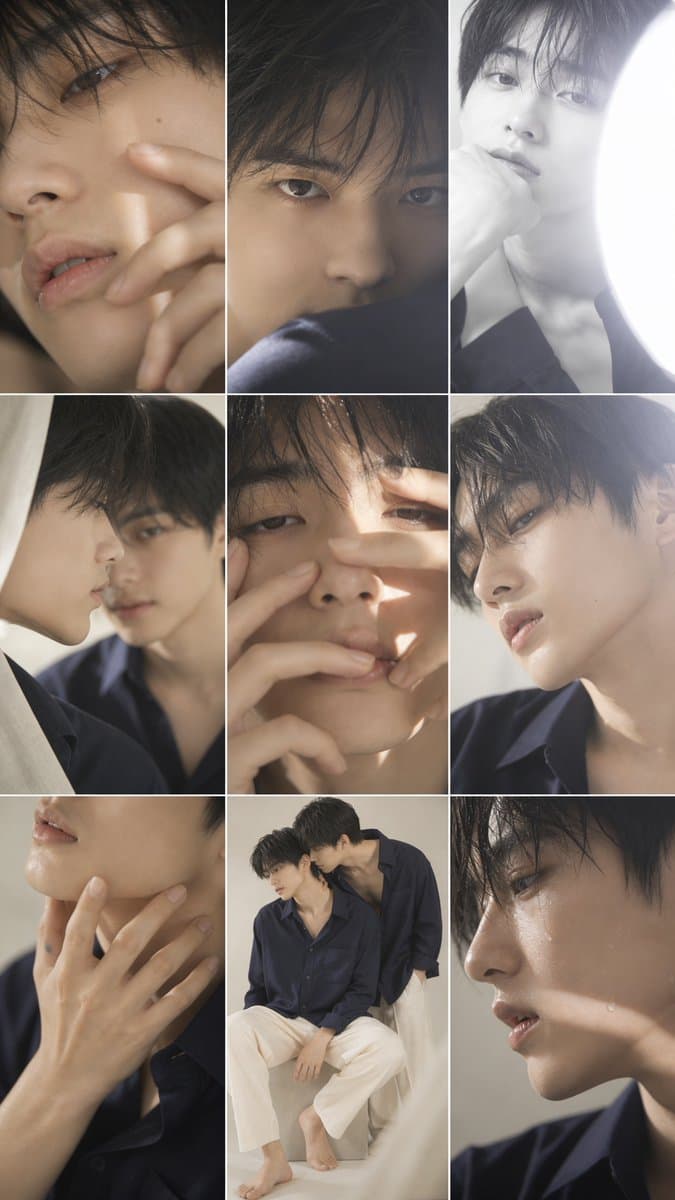
Generates a vertical editorial photo collage of two softly lit male fashion models with privacy-style rectangular censor blocks. (free to use) — Free AI image template on PicX Studio.
{"type":"editorial fashion photo collage / mood board","format":"vertical 2:3 smartphone image, about 675 x 1200 pixels","overall_style":"soft natural-light lifestyle photography, muted beige and navy palette, intimate close-up composition, clean thin white grid lines between photos, magazine contact-sheet aesthetic","subjects":{"count":2,"description":"two young adult East Asian men with slim builds and short dark hair, styled as a quiet couple or fashion model duo","outfits":"both wear loose dark navy button-up shirts; one wears cream or off-white wide-leg trousers and is barefoot in the full-body panel","mood":"tender, calm, understated, slightly sensual but non-explicit"},"customizable_details":{"subject description":"{argument name=\"subject description\" default=\"two young adult East Asian men with slim builds and short dark hair\"}","shirt color":"{argument name=\"shirt color\" default=\"dark navy\"}","trouser color":"{argument name=\"trouser color\" default=\"cream white\"}","collage palette":"{argument name=\"collage palette\" default=\"muted beige, warm skin tones, navy blue, soft gray\"}","censor style":"{argument name=\"censor style\" default=\"large opaque rectangular privacy blocks in sampled beige, brown, and gray tones covering faces and sensitive central areas\"}"},"layout":{"panel_count":9,"grid":"asymmetric 3-column collage with thin white borders","panels":[{"position":"top left","description":"large close-up portrait crop of a man's face and hair, mostly covered by a tall warm brown privacy rectangle"},{"position":"top center","description":"dark cropped hair and forehead area with a large gray-brown rectangle covering the face and center"},{"position":"top right","description":"bright high-key neck and jaw close-up beside a white light source, upper face covered by a pale gray privacy rectangle"},{"position":"middle left","description":"cropped shoulder and collar area in a navy shirt against beige fabric, partly obscured by a small beige rectangle"},{"position":"middle center","description":"largest central close-up of face, neck, and shirt, almost entirely hidden by overlapping warm beige rectangular censor blocks"},{"position":"middle right","description":"side profile crop of a man with dark hair and ear visible, face partly covered by a wide beige rectangle"},{"position":"bottom left","description":"close-up of lower face, lips, jawline, and elegant hand touching the neck, wearing a navy shirt, no large block over the hand"},{"position":"bottom center","description":"full-body couple portrait: one man seated on a white cube in cream trousers and bare feet, the other standing or leaning behind him in a navy shirt; both faces covered by small square privacy blocks"},{"position":"bottom right","description":"large close-up crop of a man's lower face, neck, and navy collar, mostly covered by a huge brown-gray rectangle"}]},"privacy_overlay":{"rectangle_count":10,"description":"place 10 opaque rectangular blocks over faces and central identifying areas: 1 large top-left brown block, 1 large top-center gray-brown block, 1 top-right pale gray block, 1 small middle-left beige block, 2 overlapping large central beige/brown blocks, 1 middle-right wide beige block, 2 small square face blocks in the bottom-center couple panel, and 1 huge bottom-right brown-gray block"},"lighting":"soft diffused daylight, occasional overexposed white window glow, gentle shadows","camera_feel":"85mm portrait lens look, shallow depth of field, creamy bokeh, realistic skin texture, high-resolution photorealism","negative_prompt":"no text, no logos, no cartoon style, no harsh flash, no saturated colors, no explicit nudity"}
Use Censored Fashion Couple Collage to plan an AI image around gpt-image-2 generation, themes such as en and gpt-image-2. Match the preview's composition first, then personalize the subject, setting, and mood for your own project.
Use the primary action to load the template settings in PicX Studio.
Adjust the subject and creative details for your destination.
Create the image, compare the result with the preview, and refine one variable at a time.
A continuous mix — similar concepts first, woven with same-model prompts and fresh picks from the catalog.
Choose the primary action to open PicX Studio with the available template settings. Review the model and format, personalize the creative direction, and generate when ready.
Yes. You can change the subject, setting, lighting, mood, format, and available model controls before creating your image.
This template is free to open and customize. Generation usage is shown in PicX Studio before you create.
Start with gpt-image-2, which is the model associated with this template. You can compare another compatible model for a different finish.
Follow a topic to a crawlable collection of related PicX Studio templates.
39,155 public templates available. Verified via the PicX Studio public templates API; refreshed hourly.
A continuous mix — similar concepts first, woven with same-model prompts and fresh picks from the catalog.