How do I use the Four Chibi AI Mascot Robots template?
Choose the primary action to open PicX Studio with the available template settings. Review the model and format, personalize the creative direction, and generate when ready.
A wide four-panel 3D toy-style lineup of adorable branded AI mascot robots, useful for social media banners or playful tech visuals. Change the subject, setting, or lighting one variable at a time.
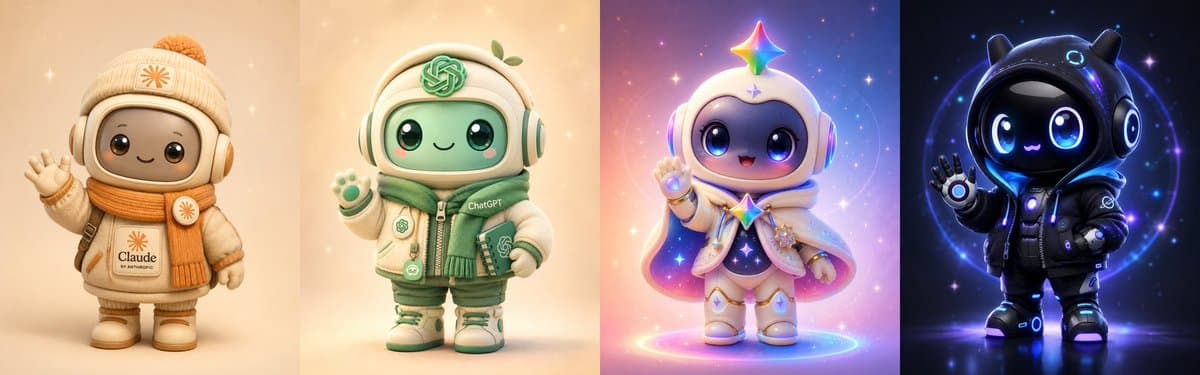
Goal: Create a wide four-panel lineup of cute collectible chibi AI mascot robots, each standing front-facing in its own vertical slice, like a polished 3D toy render for social media. Canvas: Ultra-wide horizontal banner, 4:1 aspect ratio, divided into exactly 4 equal vertical panels with no visible borders, each panel using a different color theme and lighting mood. Layout: Show exactly 4 discrete mascots, one centered in each panel, all full-body, rounded helmet-like heads, oversized glossy eyes, tiny smiling mouths, short plush proportions, winter/sci-fi clothing, soft studio lighting, high-detail toy materials, shallow depth of field, and magical sparkles. Mascot 1: A warm beige and cream robot mascot inspired by {argument name="first mascot" default="Claude by Anthropic"}, wearing a knit winter beanie with a pom-pom, padded headphones, thick orange scarf, mittens, boots, and a cream coat. Include a simple orange sunburst logo on the beanie and coat, with small readable text “Claude” and “BY ANTHROPIC” on the front patch. The robot is waving with one hand. Background is soft peach beige with subtle star glints. Mascot 2: A green and cream robot mascot inspired by {argument name="second mascot" default="ChatGPT"}, wearing large headphones, a hooded winter jacket, green scarf, shorts or padded pants, sneakers, and small tech badges. Place a green knot-style OpenAI-like emblem on the forehead area and jacket, and small readable text “ChatGPT” on the chest. The character raises one paw-like hand in greeting. Background is warm cream with golden bokeh, and a tiny green sprout accent appears near the helmet. Mascot 3: A magical pastel robot mascot inspired by {argument name="third mascot" default="Grok"}, with a white helmet, big blue-purple glossy eyes, a rainbow star floating above the head, a small star mark on the forehead, lavender headphones, a flowing white cape with pink and violet underside, star charms, glowing bracelets, and white boots. The mascot waves cheerfully while standing inside a glowing rainbow ring. Background is dreamy pink, purple, and blue nebula gradients with many sparkles. Mascot 4: A dark futuristic robot mascot inspired by {argument name="fourth mascot" default="xAI"}, wearing a glossy black cat-eared helmet or hood, black puffer jacket, gloves, boots, and neon blue circular accents. The face is black glass with luminous blue eyes and a tiny glowing mouth. Add subtle xAI-like markings on the jacket sleeve, and make the character wave with one hand. Background is deep navy-black space with electric blue rings, stars, and neon rim lighting. Visual style: High-end cute 3D rendering, toy photography, kawaii collectible figurines, rounded forms, soft vinyl/plush textures mixed with glossy robot visors, cinematic lighting, crisp details, vibrant but harmonious colors, adorable expressive faces. Constraints: Keep exactly 4 panels and exactly 4 mascots; no extra characters; each mascot should be visibly distinct by color palette and branding; use only the specified small text labels; avoid watermarks, captions, UI elements, or photorealistic humans.
Choose the primary action to open PicX Studio with the available template settings. Review the model and format, personalize the creative direction, and generate when ready.
Yes. You can change the subject, setting, lighting, mood, format, and available model controls before creating your image.
This template is free to open and customize. Generation usage is shown in PicX Studio before you create.
Start with GPT Image 2, which is the model associated with this template. You can compare another compatible model for a different finish.
© 2026 PicX Studio. All rights reserved.

Follow a topic to a crawlable collection of related PicX Studio templates.
43,474 public templates available. Verified via the PicX Studio public templates API; refreshed hourly.














![Minimalist Flat Vector Travel Poster — Premium minimalist flat-vector travel poster for {argument name="city name" default="[CITY_NAME]"}, 3:4 vertical format.](https://cms-assets.youmind.com/media/1787917359711_3ug846_HQX205cbMAA6F6S-300x400.jpg)





















![gpt2-profile-avatar-3d-cartoon-character-render — High-quality 3D CGI render of {argument name="character" default="[character]"} in a charming cartoon style, p](/_next/image?url=https%3A%2F%2Fcdn.picxstudio.com%2Fuploads%2Fp6_437e2c7f_a7b505a5-6a0a-45df-a47d-0cd40b9fe0b1.jpg&w=828&q=100)