
Indian Auto Rickshaw Street Photo
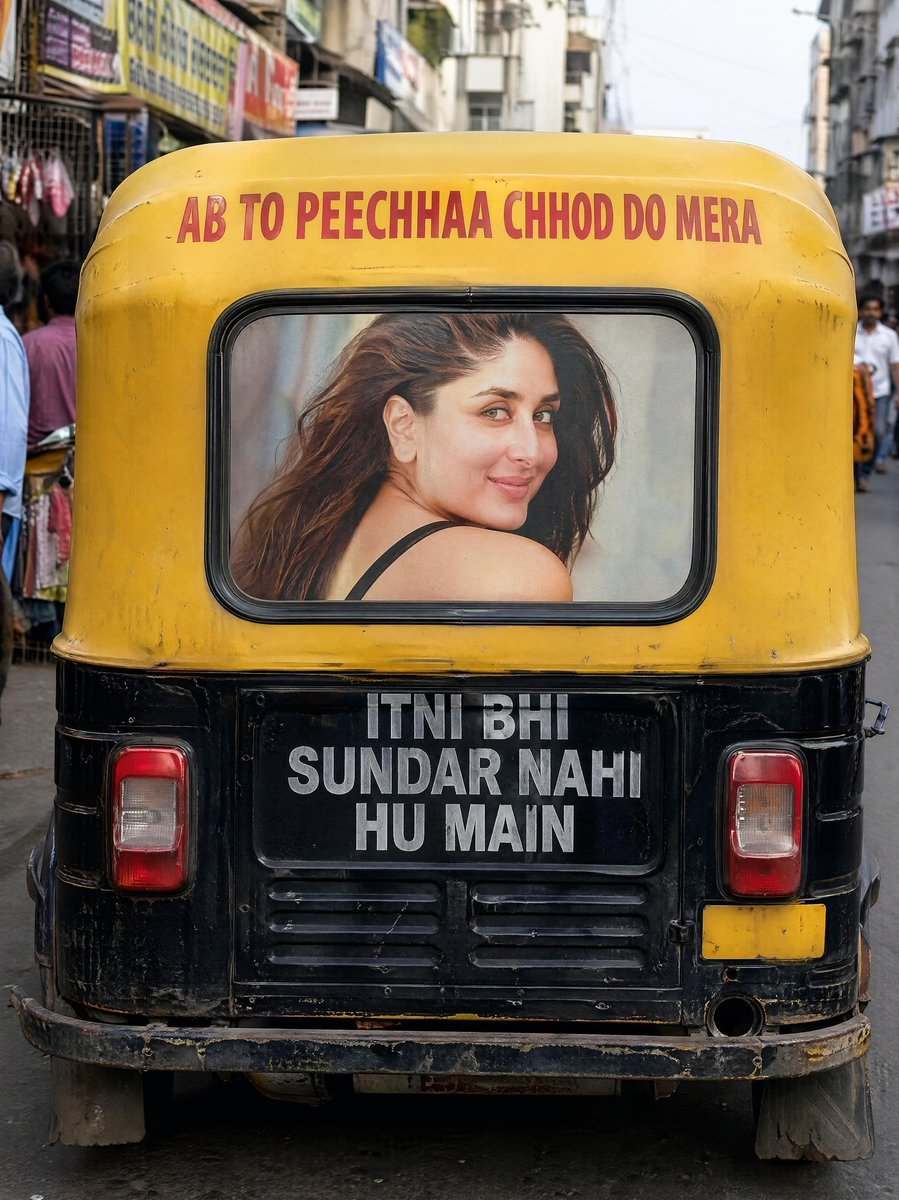
This prompt generates a realistic rear-view street photograph of a text-painted Indian auto rickshaw in a busy market, ideal for urban documentary-style visuals.
- Prompt included
- Model and format preset
- Free template
The prompt behind this image
Copy the exact prompt behind Indian Auto Rickshaw Street Photo, or open it in the studio and make it yours.
A realistic street photography image in India, vertical composition, showing the exact rear view of a black-and-yellow auto rickshaw centered in frame on a narrow busy market street. The camera is positioned low and directly behind the vehicle, creating a strong symmetrical composition with the rickshaw filling most of the image. The top yellow canopy has bold uppercase red text reading {argument name="top text" default="AB TO PEECHHAA CHHOD DO MERA"}. The back panel below the window is black with large bold uppercase white text in 3 stacked lines reading {argument name="bottom text" default="ITNI BHI SUNDAR NAHI HU MAIN"}. In the rear window there is a printed portrait of a glamorous woman with long dark brown hair, turned sideways with one bare shoulder visible and a black strap, styled like a poster behind the glass; her face appears obscured or blurred. Show 2 rectangular rear tail lights, one on each side, a worn metal bumper, mud flaps, scuffed paint, dirt, scratches, and realistic age on the vehicle. The street background contains market shops, signboards, pedestrians on both sides, and a few distant figures, but kept softly blurred with shallow depth of field so the rickshaw remains sharp. Warm daylight, realistic Indian urban atmosphere, natural colors, subtle cinematic bokeh, high detail textures, documentary street-photo realism, 4K ultra-realistic.
How to use Indian Auto Rickshaw Street Photo in 3 steps
- 1Upload ImagePNG, JPG or paste
Add your photo
Upload the photo the template builds on. The prompt, model and format are already set.
- 2…a portrait of your subject in softgolden-hour light, 85mm…
Personalize
Edit the subject and creative details for your destination.
- 3Generate
Generate
Press Generate — your image is created in PicX Studio, so you can compare it with the original and refine one variable at a time.
More like this
Templates with the same subject, style or setup. Open one to see its prompt.

Two Tickets, One Night

Meet Me When It Rains

Two Hearts. One Scooter.

1986 Street Couple

1985 Street Scene

Cinematic Street Fashion Portrait Motion Blur Crowd

Blue Hour Editorial Fashion Portrait
Golden Hour Street Motion Portrait

Face-Locked Cream Half-Zip Street Walk

Golden Hour Fedora Bar Doorway Street Style
Cyber Noir Dreadlocks Street Portrait

Face-Locked City Skyline Double Exposure
Make it yours
Indian Auto Rickshaw Street Photo works as-is. These are the safest ways to change it without losing the look.
Change one field
Copy a single group, rewrite it, and generate again so you can see what that field is doing.
Keep the frame, change the subject
Hold the composition and light of Indian Auto Rickshaw Street Photo, then swap wardrobe, props or the person for a new take.
| If the result… | Why | Fix |
|---|---|---|
| The result drifts from the preview | Too many fields changed at once. | Reuse Indian Auto Rickshaw Street Photo as-is first, then change one group — subject, light, or setting. |
| The model over-stylizes the scene | The prose prompt leaves finish and camera underspecified. | Add one camera or lighting sentence and stay on GPT Image 2. |
More GPT Image 2 templates
Other prompts made for GPT Image 2.

Six VTuber Japanese Logo Sheet

Realistic Portrait of Woman and Deer

The Vista Modular Condo Poster

AI Model Routing Comparison Infographic

2.5D Anime Art Board

Isometric Productivity Desk Scene

New York Double Exposure Poster

Four-Panel AI Landscape Comparison

Japanese Tatami Lifestyle Magazine Cover

NESCAFÉ Coffee Map Poster
More image prompts
Fresh picks from across the catalog.
Gritty Urban Restroom Portrait
Y2K Nighttime Selfie with Doodles
Hyper-Realistic Cinematic Macro Portrait with JSON Structure
Late Night Bedroom Selfie AI Photo Series
untitled
Photorealistic Spa Lifestyle Portrait with Identity Lock
Cinematic 4-Cut Video Prompt of Woman Painting
Minimalist Cola Amulet 3D Render
Dark Fantasy Bureau Role Sheet
Vintage Photo Restoration to Modern Portrait Prompt
Browse template categories
Indian Auto Rickshaw Street Photo questions
How do I use the Indian Auto Rickshaw Street Photo template?
Add your photo if the template asks for one, edit the prompt if you like — the template's model and format are already selected — and press Generate. Your version opens in PicX Studio.
Can I customize the Indian Auto Rickshaw Street Photo template?
Yes. You can change the subject, setting, lighting, mood, format, and available model controls before creating your image.
Is the Indian Auto Rickshaw Street Photo template free?
Opening and editing this template is free. Generating uses credits, shown on the Generate button when you are signed in.
Which AI model should I use?
Start with GPT Image 2, which is the model associated with this template. You can compare another compatible model for a different finish.
Looking for something else? Browse all templates.

Your photo, any look
Thousands of ready templates for every top image and video model, from one credit balance.