
Anime Strawberry Promo Banner Set
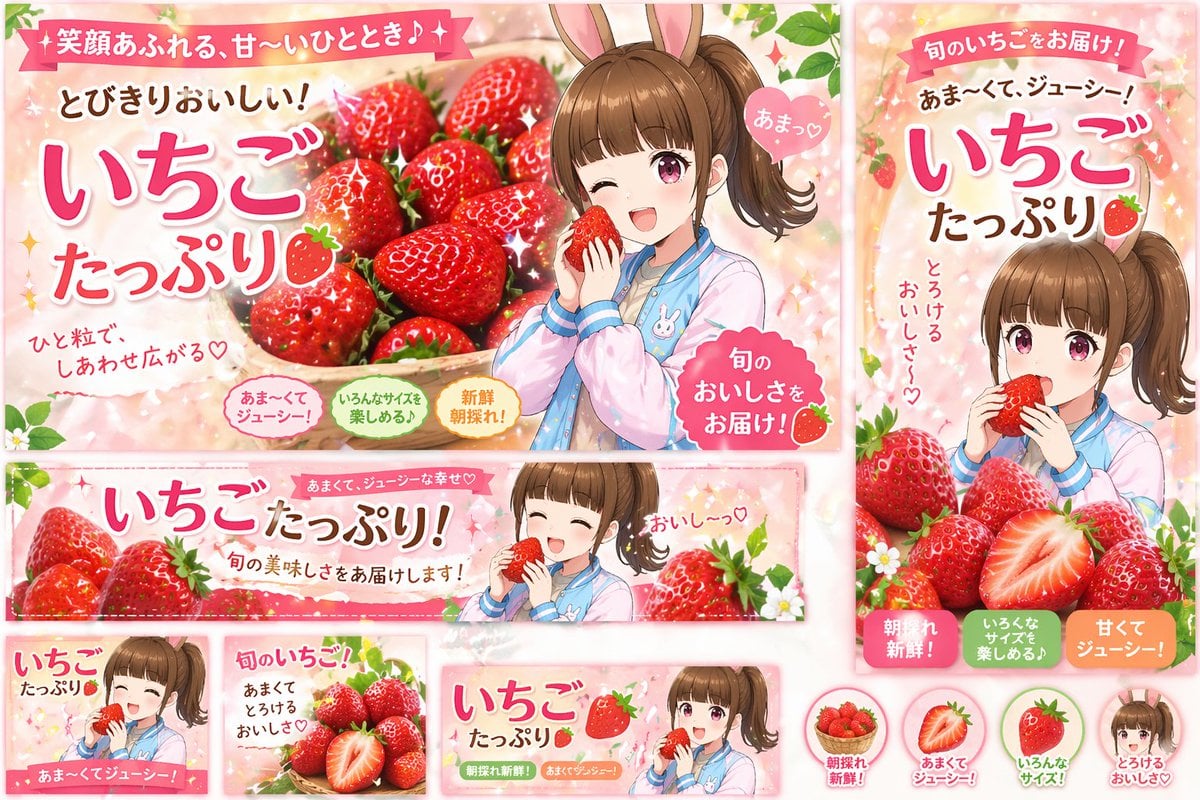
A comprehensive set of promotional web banners and icons featuring an anime girl advertising fresh strawberries.
- Prompt included
- Model and format preset
- Free template
The prompt behind this image
Copy the exact prompt behind Anime Strawberry Promo Banner Set, or open it in the studio and make it yours.
- Type
- promotional banner design set
- Theme
- strawberry advertisement campaign
- Style
- anime illustration, bright, cheerful, commercial graphic design
- Color Palette
- {argument name="primary color theme" default="pastel pink and vibrant red"}
- Character
- {argument name="character description" default="anime girl with brown side ponytail and bunny ears, wearing a pastel blue and pink jacket"}
- Product
- {argument name="product" default="fresh red strawberries"}
- Layout › Sections › 0 › Type
- large landscape banner
- Layout › Sections › 0 › Position
- top left
- Layout › Sections › 0 › Visuals
- character winking and holding a strawberry next to a large basket of strawberries
- Layout › Sections › 0 › Main Text
- {argument name="main headline" default="いちごたっぷり"}
- Layout › Sections › 0 › Sub Text
- 笑顔あふれる、甘〜いひととき♪, とびきりおいしい!, ひと粒で、しあわせ広がる♡, あまっ♡, 旬のおいしさをお届け!
- Layout › Sections › 0 › Badges › Count
- 3
- Layout › Sections › 0 › Badges › Labels
- あま〜くてジューシー!, いろんなサイズを楽しめる♪, 新鮮朝採れ!
- Layout › Sections › 1 › Type
- vertical banner
- Layout › Sections › 1 › Position
- right
- Layout › Sections › 1 › Visuals
- character eating a strawberry with a pile of strawberries below
- Layout › Sections › 1 › Main Text
- いちごたっぷり
- Layout › Sections › 1 › Sub Text
- 旬のいちごをお届け!, {argument name="secondary headline" default="あま〜くて、ジューシー!"}, とろけるおいしさ〜♡
- Layout › Sections › 1 › Badges › Count
- 3
- Layout › Sections › 1 › Badges › Labels
- 朝採れ新鮮!, いろんなサイズを楽しめる♪, 甘くてジューシー!
- Layout › Sections › 2 › Type
- wide horizontal banner
- Layout › Sections › 2 › Position
- middle
- Layout › Sections › 2 › Visuals
- character with closed eyes eating a strawberry, flanked by strawberries
- Layout › Sections › 2 › Main Text
- いちごたっぷり!
Raw JSON
{
  "type": "promotional banner design set",
  "theme": "strawberry advertisement campaign",
  "style": "anime illustration, bright, cheerful, commercial graphic design",
  "color_palette": "{argument name=\"primary color theme\" default=\"pastel pink and vibrant red\"}",
  "character": "{argument name=\"character description\" default=\"anime girl with brown side ponytail and bunny ears, wearing a pastel blue and pink jacket\"}",
  "product": "{argument name=\"product\" default=\"fresh red strawberries\"}",
  "layout": {
    "sections": [
      {
        "type": "large landscape banner",
        "position": "top left",
        "visuals": "character winking and holding a strawberry next to a large basket of strawberries",
        "main_text": "{argument name=\"main headline\" default=\"いちごたっぷり\"}",
        "sub_text": ["笑顔あふれる、甘〜いひととき♪", "とびきりおいしい!", "ひと粒で、しあわせ広がる♡", "あまっ♡", "旬のおいしさをお届け!"],
        "badges": {
          "count": 3,
          "labels": ["あま〜くてジューシー!", "いろんなサイズを楽しめる♪", "新鮮朝採れ!"]
        }
      },
      {
        "type": "vertical banner",
        "position": "right",
        "visuals": "character eating a strawberry with a pile of strawberries below",
        "main_text": "いちごたっぷり",
        "sub_text": ["旬のいちごをお届け!", "{argument name=\"secondary headline\" default=\"あま〜くて、ジューシー!\"}", "とろけるおいしさ〜♡"],
        "badges": {
          "count": 3,
          "labels": ["朝採れ新鮮!", "いろんなサイズを楽しめる♪", "甘くてジューシー!"]
        }
      },
      {
        "type": "wide horizontal banner",
        "position": "middle",
        "visuals": "character with closed eyes eating a strawberry, flanked by strawberries",
        "main_text": "いちごたっぷり!",
        "sub_text": ["あまくて、ジューシーな幸せ♡", "旬の美味しさをお届けします!", "おいし〜っ♡"]
      },
      {
        "type": "small square banner",
        "position": "bottom left",
        "visuals": "character smiling holding strawberry",
        "text": ["いちごたっぷり", "あま〜くてジューシー!"]
      },
      {
        "type": "small square banner",
        "position": "bottom mid-left",
        "visuals": "pile of strawberries with one cut in half",
        "text": ["旬のいちご!", "あまくてとろけるおいしさ♡"]
      },
      {
        "type": "small horizontal banner",
        "position": "bottom mid-right",
        "visuals": "character holding strawberry",
        "text": ["いちごたっぷり", "朝採れ新鮮!", "あまくてジューシー!"]
      },
      {
        "type": "circular icons",
        "position": "bottom right",
        "count": 4,
        "items": [
          { "visual": "basket of strawberries", "label": "朝採れ新鮮!" },
          { "visual": "half strawberry", "label": "あまくてジューシー!" },
          { "visual": "whole strawberry", "label": "いろんなサイズ!" },
          { "visual": "character face", "label": "とろけるおいしさ♡" }
        ]
      }
    ]
  }
}How to use Anime Strawberry Promo Banner Set in 3 steps
- 1Upload ImagePNG, JPG or paste
Add your photo
Upload the photo the template builds on. The prompt, model and format are already set.
- 2…a portrait of your subject in softgolden-hour light, 85mm…
Personalize
Edit the subject and creative details for your destination.
- 3Generate
Generate
Press Generate — your image is created in PicX Studio, so you can compare it with the original and refine one variable at a time.
More like this
Templates with the same subject, style or setup. Open one to see its prompt.











Make it yours
Anime Strawberry Promo Banner Set works as-is. These are the safest ways to change it without losing the look.
Change one field
Copy a single group, rewrite it, and generate again so you can see what that field is doing.
Keep the frame, change the subject
Hold the composition and light of Anime Strawberry Promo Banner Set, then swap wardrobe, props or the person for a new take.
| If the result… | Why | Fix |
|---|---|---|
| The result drifts from the preview | Too many fields changed at once. | Reuse Anime Strawberry Promo Banner Set as-is first, then change one group — subject, light, or setting. |
| GPT Image 2 ignores part of the JSON | Some models flatten or skip nested keys. | Keep the same values and paste them as a short paragraph instead. |
More GPT Image 2 templates
Other prompts made for GPT Image 2.

Six VTuber Japanese Logo Sheet

Realistic Portrait of Woman and Deer

The Vista Modular Condo Poster

AI Model Routing Comparison Infographic

2.5D Anime Art Board

Isometric Productivity Desk Scene

New York Double Exposure Poster

Four-Panel AI Landscape Comparison

Japanese Tatami Lifestyle Magazine Cover

NESCAFÉ Coffee Map Poster
More image prompts
Fresh picks from across the catalog.

Cinematic Street Photography Prompt (Isolation)
Google Fonts Japanese Infographic
Magical Mini Me Portrait
Anime Knight King on Burning Battlefield
Hyper-Realistic Cinematic Portrait of Elemental Balance (Fire and Water)

Detailed JSON Prompt for Lifestyle Portrait Photography
Converting Images to Cute Paper Crafts with Grok and Nano Banana Pro
Stick Figure Driver Sketch

untitled

Candid Couch Dinner Flash Photo
Browse template categories
Anime Strawberry Promo Banner Set questions
How do I use the Anime Strawberry Promo Banner Set template?
Add your photo if the template asks for one, edit the prompt if you like — the template's model and format are already selected — and press Generate. Your version opens in PicX Studio.
Can I customize the Anime Strawberry Promo Banner Set template?
Yes. You can change the subject, setting, lighting, mood, format, and available model controls before creating your image.
Is the Anime Strawberry Promo Banner Set template free?
Opening and editing this template is free. Generating uses credits, shown on the Generate button when you are signed in.
Which AI model should I use?
Start with GPT Image 2, which is the model associated with this template. You can compare another compatible model for a different finish.
Looking for something else? Browse all templates.

Your photo, any look
Thousands of ready templates for every top image and video model, from one credit balance.