
Magical Mini Me Portrait
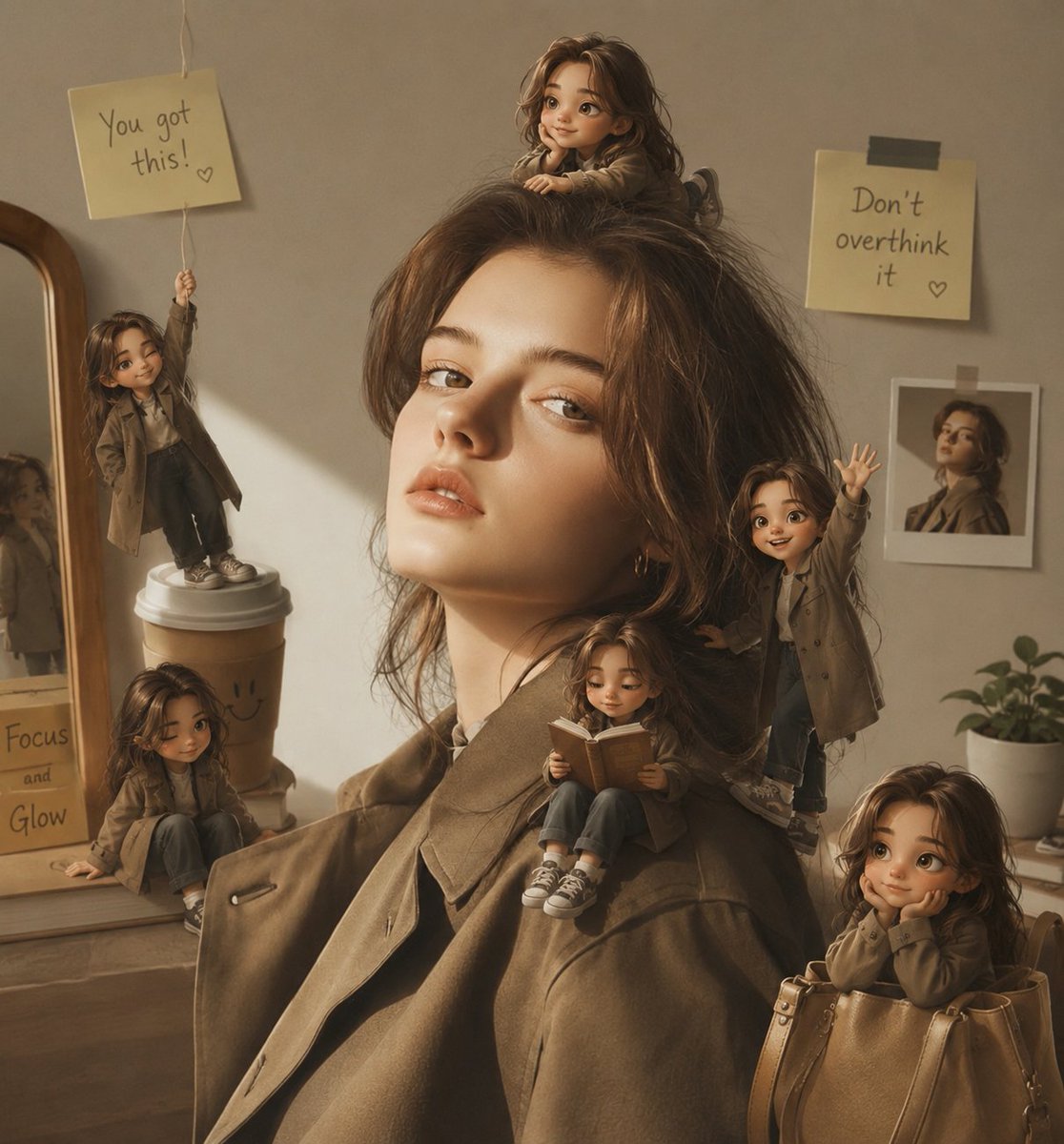
Creates a cozy realistic portrait filled with six tiny animated Mini Me characters interacting with the subject and surroundings for a playful social media scene.
- Prompt included
- Model and format preset
- Premium template
The prompt behind this image
Copy the exact prompt behind Magical Mini Me Portrait, or open it in the studio and make it yours.
- Type
- magical Mini Me social media portrait, realistic photo composite with cute 3D animated miniature clones
- Scene
- A warm cozy indoor portrait of a young woman in an oversized olive-brown trench coat, softly lit by golden window light, with her original face intentionally left as a flat anonymized square mask. Around her, exactly 6 tiny 3D-style animated versions of the same woman come to life and interact with the room and her outfit, all with matching wavy brown hair, miniature trench coats, jeans, and sneakers. Keep the main portrait realistic and untouched except for the added mini characters, with believable depth, contact shadows, soft ambient occlusion, and a dreamy emotional social-media-story aesthetic.
- Customizable Subject › Main Person
- {argument name="main person" default="young woman with wavy brown hair"}
- Customizable Subject › Outfit
- {argument name="outfit" default="oversized olive-brown trench coat over a light top"}
- Customizable Subject › Room Mood
- {argument name="room mood" default="warm beige cozy bedroom corner with golden sunlight"}
- Mini Characters › Count
- 6
- Mini Characters › Items › 0 › Position
- far left, standing on top of a takeaway coffee cup
- Mini Characters › Items › 0 › Action
- holding up a string sign with one arm, cheerful and encouraging
- Mini Characters › Items › 0 › Prop Text
- {argument name="left note text" default="You got this! ♡"}
- Mini Characters › Items › 1 › Position
- bottom left, sitting on the dresser in front of the mirror
- Mini Characters › Items › 1 › Action
- relaxed seated pose with legs forward, leaning near a handwritten note
- Mini Characters › Items › 2 › Position
- top center, sitting on the main person's hair like a soft nest
- Mini Characters › Items › 2 › Action
- tiny seated pose, hands resting on hair, looking cute and calm
- Mini Characters › Items › 3 › Position
- right side, standing against the main person's hair and shoulder
- Mini Characters › Items › 3 › Action
- waving one hand enthusiastically toward the viewer
- Mini Characters › Items › 4 › Position
- center lower shoulder, sitting on the main person's coat lapel
- Mini Characters › Items › 4 › Action
- reading a small open brown book with both hands
- Mini Characters › Items › 5 › Position
- bottom right, sitting inside a tan leather handbag
- Mini Characters › Items › 5 › Action
- peeking out shyly with hands near face, cozy and playful
- Background Details › Left
- wood-framed mirror on a dresser, coffee cup with simple doodle face, reflected miniature figure visible in the mirror, handwritten card reading Focus and Glow
- Background Details › Right
- small potted plant, taped instant-photo print of a mini character, yellow sticky note on wall
- Background Details › Right Note Text
- {argument name="right note text" default="Don’t overthink it ♡"}
- Style
- photorealistic base portrait blended with whimsical polished 3D cartoon mini figures, soft rounded features, lifelike fabric texture, cinematic warm beige color grading, shallow depth of field, realistic scale, natural shadows, cozy magical realism, square composition, story-worthy Instagram aesthetic
- Negative Prompt
- do not change the main person's pose or room layout, no extra miniature characters beyond the exact 6 listed, no harsh outlines, no plastic toy look, no distorted hands, no floating characters without shadows, no cluttered background, no unreadable major note text
Raw JSON
{"type":"magical Mini Me social media portrait, realistic photo composite with cute 3D animated miniature clones","scene":"A warm cozy indoor portrait of a young woman in an oversized olive-brown trench coat, softly lit by golden window light, with her original face intentionally left as a flat anonymized square mask. Around her, exactly 6 tiny 3D-style animated versions of the same woman come to life and interact with the room and her outfit, all with matching wavy brown hair, miniature trench coats, jeans, and sneakers. Keep the main portrait realistic and untouched except for the added mini characters, with believable depth, contact shadows, soft ambient occlusion, and a dreamy emotional social-media-story aesthetic.","customizable_subject":{"main person":"{argument name=\"main person\" default=\"young woman with wavy brown hair\"}","outfit":"{argument name=\"outfit\" default=\"oversized olive-brown trench coat over a light top\"}","room mood":"{argument name=\"room mood\" default=\"warm beige cozy bedroom corner with golden sunlight\"}"},"mini_characters":{"count":6,"items":[{"position":"far left, standing on top of a takeaway coffee cup","action":"holding up a string sign with one arm, cheerful and encouraging","prop_text":"{argument name=\"left note text\" default=\"You got this! ♡\"}"},{"position":"bottom left, sitting on the dresser in front of the mirror","action":"relaxed seated pose with legs forward, leaning near a handwritten note"},{"position":"top center, sitting on the main person's hair like a soft nest","action":"tiny seated pose, hands resting on hair, looking cute and calm"},{"position":"right side, standing against the main person's hair and shoulder","action":"waving one hand enthusiastically toward the viewer"},{"position":"center lower shoulder, sitting on the main person's coat lapel","action":"reading a small open brown book with both hands"},{"position":"bottom right, sitting inside a tan leather handbag","action":"peeking out shyly with hands near face, cozy and playful"}]},"background_details":{"left":"wood-framed mirror on a dresser, coffee cup with simple doodle face, reflected miniature figure visible in the mirror, handwritten card reading Focus and Glow","right":"small potted plant, taped instant-photo print of a mini character, yellow sticky note on wall","right_note_text":"{argument name=\"right note text\" default=\"Don’t overthink it ♡\"}"},"style":"photorealistic base portrait blended with whimsical polished 3D cartoon mini figures, soft rounded features, lifelike fabric texture, cinematic warm beige color grading, shallow depth of field, realistic scale, natural shadows, cozy magical realism, square composition, story-worthy Instagram aesthetic","negative_prompt":"do not change the main person's pose or room layout, no extra miniature characters beyond the exact 6 listed, no harsh outlines, no plastic toy look, no distorted hands, no floating characters without shadows, no cluttered background, no unreadable major note text"}How to use Magical Mini Me Portrait in 3 steps
- 1Upload ImagePNG, JPG or paste
Add your photo
Upload the photo the template builds on. The prompt, model and format are already set.
- 2…a portrait of your subject in softgolden-hour light, 85mm…
Personalize
Edit the subject and creative details for your destination.
- 3Generate
Generate
Press Generate — your image is created in PicX Studio, so you can compare it with the original and refine one variable at a time.
More like this
Templates with the same subject, style or setup. Open one to see its prompt.
Gemini Nano Banana Portrait

Gemini Nano Banana 2 Isometric 3d City D

Gemini Nano Banana 2

Gemini Nano Banana 2 Logo in Wet Sand Be

Couple Goals from the Google Gemini Nano

Found Photograph: Us, 1970

80s Couple Studio Portrait

80s Bollywood Star

80s Golden Hour Cinema

Me in 1985

1985 Studio Portrait

Hyper-Realistic Minecraft POV Portrait
Make it yours
Magical Mini Me Portrait works as-is. These are the safest ways to change it without losing the look.
Swap the setting
Keep the rest of the prompt and replace the location block. The current setting is “{argument name="room mood" default="warm beige cozy bedroom corner with golden s”.
Change one field
Copy a single group, rewrite it, and generate again so you can see what that field is doing.
Keep the frame, change the subject
Hold the composition and light of Magical Mini Me Portrait, then swap wardrobe, props or the person for a new take.
| If the result… | Why | Fix |
|---|---|---|
| The result drifts from the preview | Too many fields changed at once. | Reuse Magical Mini Me Portrait as-is first, then change one group — subject, light, or setting. |
| GPT Image 2 ignores part of the JSON | Some models flatten or skip nested keys. | Keep the same values and paste them as a short paragraph instead. |
More GPT Image 2 templates
Other prompts made for GPT Image 2.

Six VTuber Japanese Logo Sheet

Realistic Portrait of Woman and Deer

The Vista Modular Condo Poster

AI Model Routing Comparison Infographic

2.5D Anime Art Board

Isometric Productivity Desk Scene

New York Double Exposure Poster

Four-Panel AI Landscape Comparison

Japanese Tatami Lifestyle Magazine Cover

NESCAFÉ Coffee Map Poster
More image prompts
Fresh picks from across the catalog.
Clothing items laid out on asphalt
Elderly bearded man black-and-white portrait

Hyper-Realistic Nightclub Portrait Prompt
High-End Matcha Product Photography Prompt for Nano Banana 2

Rooftop Walkway Fashion OOTD
Glamorous Photo Prompt for Gemini Nano Banana Creation

Instagram Story with Annotations
Stylized 3D Character Toy Render
Luxury Floating Macarons Ad

Premium Product Hero Shot Template
Browse template categories
Magical Mini Me Portrait questions
How do I use the Magical Mini Me Portrait template?
Add your photo if the template asks for one, edit the prompt if you like — the template's model and format are already selected — and press Generate. Your version opens in PicX Studio.
Can I customize the Magical Mini Me Portrait template?
Yes. You can change the subject, setting, lighting, mood, format, and available model controls before creating your image.
Is the Magical Mini Me Portrait template free?
Opening and editing this template is free. Generating uses credits, shown on the Generate button when you are signed in.
Which AI model should I use?
Start with GPT Image 2, which is the model associated with this template. You can compare another compatible model for a different finish.
Looking for something else? Browse all templates.

Your photo, any look
Thousands of ready templates for every top image and video model, from one credit balance.