
Gold Gmail AI Risk Infographic
A flashy Japanese infographic poster explaining Gmail AI upgrades, Gemini summaries, and related security risks, useful for social posts, slide visuals, or blog summaries.
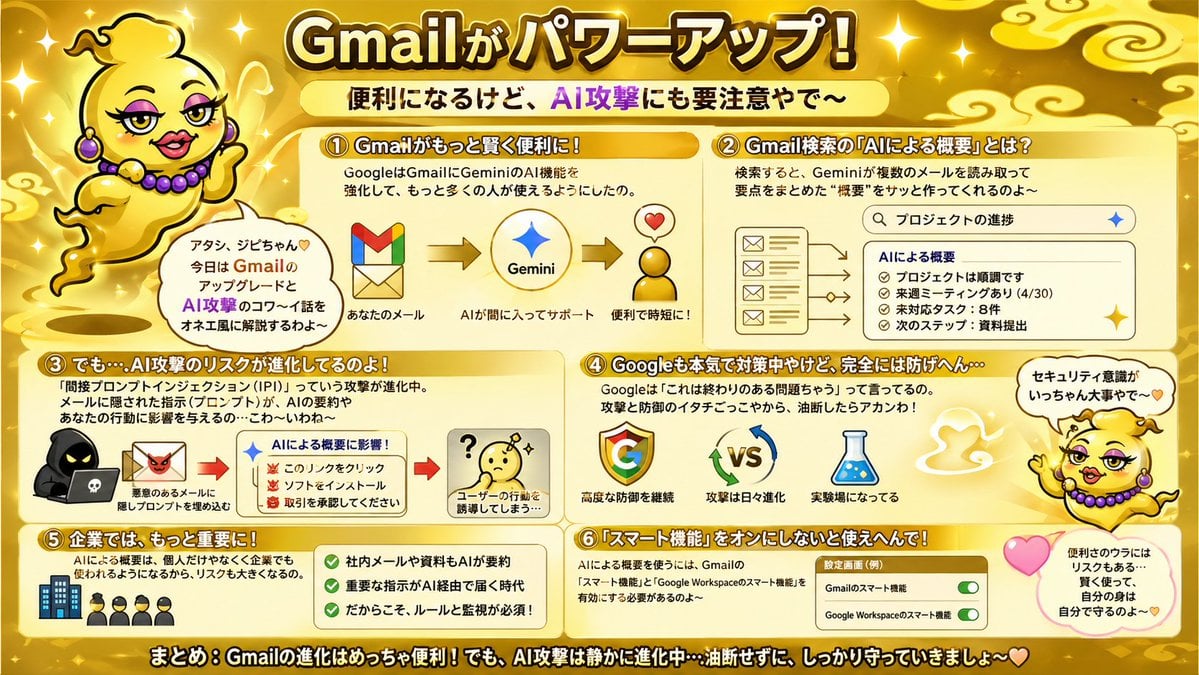
- Prompt included
- Model and format preset
- Free template
The prompt behind this image
Copy the exact prompt behind Gold Gmail AI Risk Infographic, or open it in the studio and make it yours.
- Type
- Japanese infographic poster
- Topic
- Gmail feature upgrades and AI security risks
- Style
- bright playful educational explainer, glossy gold theme, high-contrast Japanese TV variety-show graphic design, thick outlined text, rounded boxes, sparkles, soft gradients, cute warning visuals
- Aspect Ratio
- 16:9
- Language
- Japanese
- Background › Base Color
- metallic gold
- Background › Details
- glowing sparkles scattered across the whole image, stylized pale gold cloud swirls in the corners and top area, soft radial highlights, warm shiny gradient backdrop
- Headline › Text
- {argument name="headline text" default="Gmailがパワーアップ!"}
- Headline › Position
- top center
- Headline › Style
- very large bold Japanese display text, white to pale yellow fill, thick dark brown outline, bright glow
- Subheadline › Text
- 便利になるけど、AI攻撃にも要注意やで〜
- Subheadline › Position
- below headline center
- Subheadline › Style
- bold Japanese text on a pale yellow rounded banner, with AI攻撃 in vivid purple
- Mascot › Count
- 2
- Mascot › Description
- a cute floating genie character in a shiny gold lamp-spirit body with no legs, round yellow face, tiny curl of hair, purple earrings and purple bead necklace, expressive hands, outlined in black, speaking in an onee-style Kansai vibe
- Mascot › Placements › 0 › Position
- upper left
- Mascot › Placements › 0 › Pose
- floating beside the title, one hand raised, with a speech bubble
- Mascot › Placements › 1 › Position
- right side lower-middle
- Mascot › Placements › 1 › Pose
- floating near sections 4 and 6, one arm raised, with a speech bubble and pink heart nearby
- Mascot › Speech Bubbles
- アタシ、ジビちゃん♡ 今日は GmailのアップデートとAI攻撃のコワ〜イ話をオネエ風に解説するわよ〜, セキュリティ意識がいっちゃん大事やで〜
- Layout › Sections › 0 › Title
- ① Gmailがもっと賢く便利に!
- Layout › Sections › 0 › Position
- upper left
- Layout › Sections › 0 › Count
- 1
- Layout › Sections › 0 › Contents
- short explanation about Google strengthening Gemini AI features in Gmail so more people can use it, 3-step visual flow: Gmail logo -> Gemini star logo -> happy convenience icon with heart, small labels: あなたのメール / AIが間に入ってサポート / 便利で時短に!
Raw JSON
{"type":"Japanese infographic poster","topic":"Gmail feature upgrades and AI security risks","style":"bright playful educational explainer, glossy gold theme, high-contrast Japanese TV variety-show graphic design, thick outlined text, rounded boxes, sparkles, soft gradients, cute warning visuals","aspect_ratio":"16:9","language":"Japanese","background":{"base_color":"metallic gold","details":["glowing sparkles scattered across the whole image","stylized pale gold cloud swirls in the corners and top area","soft radial highlights","warm shiny gradient backdrop"]},"headline":{"text":"{argument name=\"headline text\" default=\"Gmailがパワーアップ!\"}","position":"top center","style":"very large bold Japanese display text, white to pale yellow fill, thick dark brown outline, bright glow"},"subheadline":{"text":"便利になるけど、AI攻撃にも要注意やで〜","position":"below headline center","style":"bold Japanese text on a pale yellow rounded banner, with AI攻撃 in vivid purple"},"mascot":{"count":2,"description":"a cute floating genie character in a shiny gold lamp-spirit body with no legs, round yellow face, tiny curl of hair, purple earrings and purple bead necklace, expressive hands, outlined in black, speaking in an onee-style Kansai vibe","placements":[{"position":"upper left","pose":"floating beside the title, one hand raised, with a speech bubble"},{"position":"right side lower-middle","pose":"floating near sections 4 and 6, one arm raised, with a speech bubble and pink heart nearby"}],"speech_bubbles":["アタシ、ジビちゃん♡ 今日は GmailのアップデートとAI攻撃のコワ〜イ話をオネエ風に解説するわよ〜","セキュリティ意識がいっちゃん大事やで〜"]},"layout":{"sections":[{"title":"① Gmailがもっと賢く便利に!","position":"upper left","count":1,"contents":["short explanation about Google strengthening Gemini AI features in Gmail so more people can use it","3-step visual flow: Gmail logo -> Gemini star logo -> happy convenience icon with heart","small labels: あなたのメール / AIが間に入ってサポート / 便利で時短に!"]},{"title":"② Gmail検索の『AIによる概要』とは?","position":"upper right","count":1,"contents":["description that Gemini reads multiple emails from search results and quickly creates a summary","search bar mockup with the query プロジェクトの進捗","left side stack of 4 email icons/cards","right side summary panel titled AIによる概要","4 bullet items in the summary: プロジェクトは順調です / 来週ミーティングあり(4/30) / 未対応タスク:8件 / 次のステップ:資料提出"]},{"title":"③ でも…AI攻撃のリスクが進化してるのよ!","position":"middle left","count":1,"contents":["warning text about prompt injection attacks hidden in emails and documents influencing AI summaries and affecting user behavior","left visual of a hooded hacker with a laptop and a malicious email icon","center summary box titled AIによる概要に影響!","3 warning bullets with red demon icons: このリンクをクリック / ソフトをインストール / 取引を承認してください","right visual of a confused yellow face with a question mark","caption: ユーザーの行動を誘導してしまう…"]},{"title":"④ Googleも本気で対策中やけど、完全には防げへん…","position":"middle right","count":1,"contents":["text explaining Google says this is an ongoing problem, so both attackers and defenders keep evolving and users should not let their guard down","3 main icons: Google G logo / VS with rotating blue and green arrows / laboratory flask","captions: 高度な防御を継続 / 攻撃は日々進化 / 実験場になってる"]},{"title":"⑤ 企業では、もっと大きな課題に!","position":"lower left","count":1,"contents":["text stating that AI summaries will be used not only by individuals but also by companies, increasing the risk","small icon row of 1 office building and 4 businesspeople","green checklist panel with 3 check items: 社内メールや資料もAIが要約 / 重要な指示がAI経由で届く時代 / だからこそ、ルールと監視が必須!"]},{"title":"⑥ 『スマート機能』をオンにしないと使えへんで!","position":"lower right","count":1,"contents":["text explaining that to use AI summaries, Gmail smart features and Google Workspace smart features must be enabled","settings card labeled 設定画面(例)","2 toggle rows: Gmailのスマート機能 / Google Workspaceのスマート機能","both toggles shown in green and switched on","nearby pink heart and a rounded note bubble saying: 便利のウラにはリスクもある… 賢く使って、自分の身は自分で守るのよ〜♡"]}],"footer":{"text":"まとめ:Gmailの進化はめっちゃ便利!でも、AI攻撃は静かに進化中…油断せずに、しっかり守っていきましょ〜♡","position":"bottom full width","style":"large bold white Japanese text with thick black outline on a dark gold strip"}},"visual_counts":{"numbered_sections":6,"speech_bubbles":3,"heart_icons":3,"toggle_switches":2,"main_flow_arrows_in_section_1":2,"email_icons_in_section_2":4,"summary_bullets_in_section_2":4,"warning_bullets_in_section_3":3,"checkmarks_in_section_5":3},"render_notes":"Keep everything in a single flat infographic composition with rounded cream panels and orange-gold headers. Emphasize readability, cute-but-urgent tone, and comedic personality. Use Japanese text exactly as shown, with bold outlines and clear hierarchy. The mascot should feel charming and talkative, floating as if made of lamp smoke rather than walking."}How to use Gold Gmail AI Risk Infographic in 3 steps
- 1Upload ImagePNG, JPG or paste
Add your photo
Upload the photo the template builds on. The prompt, model and format are already set.
- 2…a portrait of your subject in softgolden-hour light, 85mm…
Personalize
Edit the subject and creative details for your destination.
- 3Generate
Generate
Press Generate — your image is created in PicX Studio, so you can compare it with the original and refine one variable at a time.
More like this
Templates with the same subject, style or setup. Open one to see its prompt.








Make it yours
Gold Gmail AI Risk Infographic works as-is. These are the safest ways to change it without losing the look.
Swap the setting
Keep the rest of the prompt and replace the location block. The current setting is “metallic gold”.
Change one field
Copy a single group, rewrite it, and generate again so you can see what that field is doing.
Keep the frame, change the subject
Hold the composition and light of Gold Gmail AI Risk Infographic, then swap wardrobe, props or the person for a new take.
| If the result… | Why | Fix |
|---|---|---|
| The result drifts from the preview | Too many fields changed at once. | Reuse Gold Gmail AI Risk Infographic as-is first, then change one group — subject, light, or setting. |
| GPT Image 2 ignores part of the JSON | Some models flatten or skip nested keys. | Keep the same values and paste them as a short paragraph instead. |
More GPT Image 2 templates
Other prompts made for GPT Image 2.

Six VTuber Japanese Logo Sheet

Realistic Portrait of Woman and Deer

The Vista Modular Condo Poster

AI Model Routing Comparison Infographic

2.5D Anime Art Board

Isometric Productivity Desk Scene

New York Double Exposure Poster

Four-Panel AI Landscape Comparison

Japanese Tatami Lifestyle Magazine Cover

NESCAFÉ Coffee Map Poster
More image prompts
Fresh picks from across the catalog.

Candid London Cafe Morning Portrait (JSON)
Korean Classroom Aesthetic Portrait
Instagram-style Japanese handwritten cosmetic ad
Spherical Miniature World Cityscape
Futuristic streetwear campaign poster

European Umbrella Street Portrait
Gourmet Burger Commercial Photography

Arnold Schwarzenegger Silhouette with Volumetric Mountain Forest

Professional Magazine Cover Portrait

Modern Santa Fashion Editorial with Reindeer
Browse template categories
Gold Gmail AI Risk Infographic questions
How do I use the Gold Gmail AI Risk Infographic template?
Add your photo if the template asks for one, edit the prompt if you like — the template's model and format are already selected — and press Generate. Your version opens in PicX Studio.
Can I customize the Gold Gmail AI Risk Infographic template?
Yes. You can change the subject, setting, lighting, mood, format, and available model controls before creating your image.
Is the Gold Gmail AI Risk Infographic template free?
Opening and editing this template is free. Generating uses credits, shown on the Generate button when you are signed in.
Which AI model should I use?
Start with GPT Image 2, which is the model associated with this template. You can compare another compatible model for a different finish.
Looking for something else? Browse all templates.

Your photo, any look
Thousands of ready templates for every top image and video model, from one credit balance.