
Architectural Blueprint to Reality Transformation
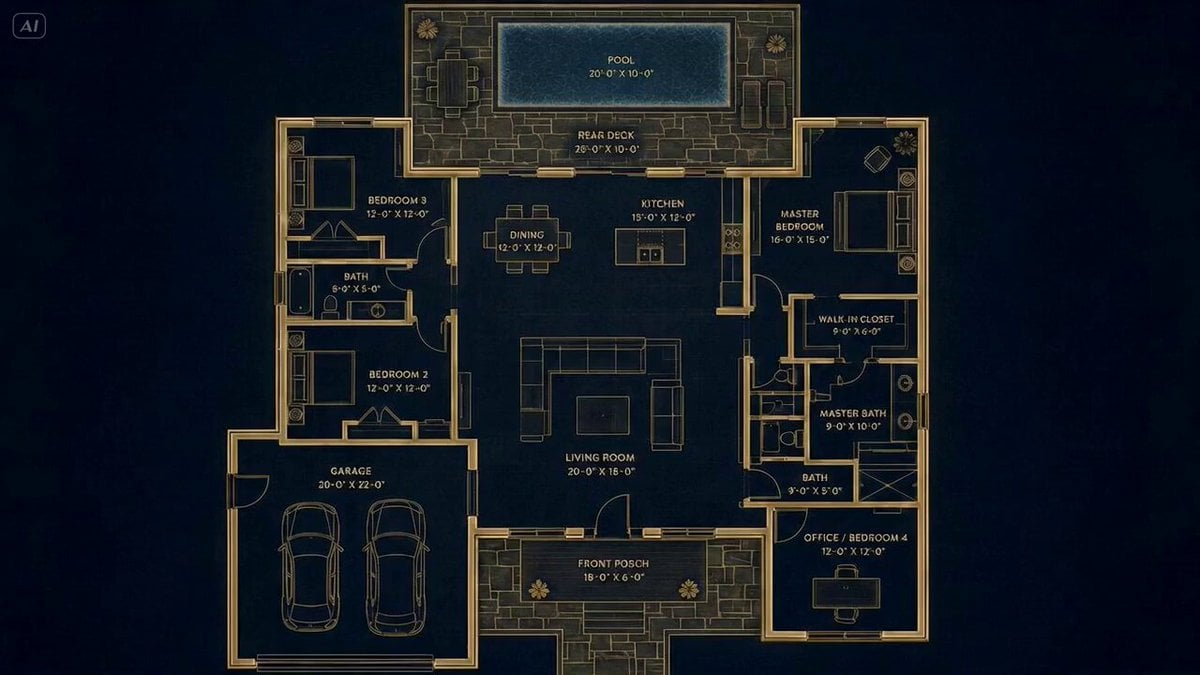
A cinematic architectural visualization prompt that seamlessly transforms a glowing 2D blueprint into a luxury 3D home with photorealistic materials.
- Prompt included
- Model and format preset
- Premium template
The prompt behind this video
Copy the exact prompt behind Architectural Blueprint to Reality Transformation, or open it in the studio and make it yours.
Title: “Blueprint to Reality” Duration: 12 seconds Style: Hyperrealistic architectural visualization, luxury real-estate cinematic, ultra-smooth timelapse transformation, precise omnireference consistency, elegant lighting transitions, photoreal materials IMPORTANT: The blueprint and final house MUST match EXACTLY: — same layout — same room positioning — same roof geometry — same garage placement — same window locations — same backyard pool placement — same proportions and structure Absolute architectural consistency required throughout the entire transformation. Camera: Perfect top-front aerial angle matching the reference image. Slow cinematic floating motion only. No sudden camera cuts. One continuous seamless shot. Music: Elegant cinematic electronic soundtrack with deep bass pulses, soft piano accents, futuristic architectural atmosphere, emotional buildup [00:00 - 00:02] Start EXACTLY on the glowing luxury blueprint shown on top of the image. Dark navy blueprint background. Gold architectural lines glowing softly. Labels and dimensions visible. Subtle animated blueprint shimmer. Camera slowly pushes inward. Ambient sound: soft electrical hum, faint drafting sounds, digital blueprint energy. [00:02 - 00:04] The blueprint lines begin activating. Gold outlines illuminate brighter. Walls start extruding upward from the blueprint. Thin wireframe geometry rises from the floorplan. Pool edges and deck appear first. Garage walls rise in correct position. Roof boundaries form precisely. Transformation feels engineered and realistic. [00:04 - 00:06] The wireframe structure rapidly develops into a white architectural massing model. Concrete walls materialize. Glass windows appear. Front porch forms. Garage door slides into existence. The house geometry must remain EXACTLY identical to the blueprint layout. Lighting transitions gradually from blueprint darkness into sunset realism. [00:06 - 00:08] Roof sections lock perfectly into place. Exterior textures become photoreal: — stone walls — wood paneling — glass reflections — landscape lighting — driveway concrete Backyard pool fills with reflective water. Timelapse landscaping grows naturally around the house. [00:08 - 00:10] The house is now nearly complete. Warm interior lights turn on room by room. Pool lights glow softly. Exterior pathway lights illuminate. Camera continues smooth cinematic movement. Luxury modern atmosphere. [00:10 - 00:12] Final fully completed hyperrealistic luxury home matching EXACTLY the bottom image. Golden hour lighting. Soft reflections on windows. Pool water moving naturally. Subtle environmental movement: trees swaying, light breeze, warm ambient glow. End on a polished cinematic hero shot of the completed home. No inconsistencies between blueprint and final architecture. Perfect continuity from start to finish.
How to use Architectural Blueprint to Reality Transformation in 3 steps
- 1Upload ImagePNG, JPG or paste
Add your photo
Upload the photo the template builds on. The prompt, model and format are already set.
- 2…a portrait of your subject in softgolden-hour light, 85mm…
Personalize
Edit the subject and creative details for your destination.
- 3Generate
Generate
Press Generate — your video is created in PicX Studio, so you can compare it with the original and refine one variable at a time.
More like this
Templates with the same subject, style or setup. Open one to see its prompt.

Magical Room Transformation - Seedance 2.5

Dark Tokusatsu Transformation - Seedance 2.5

RX-7 to Mech Transformation Cyberpunk
Luxury House Tour — 15 Shots in 15 Seconds (Seedance)
Civilization Timelapse — Centuries in One Shot
Mecha Transformation vs Kaiju — 4-Scene Epic
Mixed-Reality Stop-Motion Transformation
Blueprint to House Timelapse Transformation
Fantasy Map Reality Transformation
Large-Scale Architectural Transformation and Destruction Physics Video Prompt
Futuristic Palace Architectural Tour
Romance Reality Show Confession
Make it yours
Architectural Blueprint to Reality Transformation works as-is. These are the safest ways to change it without losing the look.
Change one field
Copy a single group, rewrite it, and generate again so you can see what that field is doing.
Keep the frame, change the subject
Hold the composition and light of Architectural Blueprint to Reality Transformation, then swap wardrobe, props or the person for a new take.
| If the result… | Why | Fix |
|---|---|---|
| The result drifts from the preview | Too many fields changed at once. | Reuse Architectural Blueprint to Reality Transformation as-is first, then change one group — subject, light, or setting. |
| The model over-stylizes the scene | The prose prompt leaves finish and camera underspecified. | Add one camera or lighting sentence and stay on Seedance 2.0. |
More Seedance 2.0 templates
Other prompts made for Seedance 2.0.

Comical Martial Arts Punch Scene

Maglev Train Action Sequence

Martial Arts Fight Sequence

Wuxia Protection and Trust Script

Vintage Korean Arcade MiniDV Vlog

Mercedes 190 SL Luxury Ad

Rainy Night Supernatural Reverse Comedy Video Script

Amazon Civilization Discovery

Futuristic South Asian City Transformation

Cozy Luxury Cafe Commercial
More video prompts
Fresh picks from across the catalog.
Stadium Construction Blueprint Timelapse

Chibi Fairy Superheroes in Golden Clouds

Visual Magic Egg Transformation Prompt

Arctic Titan Awakening Dark Fantasy Prompt

POV Cooking Vlog with 2D Sticker Animation
Charming Budgie and Floating Heart

Cinematic Horse in Snowy Forest

Elderly Wizard Oil Painting
Continuous Easter Sunrise Aerial Shot

Seedance 2.0 CG Video Prompt: Tea Kill - Instant Purgatory
Browse template categories
Architectural Blueprint to Reality Transformation questions
How do I use the Architectural Blueprint to Reality Transformation template?
Add your photo if the template asks for one, edit the prompt if you like — the template's model and format are already selected — and press Generate. Your version opens in PicX Studio.
Can I customize the Architectural Blueprint to Reality Transformation template?
Yes. You can change the subject, setting, lighting, mood, format, and available model controls before creating your video.
Is the Architectural Blueprint to Reality Transformation template free?
Opening and editing this template is free. Generating uses credits, shown on the Generate button when you are signed in.
Which AI model should I use?
Start with Seedance 2.0, which is the model associated with this template. You can compare another compatible model for a different finish.
Looking for something else? Browse all templates.

Your photo, any look
Thousands of ready templates for every top image and video model, from one credit balance.