How do I use the Cinematic Music Producer Portrait template?
Choose the primary action to open PicX Studio with the available template settings. Review the model and format, personalize the creative direction, and generate when ready.
A dramatic portrait prompt of a musician with high-contrast lighting and a warm, glowing background, designed to be used with a reference photo. Change the subject, setting, or lighting one variable at a time.
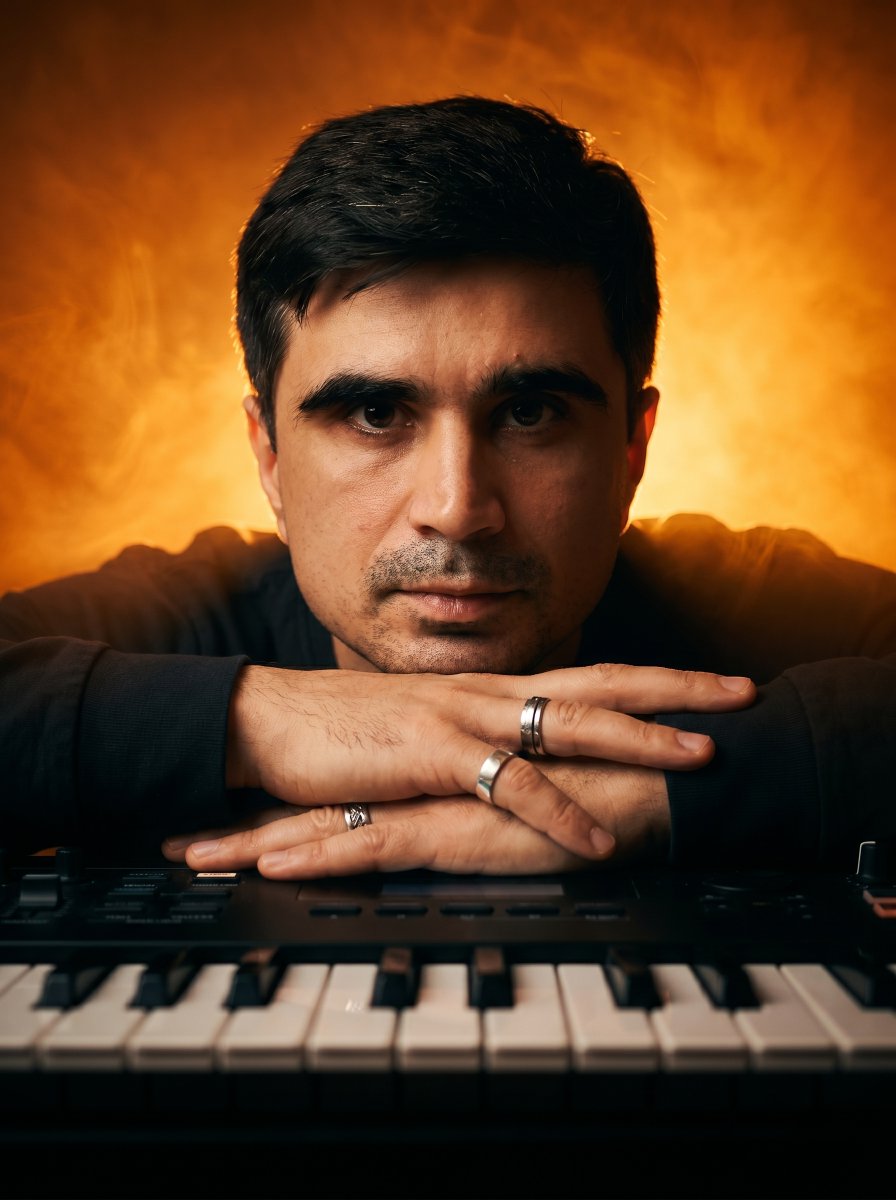
A medium close-up cinematic portrait of a {argument name="subject" default="man leaning forward with his chin resting on his crossed hands"} placed atop a professional {argument name="musical instrument" default="electronic music keyboard"}. His hands wear multiple silver rings. The keyboard keys are clearly visible in the foreground with sharp texture. Shot at eye level with a 50mm lens, shallow depth of field, sharp focus on the face. Lighting is dramatic and cinematic, not soft: strong directional backlight behind the subject, creating a glowing halo through dense volumetric fog. High contrast lighting with deep shadows and bright highlights on the face and hands. Subtle front fill light only to preserve facial details. The background is a {argument name="background color" default="rich, intense orange and golden gradient"} with high saturation and luminous glow, resembling heated air or fire-like atmosphere. The fog catches the backlight, creating a vivid, radiant diffusion. Color grading is cinematic with high contrast, deep blacks, and strong color density. No washed-out tones.
Choose the primary action to open PicX Studio with the available template settings. Review the model and format, personalize the creative direction, and generate when ready.
Yes. You can change the subject, setting, lighting, mood, format, and available model controls before creating your image.
This template is free to open and customize. Generation usage is shown in PicX Studio before you create.
Start with Nano Banana 2, which is the model associated with this template. You can compare another compatible model for a different finish.
Follow a topic to a crawlable collection of related PicX Studio templates.
43,474 public templates available. Verified via the PicX Studio public templates API; refreshed hourly.

![69-untitled — FORMAT: 15s / 145 BPM / 14 SHOTS
SUBJECT: @[image1]
WARDROBE: Clean modern outfit
ENVIRONMENT: Street / indoor transitions
MOOD: Discovery → contr](/_next/image?url=https%3A%2F%2Fcdn.picxstudio.com%2Fuploads%2Fpost69_img0_d45faecf-38c3-4bcb-81a4-f6eb1cf42bb2.jpg&w=828&q=100)
















![118-google-nano-banana-pro-skincare-product- — A professional skincare shot of a [product container] with [cap/lid], labeled [brand, product, descriptor, volume](/_next/image?url=https%3A%2F%2Fcdn.picxstudio.com%2Fuploads%2Fpost118_img0_332898b8-29ea-42a9-87ab-9ed746a3f944.jpg&w=828&q=100)



![Naive doodle-style subject illustration — A doodle-style {argument name="subject" default="[subject]"}, naive lines, humorous shape exaggeration](https://pbs.twimg.com/media/G6Wl2YxbsAARB2b.jpg)