How do I use the Cozy Bedroom Selfie Portrait template?
Edit the prompt in the box under the preview — the template's model and format are already selected — and press Generate. Your version appears right on this page.
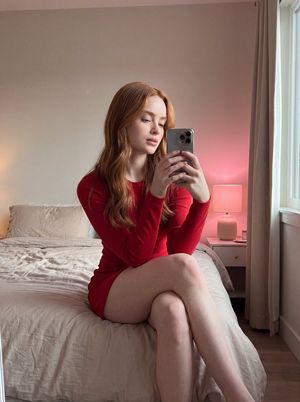
A warm, 90s film-style selfie of a young woman in a cozy bedroom during golden hour, featuring soft knit textures and nostalgic aesthetics.

A high-quality, 2:3 aspect ratio portrait of a {argument name="subject" default="young woman with clear green eyes and light brown hair"}, leaning her cheek gently against her left hand in a casual selfie pose. She is wearing a {argument name="clothing" default="soft pink V-neck knit sweater"}, a small pink bow hair clip on the side of her hair, and a delicate thin gold chain necklace featuring a small, subtle letter "N" pendant. She has a warm, gentle smile, clear sharp facial features with zero blur, soft Douyin-style makeup featuring a prominent pink rosy blush on her cheeks, and a subtle lip gloss. The scene is illuminated by warm, golden hour sunlight streaming in from a window, casting soft shadows. The background is a {argument name="background" default="cozy, decorated bedroom with polaroid photos and green vine fairy lights hanging on a white wall to the left, a dark wooden door in the center, and a glowing neon pink heart mirror on the right"}. 90s film grain aesthetic, Kodak Portra 400 vibes, clean focus on the face, photorealistic, 8k resolution. --ar 2:3
A high-quality, 2:3 aspect ratio portrait of a {argument name="subject" default="young woman with clear green eyes and light brown hair"}, leaning her cheek gently against her left hand in a casual selfie pose. She is wearing a {argument name="clothing" default="soft pink V-neck knit sweater"}, a small pink bow hair clip on the side of her hair, and a delicate thin gold chain necklace featuring a small, subtle letter "N" pendant. She has a warm, gentle smile, clear sharp facial features with zero blur, soft Douyin-style makeup featuring a prominent pink rosy blush on her cheeks, and a subtle lip gloss. The scene is illuminated by warm, golden hour sunlight streaming in from a window, casting soft shadows. The background is a {argument name="background" default="cozy, decorated bedroom with polaroid photos and green vine fairy lights hanging on a white wall to the left, a dark wooden door in the center, and a glowing neon pink heart mirror on the right"}. 90s film grain aesthetic, Kodak Portra 400 vibes, clean focus on the face, photorealistic, 8k resolution. --ar 2:3
Edit the prompt in the box under the preview — the template's model and format are already selected — and press Generate. Your version appears right on this page.
Yes. You can change the subject, setting, lighting, mood, format, and available model controls before creating your image.
Opening and editing this template is free. Generating uses credits, shown on the Generate button when you are signed in.
Start with Nano Banana 2, which is the model associated with this template. You can compare another compatible model for a different finish.
Follow a topic to a crawlable collection of related PicX Studio templates.