
Pastel Chinese Landscape Expansion
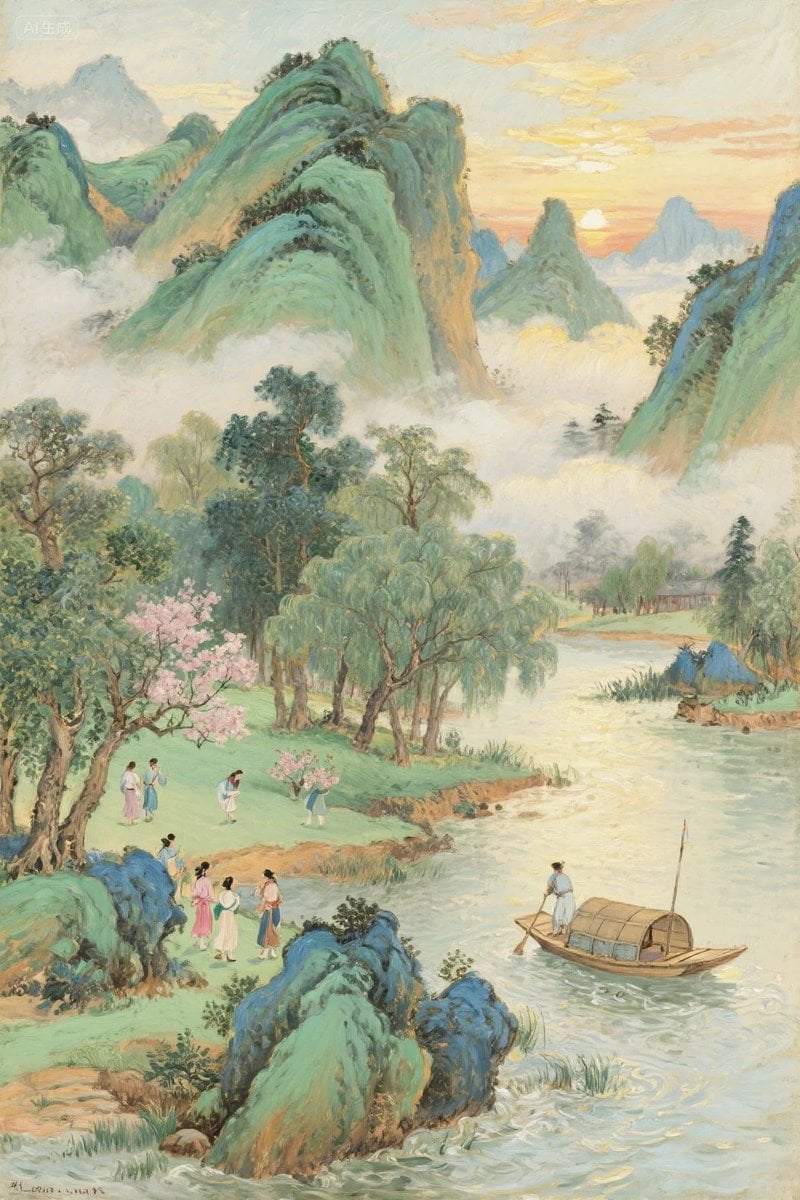
Transforms a sparse abstract reference into a detailed traditional Chinese riverside mountain landscape with figures, boat, mist, and spring scenery.
- Prompt included
- Model and format preset
- Free template
The prompt behind this image
Copy the exact prompt behind Pastel Chinese Landscape Expansion, or open it in the studio and make it yours.
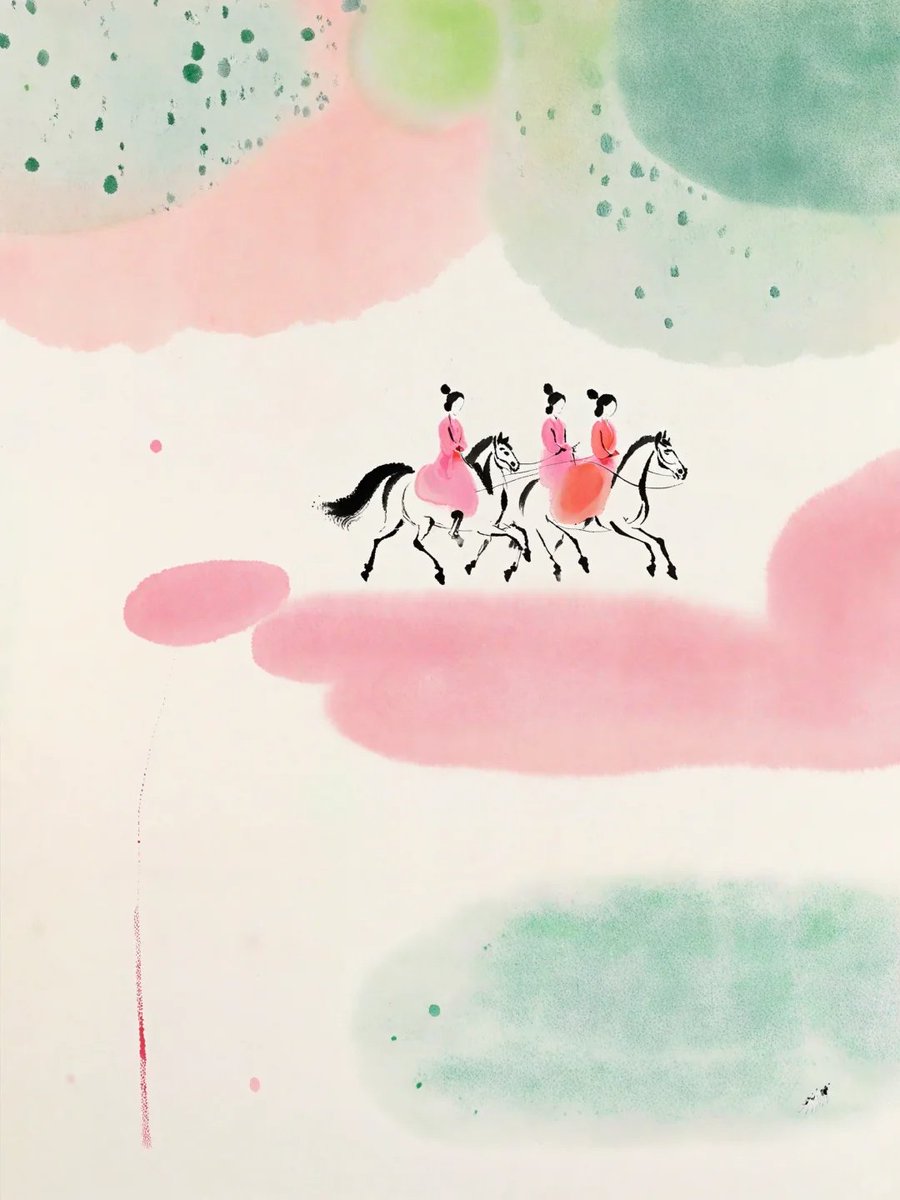
Using the provided reference image as the compositional and color inspiration, expand the minimal abstract scene into a richly detailed vertical classical Chinese landscape painting rather than a sparse illustration. Reinterpret the soft green and pink watercolor washes as real scenery: mist-wrapped emerald mountains, pale sunrise clouds, spring trees, flowering blossoms, grassy riverbanks, and a winding river. Remove the simple horse-rider motif and replace it with an inhabited riverside scene containing exactly 10 small human figures: 9 travelers or villagers on the left bank in small groups, and 1 boatman standing on a covered wooden boat on the river. Add one covered wooden boat, willow trees, flowering pink trees, distant huts, layered blue-green peaks, low fog between mountains, and gentle ripples in the water. Keep the airy pastel mood and vertical composition from the reference, but make the world feel complete, narrative, and collectible, with delicate brushwork, luminous atmosphere, and an elegant traditional landscape aesthetic. Target style: {argument name="art style" default="classical Chinese landscape painting with soft pastel brushwork"}. Time of day: {argument name="time of day" default="sunrise"}. Season: {argument name="season" default="spring"}. Main setting: {argument name="main setting" default="misty riverside mountain valley"}. Mood: {argument name="mood" default="peaceful, poetic, and idyllic"}.
Reference images included
Pastel Chinese Landscape Expansion needs input media to work. They load alongside the prompt when you open it in the studio.
How to use Pastel Chinese Landscape Expansion in 3 steps
- 1Upload ImagePNG, JPG or paste
Add your photo
Upload the photo the template builds on. The prompt, model and format are already set.
- 2…a portrait of your subject in softgolden-hour light, 85mm…
Personalize
Edit the subject and creative details for your destination.
- 3Generate
Generate
Press Generate — your image is created in PicX Studio, so you can compare it with the original and refine one variable at a time.
More like this
Templates with the same subject, style or setup. Open one to see its prompt.

Premium Vintage Travel Poster Landscape
Premium Vintage Travel Poster Landscape

Pastel Fantasy Pagoda Mountain Landscape

Teen Girl Alpine Lake Mountain View

Anime Catgirl in Chinese Ink Landscape

Eid al-Adha Cute Chaos — Fisheye Selfie with Farm Selfie, Mosque & Animals

Cute Layered Paper Cut Chibi Girl

Layered Paper Cut Illustration Template

Mountain Lake Sunset Landscape

Ghibli Final Takeoff Field

Ghibli Rainy Tram Interior

Ghibli Star Observatory
Make it yours
Pastel Chinese Landscape Expansion works as-is. These are the safest ways to change it without losing the look.
Change one field
Copy a single group, rewrite it, and generate again so you can see what that field is doing.
Keep the frame, change the subject
Hold the composition and light of Pastel Chinese Landscape Expansion, then swap wardrobe, props or the person for a new take.
| If the result… | Why | Fix |
|---|---|---|
| The result drifts from the preview | Too many fields changed at once. | Reuse Pastel Chinese Landscape Expansion as-is first, then change one group — subject, light, or setting. |
| The model over-stylizes the scene | The prose prompt leaves finish and camera underspecified. | Add one camera or lighting sentence and stay on GPT Image 2. |
More GPT Image 2 templates
Other prompts made for GPT Image 2.

Six VTuber Japanese Logo Sheet

Realistic Portrait of Woman and Deer

The Vista Modular Condo Poster

AI Model Routing Comparison Infographic

2.5D Anime Art Board

Isometric Productivity Desk Scene

New York Double Exposure Poster

Four-Panel AI Landscape Comparison

Japanese Tatami Lifestyle Magazine Cover

NESCAFÉ Coffee Map Poster
More image prompts
Fresh picks from across the catalog.
Android Engineer in Maintenance Bay
Vertical Cinematic Arctic Portrait (Tan/Brown Palette)

Historical Moment Capture Prompt
Construction of the Impossible Prompt: Miniature Engineers
1970s High-Glamour Fashion Portrait
Cinematic Food Action Collage

Earbuds E-commerce Infographic
Absolute Face Preservation Urban Streetwear
Cinematic Winter Photoshoot with Heart-Shaped Snow Frame

Energetic Food Advertisement
Browse template categories
Pastel Chinese Landscape Expansion questions
How do I use the Pastel Chinese Landscape Expansion template?
Add your photo if the template asks for one, edit the prompt if you like — the template's model and format are already selected — and press Generate. Your version opens in PicX Studio.
Can I customize the Pastel Chinese Landscape Expansion template?
Yes. You can change the subject, setting, lighting, mood, format, and available model controls before creating your image.
Is the Pastel Chinese Landscape Expansion template free?
Opening and editing this template is free. Generating uses credits, shown on the Generate button when you are signed in.
Which AI model should I use?
Start with GPT Image 2, which is the model associated with this template. You can compare another compatible model for a different finish.
Looking for something else? Browse all templates.

Your photo, any look
Thousands of ready templates for every top image and video model, from one credit balance.