How do I use the Pixar Style Fashion Editorial template?
Choose the primary action to open PicX Studio with the available template settings. Review the model and format, personalize the creative direction, and generate when ready.
An ultra-realistic Pixar-style portrait of a stylish man for a fashion editorial, including specific brand typography.
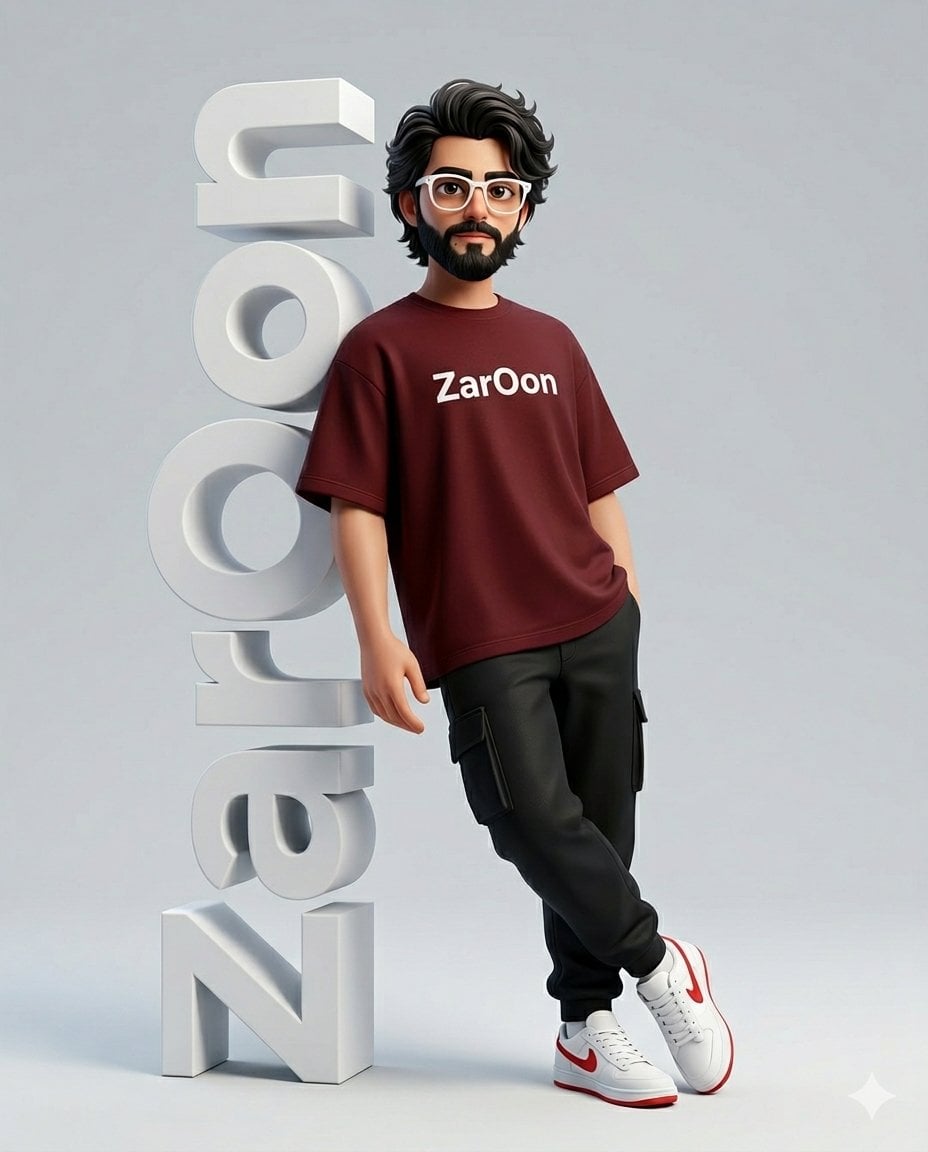
Ultra-realistic fashion editorial portrait of a {argument name="character style" default="3d cute pixar style stylish man"} with white frame glasses standing in a minimalist studio beside large vertical 3D white letters spelling "{argument name="brand name" default="ZarOon"}". he leans casually leaning back against the letters with a confident, relaxed pose. he wears a {argument name="clothing" default="ZarOon oversized t-shirt with printed in clean white typography on the chest, black cargo pants, and white sneakers with red accents"}. Fashionable glasses, calm confident expression, modern streetwear aesthetic. Ratio 4:5
Choose the primary action to open PicX Studio with the available template settings. Review the model and format, personalize the creative direction, and generate when ready.
Yes. You can change the subject, setting, lighting, mood, format, and available model controls before creating your image.
This template is free to open and customize. Generation usage is shown in PicX Studio before you create.
Start with Nano Banana 2, which is the model associated with this template. You can compare another compatible model for a different finish.
Follow a topic to a crawlable collection of related PicX Studio templates.