How do I use the Streetwear Fashion Collage Prompt template?
Choose the primary action to open PicX Studio with the available template settings. Review the model and format, personalize the creative direction, and generate when ready.
A multi-frame fashion photography prompt creating a streetwear collage with focus on futuristic apparel and urban textures.
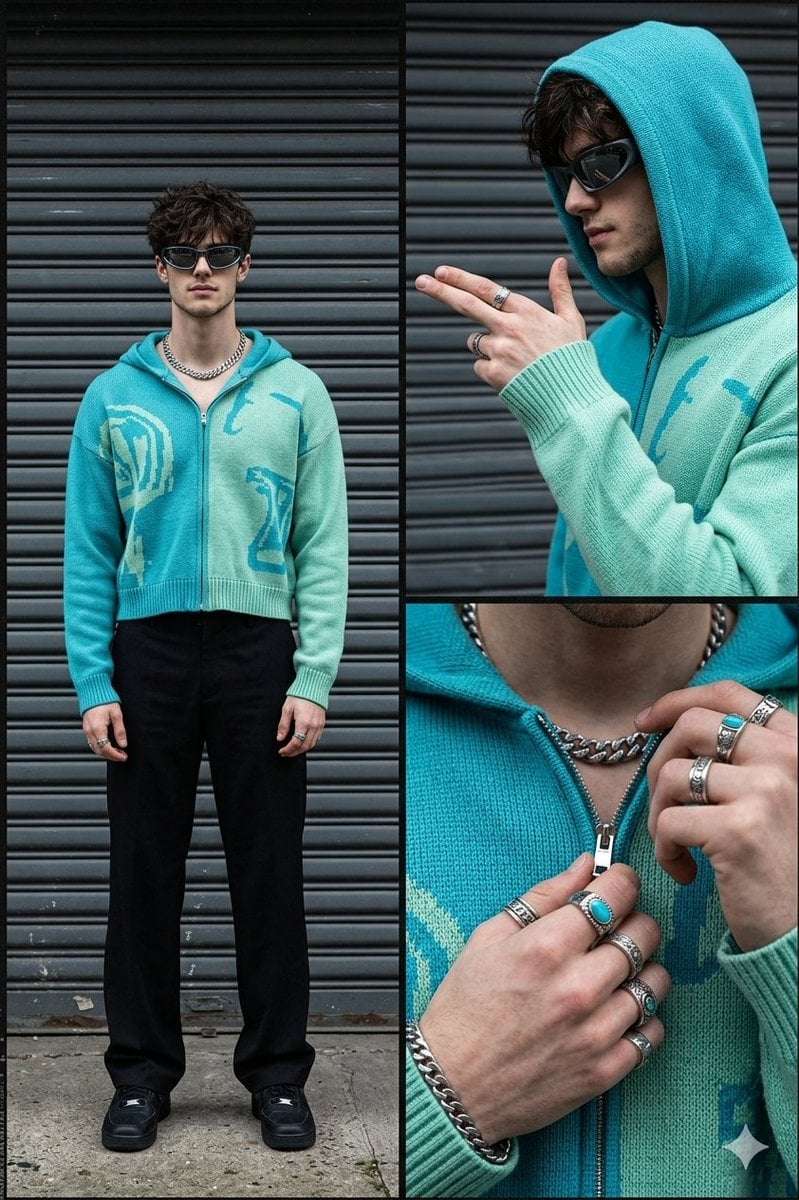
Hyper realistic fashion photo collage consisting of three detailed frames. Show a confident man in an urban setting against a background of dark gray horizontal metal shutters. Color palette: {argument name="colors" default="graphite black, turquoise blue, mint green"}, with silver accents and a concrete texture. Left frame (full body portrait): Stylish man standing in a relaxed pose, looking straight at camera. He wears {argument name="accessories" default="futuristic sunglasses, a chunky silver chain"}, a cropped knitted hoodie in turquoise and mint tones, black wide-leg trousers, and black sneakers. Strong streetwear attitude. Top right frame (profile shot): Close-up side profile of the man. Hood up. He extends his arm forward with fingers shaped like a finger-gun gesture. Dark sunglasses remain on. Focus on the sleeve texture, knitted fabric, and hand details. Bottom right frame (detail shot): Close-up of hands adjusting the zipper or collar of the hoodie. Hands decorated with silver rings and bracelet. Emphasize jewelry texture, ribbed knit fabric, zipper shine, and finger details. Lighting should be cinematic and contrasty with soft reflections. Highly detailed textures on fabric, jewelry, skin, and metal background. Premium streetwear editorial style, modern luxury fashion campaign look.
Choose the primary action to open PicX Studio with the available template settings. Review the model and format, personalize the creative direction, and generate when ready.
Yes. You can change the subject, setting, lighting, mood, format, and available model controls before creating your image.
This template is free to open and customize. Generation usage is shown in PicX Studio before you create.
Start with Nano Banana 2, which is the model associated with this template. You can compare another compatible model for a different finish.
Follow a topic to a crawlable collection of related PicX Studio templates.