
Pixar Style Beverage Commercial
A detailed storyboard-based prompt for a 15-second beverage commercial featuring a young woman and a 'FRUVE' soda can in Pixar's 3D style.
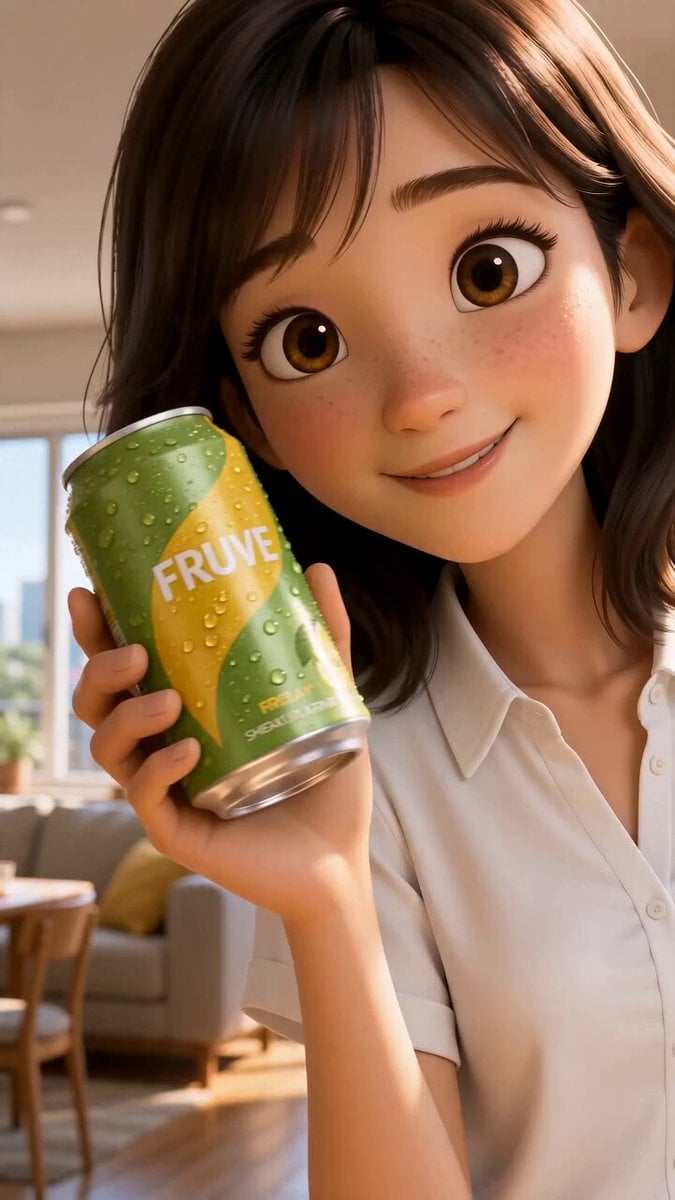
- Prompt included
- Model and format preset
- Free template
The prompt behind this video
Copy the exact prompt behind Pixar Style Beverage Commercial, or open it in the studio and make it yours.
Shot count: 8 | Duration: 15s | Aspect ratio: 9:16 Use @Image1 as the storyboard reference. Follow its 8 numbered panels in order, one shot per panel. The storyboard panels are landscape — recompose each shot into vertical 9:16 framing: center the subject, tighter framing, comfortable headroom, background extends naturally above and below. Maintain the exact same Pixar-style 3D CG character and can design from @Image1 throughout: a cheerful young Japanese woman in her early 20s, shoulder-length dark brown hair, big warm brown eyes, white short-sleeve blouse, light beige pants; a chilled lime-green and yellow aluminum can labeled "FRUVE" with glistening condensation. Audio: warm female Japanese voice-over narration (bright, natural, gentle CM tone) synced to the shots as written below, plus light refreshing acoustic-pop BGM and subtle real sound effects (can pop, fizz, pouring, birds in the park). Shot 1 (0-2s): As in Panel 1 — bright modern Japanese apartment, she smiles directly into camera holding the ice-cold FRUVE can beside her face, rotating it playfully. Vertical medium close-up, face and can filling the upper two-thirds of frame. Camera: slow push-in. Lighting: soft morning sunlight through a large window. Narration (Japanese, soft and inviting): 「なんだか、いいことありそう。」 Shot 2 (2-4s): As in Panel 2 — in the minimalist kitchen she pops the can open with a satisfying fizz, tiny sparkling droplets and a small vapor puff, delighted expression. Vertical framing with the can at center and her face above it. Camera: fixed close-up. Lighting: warm natural daylight. Audio: crisp can-pop and fizz sound, no narration. Shot 3 (4-6s): As in Panel 3 — macro shot of the can, sparkling bubbles and water droplets running down the cold surface, cold vapor rising; the tall can fills the vertical frame. Camera: slow orbit. Lighting: sunlight glints on the wet metal. Narration (Japanese, gently excited): 「かじつ、はじける。」 Shot 4 (6-8s): As in Panel 4 — slow-motion splash scene, fresh lemon slices, strawberries, mint leaves and ice cubes drifting gracefully through the air around the floating can with swirling crystal-clear liquid, elements arranged vertically around the can. Camera: slow orbit. Lighting: bright clean high-key. Narration (Japanese, airy): 「スパークリング。」 Shot 5 (8-9.5s): As in Panel 5 — she gently pours the sparkling liquid from the can into a tall glass filled with ice on the kitchen counter; a realistic calm pour, liquid flows smoothly into the glass, soft bubbles rise inside, nothing splashes out. Vertical close-up on the tall glass, pour stream running down the frame. Camera: fixed close-up. Lighting: warm backlight. Audio: gentle pouring and fizzing sound, no narration. Shot 6 (9.5-11.5s): As in Panel 6 — she relaxes beside the large window taking a refreshing sip from the glass, eyes closed, blissful smile. Vertical medium shot. Camera: slow push-in from side angle. Lighting: golden sunlight highlighting her face. Narration (Japanese, satisfied sigh then softly): 「ごくっと、爽快。」 Shot 7 (11.5-13.5s): As in Panel 7 — sunny afternoon, she walks through a green Japanese park holding the can, laughing, natural stride, full body in vertical frame with tall trees above her. Camera: smooth tracking shot. Lighting: warm golden light, soft bokeh trees. Narration (Japanese, upbeat): 「今日をもっと、フレッシュに。」 Shot 8 (13.5-15s): As in Panel 8 — final hero shot, she raises the chilled FRUVE can toward the camera with a bright smile, can prominent in the center of the vertical frame, subtle floating citrus slices and mint around it. Camera: slow pull-out with slight low angle. Lighting: warm golden sparkle. Narration (Japanese, clear brand-tagline delivery): 「フルーヴ、新登場。」 Style: high-quality Pixar-style 3D CG animation, vibrant saturated colors, glossy detailed materials, cinematic quality, shallow depth of field, smooth stable footage, vertical 9:16 short-form video. Keep the "FRUVE" label clearly readable and identical in every shot, consistent character throughout, maintain exact appearance from @Image1, no deformation or drift, stable face, normal body proportions. Avoid: jitter, distortion, blur, deformation, flickering, ghosting, no text overlays, no captions, no subtitles, no watermarks, no extra logos, no duplicate people, no photorealistic style, no letterboxing, no black bars.
How to use Pixar Style Beverage Commercial in 3 steps
- 1
Open
The prompt is already in the box next to the preview, with the template's model and format selected.
- 2…a portrait of your subject in softgolden-hour light, 85mm…
Personalize
Edit the subject and creative details for your destination.
- 3Generate
Generate
Press Generate — your video is created in PicX Studio, so you can compare it with the original and refine one variable at a time.
More like this
Templates with the same subject, style or setup. Open one to see its prompt.
Fruit Cookie Commercial
Silk Road Pomegranate Folk Animation
Mechanical Flower Bloom Brand Film
Crystal Ball Match-Cut Brand Film

Sneaker Product Commercial
Skincare Product Commercial 3
Cinematic Portrait Study 3
Product UGC Commercial
Cinematic Portrait Study
Skincare Product Commercial
Luxury Handbag Commercial — Hollywood VFX Ad
Make it yours
Pixar Style Beverage Commercial works as-is. These are the safest ways to change it without losing the look.
Change one field
Copy a single group, rewrite it, and generate again so you can see what that field is doing.
Keep the frame, change the subject
Hold the composition and light of Pixar Style Beverage Commercial, then swap wardrobe, props or the person for a new take.
| If the result… | Why | Fix |
|---|---|---|
| The result drifts from the preview | Too many fields changed at once. | Reuse Pixar Style Beverage Commercial as-is first, then change one group — subject, light, or setting. |
| The model over-stylizes the scene | The prose prompt leaves finish and camera underspecified. | Add one camera or lighting sentence and stay on Seedance 2.0. |
More Seedance 2.0 templates
Other prompts made for Seedance 2.0.

Comical Martial Arts Punch Scene

Maglev Train Action Sequence

Martial Arts Fight Sequence

Wuxia Protection and Trust Script

Vintage Korean Arcade MiniDV Vlog

Mercedes 190 SL Luxury Ad

Rainy Night Supernatural Reverse Comedy Video Script

Amazon Civilization Discovery

Futuristic South Asian City Transformation

Cozy Luxury Cafe Commercial
More video prompts
Fresh picks from across the catalog.

Knight Quote Video Prompt
Beach Dance Zombie Chase
Anime Wall Running Action Scene
Video Prompt for Stationary Camera and Model Movement
Moroccan Desert Rally Race
Urban Documentary Subway Commute
Luxury Skincare Product Commercial
Cinematic BMW 8 Series Commercial
Samurai Duel on Dark Lake
Woman by the Lake at Sunset
Browse template categories
Pixar Style Beverage Commercial questions
How do I use the Pixar Style Beverage Commercial template?
Add your photo if the template asks for one, edit the prompt if you like — the template's model and format are already selected — and press Generate. Your version opens in PicX Studio.
Can I customize the Pixar Style Beverage Commercial template?
Yes. You can change the subject, setting, lighting, mood, format, and available model controls before creating your video.
Is the Pixar Style Beverage Commercial template free?
Opening and editing this template is free. Generating uses credits, shown on the Generate button when you are signed in.
Which AI model should I use?
Start with Seedance 2.0, which is the model associated with this template. You can compare another compatible model for a different finish.
Looking for something else? Browse all templates.

Your photo, any look
Thousands of ready templates for every top image and video model, from one credit balance.