
Anime Tactical Soldier Outfit Design
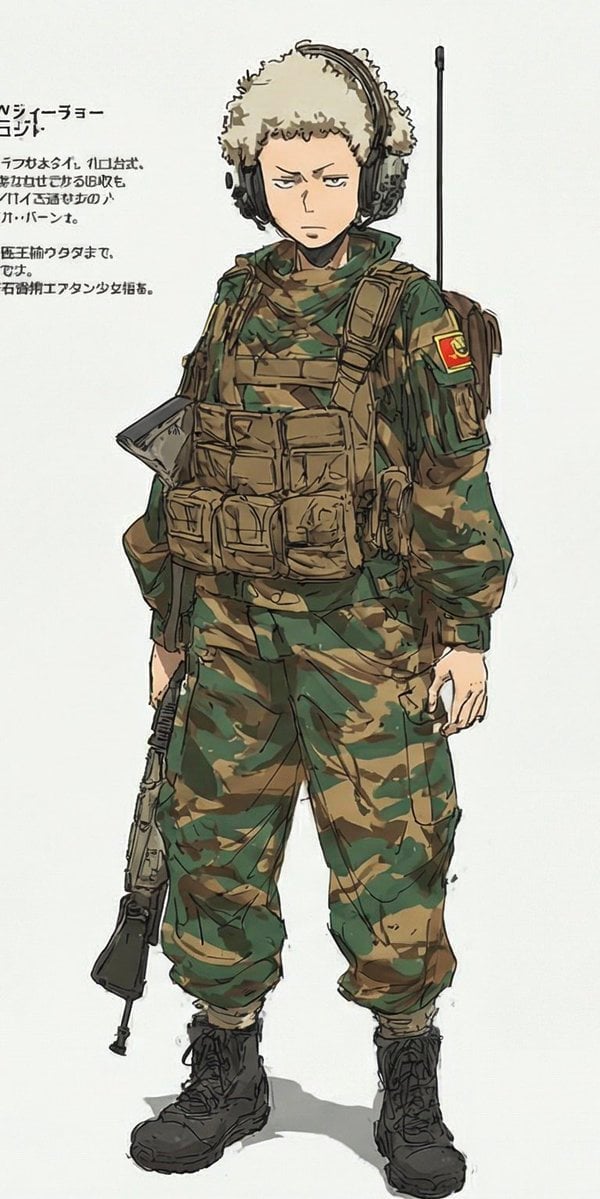
Generates a single full-body anime character wearing a detailed modern camouflage tactical outfit for character design or costume variation use.
- Prompt included
- Model and format preset
- Free template
The prompt behind this image
Copy the exact prompt behind Anime Tactical Soldier Outfit Design, or open it in the studio and make it yours.
Create a vertical full-body anime concept-art illustration of exactly one young male character, {argument name="character name" default="a stern teenage soldier"}, standing front-facing with a slight relaxed slouch on an off-white blank studio background. Preserve a serious, unimpressed expression, short light-blond curly hair mostly covered by a fluffy beige ushanka-style winter hat, pale skin, slim youthful proportions, and large black over-ear tactical headphones. Redesign only the outfit as a modern military field uniform: green-and-brown woodland camouflage jacket and loose cargo pants tucked into black lace-up combat boots, a tan tactical plate carrier with many pouches across the chest and abdomen, tan shoulder straps, a side satchel or backpack visible behind the right arm, a green scarf or neck wrap, and a red-and-yellow sleeve patch on the upper right arm. Add one long black radio antenna rising vertically behind the shoulder and one black assault rifle hanging downward at the character’s left side, held loosely by a strap; do not show the weapon aimed or in use. Include exactly one outfit and exactly one character, no lineup, no collage, no alternate versions. On the left side of the image, add a small block of Japanese-style annotation text with a bold heading and four short lines beneath it, partially cropped and slightly nonsensical, like a character design sheet note. Use expressive sketchy ink outlines, muted watercolor/marker coloring, visible rough construction strokes, subtle shadows under the boots, and a clean manga character-design-sheet aesthetic. The outfit color theme is {argument name="camouflage palette" default="olive green, dark forest green, tan, and brown"}; the sleeve patch should feature {argument name="patch colors" default="red and yellow"}.
How to use Anime Tactical Soldier Outfit Design in 3 steps
- 1Upload ImagePNG, JPG or paste
Add your photo
Upload the photo the template builds on. The prompt, model and format are already set.
- 2…a portrait of your subject in softgolden-hour light, 85mm…
Personalize
Edit the subject and creative details for your destination.
- 3Generate
Generate
Press Generate — your image is created in PicX Studio, so you can compare it with the original and refine one variable at a time.
More like this
Templates with the same subject, style or setup. Open one to see its prompt.









Make it yours
Anime Tactical Soldier Outfit Design works as-is. These are the safest ways to change it without losing the look.
Change one field
Copy a single group, rewrite it, and generate again so you can see what that field is doing.
Keep the frame, change the subject
Hold the composition and light of Anime Tactical Soldier Outfit Design, then swap wardrobe, props or the person for a new take.
| If the result… | Why | Fix |
|---|---|---|
| The result drifts from the preview | Too many fields changed at once. | Reuse Anime Tactical Soldier Outfit Design as-is first, then change one group — subject, light, or setting. |
| The model over-stylizes the scene | The prose prompt leaves finish and camera underspecified. | Add one camera or lighting sentence and stay on GPT Image 2. |
More GPT Image 2 templates
Other prompts made for GPT Image 2.

Six VTuber Japanese Logo Sheet

Realistic Portrait of Woman and Deer

The Vista Modular Condo Poster

AI Model Routing Comparison Infographic

2.5D Anime Art Board

Isometric Productivity Desk Scene

New York Double Exposure Poster

Four-Panel AI Landscape Comparison

Japanese Tatami Lifestyle Magazine Cover

NESCAFÉ Coffee Map Poster
More image prompts
Fresh picks from across the catalog.
Shocked Expression Candid Photo Prompt
Object-Based Miniature Surreal Ecosystem
Sunset Motocross Action Portrait
Nintendo Game Boy Product Showcase Infographic with Tetris
Makoto Shinkai Inspired Anime Cinematic Scene
Tuxedo European Street Portrait
Expression-Rich Sticker Pack Grid
Anime Elf Girl on Forest Path
Realistic Saree Portrait Generation
Minimalist Studio Editorial Poster
Browse template categories
Anime Tactical Soldier Outfit Design questions
How do I use the Anime Tactical Soldier Outfit Design template?
Add your photo if the template asks for one, edit the prompt if you like — the template's model and format are already selected — and press Generate. Your version opens in PicX Studio.
Can I customize the Anime Tactical Soldier Outfit Design template?
Yes. You can change the subject, setting, lighting, mood, format, and available model controls before creating your image.
Is the Anime Tactical Soldier Outfit Design template free?
Opening and editing this template is free. Generating uses credits, shown on the Generate button when you are signed in.
Which AI model should I use?
Start with GPT Image 2, which is the model associated with this template. You can compare another compatible model for a different finish.
Looking for something else? Browse all templates.

Your photo, any look
Thousands of ready templates for every top image and video model, from one credit balance.