How do I use the Anime Girl by Mountain Stream template?
Choose the primary action to open PicX Studio with the available template settings. Review the model and format, personalize the creative direction, and generate when ready.
Generates a polished summer anime key visual of a white-haired girl sitting by a sparkling mountain stream.
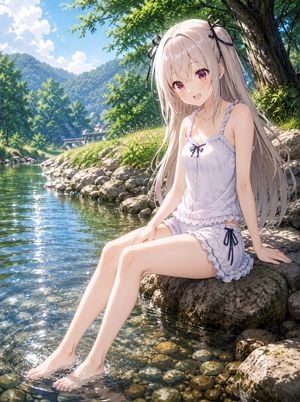
Create a high-resolution anime illustration of {argument name="character name" default="Atri"}, a delicate young anime girl sitting on a large mossy river rock with her bare feet dipped in clear shallow water. She has very long {argument name="hair color" default="silvery white"} hair flowing past her waist, soft bangs, two small black ribbon hair bows near the sides of her head, large pink-red eyes, fair skin, and a gentle open-mouth smile while looking toward the viewer. She wears a frilly white summer camisole and matching ruffled shorts, with small dark navy bow accents on the chest and at the side of the shorts. The pose is relaxed and graceful: seated three-quarter view, one hand resting behind her on the rock for support, the other near her thigh, both legs extended diagonally into the sparkling stream. Set the scene in a bright idyllic mountain riverside during {argument name="season and weather" default="a sunny summer afternoon"}: transparent green-blue water revealing rounded pebbles beneath, sunlight glittering on ripples around her feet, a rocky bank lined with grass and wild greenery, dense leafy trees casting dappled shade, distant forested mountains, a small bridge or rural building far in the background, and a vivid blue sky with soft white clouds. Use a polished Japanese visual novel / modern anime key visual style with highly detailed hair strands, luminous skin highlights, crisp linework, saturated natural colors, soft atmospheric depth, cinematic composition, and 4K-level detail. Emphasize sparkling water reflections, warm sunbeams through leaves, peaceful rural freshness, and a wholesome serene mood. No text, no watermark, no extra characters, no damaged artifacts, no distorted anatomy.
Choose the primary action to open PicX Studio with the available template settings. Review the model and format, personalize the creative direction, and generate when ready.
Yes. You can change the subject, setting, lighting, mood, format, and available model controls before creating your image.
This template is free to open and customize. Generation usage is shown in PicX Studio before you create.
Start with GPT Image 2, which is the model associated with this template. You can compare another compatible model for a different finish.
Follow a topic to a crawlable collection of related PicX Studio templates.