How do I use the Anime Girl Generation Grid template?
Choose the primary action to open PicX Studio with the available template settings. Review the model and format, personalize the creative direction, and generate when ready.
Creates a 12-card comparison gallery of a pink-haired anime girl in kimono variations for showcasing image-generation outputs.
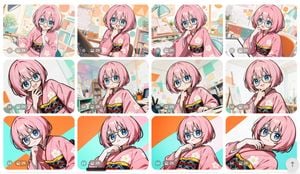
Goal: Create a contact-sheet style comparison grid of anime image generations featuring the same character in multiple variations. Canvas: Wide landscape canvas, approximately 16:9, with a clean off-white page background and generous margins. Arrange exactly 12 rounded-rectangle image cards in a 4-column by 3-row grid with narrow white gutters between cards. Subject details: Each card shows the same cute anime girl, {argument name="character name" default="a pink-haired manga artist girl"}, with a short fluffy bob haircut, large bright blue eyes, round wire-frame glasses, pale skin, and a cheerful curious expression. She wears a soft pink kimono with white flower motifs and a dark navy obi decorated with red and yellow crisscross cords. Her poses vary slightly but keep a consistent thoughtful gesture: hand near chin, cheek, mouth, or collar, with occasional leaning or tilted framing. Card count and visible variations: Include exactly 12 generated-image thumbnails. Row 1 has 4 cards: 1) girl holding a drawing pen in a bright studio, 2) girl at a drafting tablet with hand near mouth, 3) girl leaning forward in an art room with desk lamp, 4) girl seated beside an orange chair with sketch papers behind her. Row 2 has 4 cards: 5) close-up tilted pose with hand near mouth, 6) centered pose in a colorful classroom-like studio, 7) thoughtful pose beside a drawing desk, 8) bright close-up with a softly blurred art-room background. Row 3 has 4 cards: 9) dramatic diagonal close-up against orange and turquoise graphic background, 10) low-angle portrait with hand at chin, 11) centered portrait against the same orange/turquoise diagonal background, 12) reclining tilted portrait with hand near collar. Backgrounds: Use a cheerful manga studio or art classroom setting in most cards: bookshelves, pencils in cups, drafting tables, sketch sheets, lamps, bulletin boards, pastel geometric wall decorations, plants, and warm daylight. For the bottom row, use a flatter bold graphic backdrop with turquoise and orange diagonal shapes in at least three cards. Visual style: Polished modern anime illustration, crisp black line art, glossy eyes, soft cel shading, pastel color palette, clean high-resolution look, bright and friendly. Make each thumbnail feel like a separate generation with small differences in crop, pose, and background, while maintaining character consistency. Interface overlays: On every card, add a small semi-transparent gray control strip near the lower-left corner. The strip contains tiny round utility icons and a visible label reading {argument name="quality label" default="2K"}. Some cards may include a small bar-chart style icon at the far left of the strip. Add a subtle rounded up-arrow floating button near the lower-right edge of the overall canvas. Constraints: Preserve the exact 4 by 3 grid and exactly 12 cards. Do not add extra characters. Avoid text other than the repeated small {argument name="quality label" default="2K"} overlay. Keep rounded corners, consistent spacing, and the feel of a screenshot from an image-generation gallery.
Choose the primary action to open PicX Studio with the available template settings. Review the model and format, personalize the creative direction, and generate when ready.
Yes. You can change the subject, setting, lighting, mood, format, and available model controls before creating your image.
This template is free to open and customize. Generation usage is shown in PicX Studio before you create.
Start with GPT Image 2, which is the model associated with this template. You can compare another compatible model for a different finish.
Follow a topic to a crawlable collection of related PicX Studio templates.