How do I use the Candid Train Portrait template?
Choose the primary action to open PicX Studio with the available template settings. Review the model and format, personalize the creative direction, and generate when ready.
A photorealistic close-up portrait prompt for generating a shy young woman seated on a moving train while holding a smartphone.
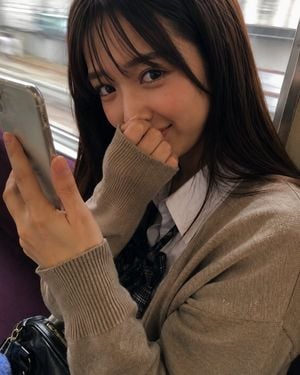
Create a vertical photorealistic close-up portrait of a young woman sitting on a train seat, viewed from slightly above and very close, as if photographed candidly with a smartphone. The subject is {argument name="character description" default="a young Japanese woman with long straight black hair and wispy bangs"}, wearing {argument name="outfit" default="a beige oversized knit cardigan with long ribbed sleeves over a white collared shirt and dark plaid school-style ribbon tie"}. She is seated beside a train window with blurred motion outside, suggesting the train is moving; include a purple train seat at the left edge, a metal window frame on the right, and a small black leather bag partially visible near the lower left. She holds {argument name="phone" default="a silver smartphone"} in her left hand close to the camera, while her right hand is pulled into the sweater sleeve and gently covers her mouth in a shy playful gesture. Her expression is {argument name="expression" default="softly smiling with warm eye contact, slightly bashful and mischievous"}. Use natural daylight from the window, realistic skin texture, detailed eyes, soft shadows, shallow depth of field, and subtle motion blur in the background. Composition should crop tightly around her face, upper torso, hands, and phone, with her face in the upper center-right and the phone in the left foreground. Style: ultra-realistic modern Japanese train candid portrait, high detail, natural color grading, intimate everyday atmosphere. Avoid text, logos, extra people, exaggerated anime features, heavy makeup, or studio lighting.
Choose the primary action to open PicX Studio with the available template settings. Review the model and format, personalize the creative direction, and generate when ready.
Yes. You can change the subject, setting, lighting, mood, format, and available model controls before creating your image.
This template is free to open and customize. Generation usage is shown in PicX Studio before you create.
Start with GPT Image 2, which is the model associated with this template. You can compare another compatible model for a different finish.
Follow a topic to a crawlable collection of related PicX Studio templates.