How do I use the Minimalist Klein Blue Typography Poster template?
Choose the primary action to open PicX Studio with the available template settings. Review the model and format, personalize the creative direction, and generate when ready.
Generates a sparse editorial hero poster with bold condensed typography, production crop marks, and a black-and-Klein-blue print-system aesthetic.
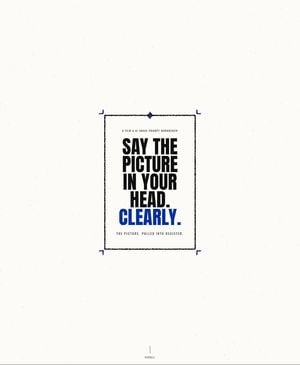
Create a minimalist editorial landing-page hero poster on an off-white coated-paper background with subtle dust speckles and scanned paper grain. Center a single vertical rectangular print sheet slightly above the middle of a wide landscape canvas, leaving large empty margins. The sheet has a thin imperfect black ink border with a slightly rough printed texture, plus four small Klein-blue crop/corner registration marks just outside the rectangle, and one small blue circular registration target centered on the top border. Inside the sheet, use stark condensed bold uppercase typography like a printed production document: a tiny tracking-spaced eyebrow at the top reading {argument name="eyebrow text" default="A FILM & AI IMAGE PROMPT WORKBENCH"}, then a large stacked headline in black reading {argument name="main headline" default="SAY THE PICTURE IN YOUR HEAD."} across five tight lines, followed by the final word in vivid Klein blue reading {argument name="accent word" default="CLEARLY."}. Add a tiny tracking-spaced caption beneath the headline reading {argument name="caption text" default="THE PICTURE, PULLED INTO REGISTER."}. At the very bottom center of the canvas, far below the poster, add a thin vertical black line and tiny uppercase text reading {argument name="bottom label" default="SCROLL"}. Use only three colors: warm paper white, black ink, and intense Klein blue. Keep all corners square, no rounded UI elements, no shadows, no gradients, no illustrations, no photos, no extra text.
Choose the primary action to open PicX Studio with the available template settings. Review the model and format, personalize the creative direction, and generate when ready.
Yes. You can change the subject, setting, lighting, mood, format, and available model controls before creating your image.
This template is free to open and customize. Generation usage is shown in PicX Studio before you create.
Start with GPT Image 2, which is the model associated with this template. You can compare another compatible model for a different finish.
Follow a topic to a crawlable collection of related PicX Studio templates.