How do I use the Floating Futuristic City at Sunset template?
Choose the primary action to open PicX Studio with the available template settings. Review the model and format, personalize the creative direction, and generate when ready.
A cinematic sci-fi cityscape prompt for generating a vast floating metropolis above the clouds with sunset lighting, towering architecture, and sleek spacecraft
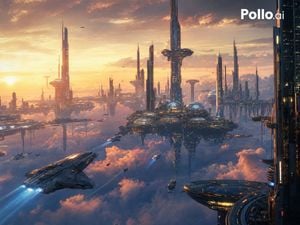
A vast cinematic sci-fi megacity floating above dense glowing clouds at sunset, viewed from a high aerial perspective. The scene shows an expansive futuristic skyline with dozens of ultra-tall elegant skyscrapers and needle-like towers rising from hovering platforms, connected by distant structures and suspended districts. In the center-right, a large floating urban hub features multiple illuminated glass domes and layered circular bases, surrounded by several monumental towers, including one especially tall central spire with a wide ring-like observation structure near the top. Warm golden sunlight pours in from the left horizon, creating a dramatic orange, peach, and lavender sky with thick clouds and atmospheric haze, while the lower half of the image is filled with soft pink and blue cloud banks reflecting the sunset. Several flying vehicles are visible: 1 large dark metallic spacecraft in the lower left foreground with bright blue engine trails, 1 circular landing-pad-like platform craft in the lower right foreground, 2 medium ships crossing the midground with blue light trails, and multiple tiny distant air vehicles scattered across the skyline. Add intricate city lighting, reflective metallic surfaces, immense scale, serene futuristic grandeur, and highly detailed concept art styling. Include the white brand text {argument name="logo text" default="Pollo.ai"} in the top-right corner as a clean overlay.
Choose the primary action to open PicX Studio with the available template settings. Review the model and format, personalize the creative direction, and generate when ready.
Yes. You can change the subject, setting, lighting, mood, format, and available model controls before creating your image.
This template is free to open and customize. Generation usage is shown in PicX Studio before you create.
Start with GPT Image 2, which is the model associated with this template. You can compare another compatible model for a different finish.
Follow a topic to a crawlable collection of related PicX Studio templates.