How do I use the Sunny Alley Fashion Portrait template?
Choose the primary action to open PicX Studio with the available template settings. Review the model and format, personalize the creative direction, and generate when ready.
A photorealistic vertical portrait prompt for creating a serene young woman posing in a sunlit old alley with natural fashion styling.
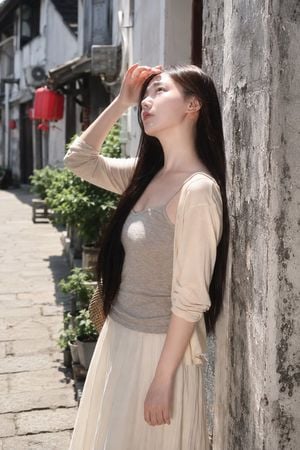
Create a photorealistic vertical street portrait of {argument name="subject" default="a young East Asian woman"} standing in a narrow old alley on a bright sunny day. She leans lightly against a rough, weathered gray plaster wall on the right side of the frame, shown from mid-thigh upward in a 2:3 vertical composition. She has very long straight {argument name="hair color" default="dark brown-black hair"} falling over her shoulders and down past her waist, fair skin, delicate natural makeup, and a calm contemplative expression as she gazes upward toward the sunlight. Her right hand is raised to her forehead to shade her eyes, while her left arm hangs relaxed by her side. Dress her in a soft casual outfit: a fitted light gray camisole tank top, a sheer cream cardigan with sleeves pushed to the elbows, and a flowing off-white long skirt; include a small woven straw shoulder bag partly visible behind her hip. The setting is an aged pedestrian lane with stone paving, potted green plants along the wall, distant old building facades, a red lantern hanging in the blurred background, and strong midday sunlight casting crisp highlights and shadows. Use natural colors, shallow depth of field, realistic skin texture, soft cinematic bokeh, high detail, 35mm documentary fashion photography style, no text, no watermark, no extra people.
Choose the primary action to open PicX Studio with the available template settings. Review the model and format, personalize the creative direction, and generate when ready.
Yes. You can change the subject, setting, lighting, mood, format, and available model controls before creating your image.
This template is free to open and customize. Generation usage is shown in PicX Studio before you create.
Start with GPT Image 2, which is the model associated with this template. You can compare another compatible model for a different finish.
Follow a topic to a crawlable collection of related PicX Studio templates.