How do I use the Monochrome Kimono Portrait template?
Choose the primary action to open PicX Studio with the available template settings. Review the model and format, personalize the creative direction, and generate when ready.
A refined black-and-white portrait of a woman in traditional kimono framed by a circular window overlooking a Zen garden.
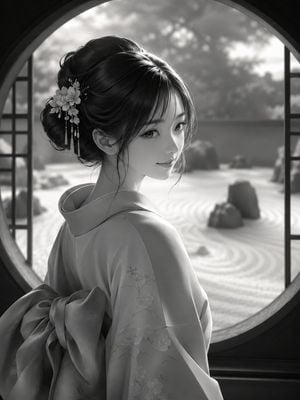
Create a monochrome, photorealistic cinematic portrait of a graceful young Japanese woman in traditional kimono, shown from the back and shoulders up as she turns her head toward the viewer with a calm, faint smile. She has {argument name="hair color" default="glossy black"} hair styled in an elegant low updo with loose face-framing strands and a decorative floral kanzashi hair ornament with dangling tassels on the left side. She wears a refined {argument name="kimono color" default="pale gray"} kimono with subtle embroidered cherry blossom patterns on the sleeve and shoulder, plus a large tied obi bow visible at her lower back. Frame her inside a large circular moon-gate window, with dark interior edges forming a round vignette and slim vertical lattice panels at both sides. Beyond the window is a softly blurred Japanese Zen garden with raked sand patterns, scattered rocks, low shrubs, and bright diffused daylight filtering through trees. Use black-and-white photography style, soft natural backlight, delicate skin tones, shallow depth of field, high detail in hair and fabric, elegant composition, serene atmosphere, 3/4 rear view, vertical 4:5 aspect ratio. No text, no watermark, no modern objects.
Choose the primary action to open PicX Studio with the available template settings. Review the model and format, personalize the creative direction, and generate when ready.
Yes. You can change the subject, setting, lighting, mood, format, and available model controls before creating your image.
This template is free to open and customize. Generation usage is shown in PicX Studio before you create.
Start with GPT Image 2, which is the model associated with this template. You can compare another compatible model for a different finish.
Follow a topic to a crawlable collection of related PicX Studio templates.