How do I use the Mysterious Portrait with Floral Accents template?
Choose the primary action to open PicX Studio with the available template settings. Review the model and format, personalize the creative direction, and generate when ready.
Creates a moody and mysterious fashion portrait of a woman wearing flowers on her hand, set against a rustic stone wall during golden hour.
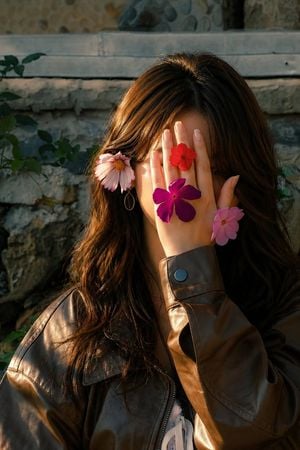
Ultra-realistic portrait photography of a {argument name="subject" default="young woman with long wavy dark brown hair"}, wearing an {argument name="outerwear" default="oversized vintage brown leather jacket"}, standing outdoors in front of a {argument name="background" default="rustic stone wall"} during golden hour. She covers most of her face with one hand placed vertically over her eyes and nose, creating a mysterious aesthetic. Fresh colorful flowers are attached to her hand and fingers: a deep purple flower centered on the hand, a bright red flower on one finger, and a soft pink flower near the wrist. A pale pink daisy-like flower is tucked behind her ear. Warm sunlight illuminates her hair and jacket from the side, creating rich highlights, soft shadows, and cinematic contrast. Natural skin texture, realistic hair strands, shallow depth of field, creamy background bokeh, moody editorial fashion style, candid composition, soft earthy tones, highly detailed, DSLR photography, 85mm lens, f/1.8, photorealistic, ultra sharp focus, 8K quality, natural outdoor lighting, luxury fashion magazine aesthetic, vertical portrait, centered composition.
Choose the primary action to open PicX Studio with the available template settings. Review the model and format, personalize the creative direction, and generate when ready.
Yes. You can change the subject, setting, lighting, mood, format, and available model controls before creating your image.
This template is free to open and customize. Generation usage is shown in PicX Studio before you create.
Start with GPT Image 2, which is the model associated with this template. You can compare another compatible model for a different finish.
Follow a topic to a crawlable collection of related PicX Studio templates.