How do I use the Cinematic Steamed Momo Photography template?
Choose the primary action to open PicX Studio with the available template settings. Review the model and format, personalize the creative direction, and generate when ready.
A highly detailed cinematic food photography prompt featuring steamed momos with macro details and dramatic studio lighting.
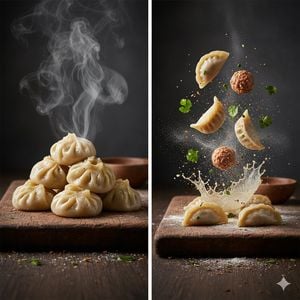
Cinematic food photography of freshly {argument name="food item" default="steamed momos (dumplings)"} stacked on a {argument name="surface" default="rustic weathered wooden board"}. The dumplings have glossy dough with intricate handmade pleats and a subtle oil sheen, with thick dramatic steam rising. Split scene showing a deconstructed view: floating dumpling wrappers, balls of spiced minced filling, and scattered fresh herbs suspended in air. Frozen-in-time effect with flour particles mid-air, motion-frozen spices, and a dramatic slow-motion splash. Wispy swirling steam and falling herb leaves add atmosphere. {argument name="setting" default="Dark moody rustic kitchen setting"}. Weathered wooden cutting board with visible wood grains and cracks. Cinematic studio lighting with warm inviting tones, high contrast and deep shadows for a professional editorial look. Macro photography, 8K resolution, hyper-detailed textures, shallow depth of field with blurred background and crisp sharp focus on the ingredients.
Choose the primary action to open PicX Studio with the available template settings. Review the model and format, personalize the creative direction, and generate when ready.
Yes. You can change the subject, setting, lighting, mood, format, and available model controls before creating your image.
This template is free to open and customize. Generation usage is shown in PicX Studio before you create.
Start with GPT Image 2, which is the model associated with this template. You can compare another compatible model for a different finish.
Follow a topic to a crawlable collection of related PicX Studio templates.