How do I use the Japanese Woman Cinematic Portrait template?
Choose the primary action to open PicX Studio with the available template settings. Review the model and format, personalize the creative direction, and generate when ready.
A cinematic, low-saturation portrait prompt for GPT Image 2 featuring a Japanese woman in a city setting with a film-like texture.
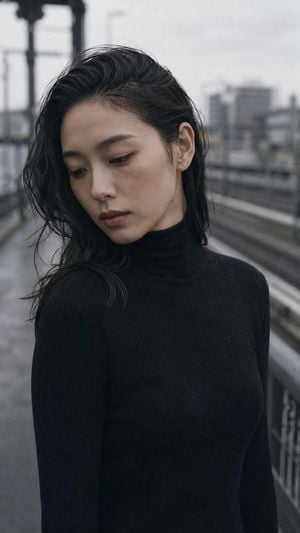
Portrait shot on 85mm f/2, close-up of a {argument name="subject" default="Japanese woman in her late 20s"}, dark wavy hair tucked behind one ear, high cheekbones, narrow eyes with elegant downward cast, expression neutral and self-contained. She wears a {argument name="clothing" default="slim black turtleneck sweater"}. Upper body portrait outdoors on an {argument name="setting" default="empty platform or overpass"}, blurred train or city infrastructure in background bokeh, grey sky visible. Overcast cold-light outdoor conditions, flat cool grey daylight, high-key diffused, very low saturation, monochromatic grey-black palette. Photographic texture and quality: ISO 400 film grain, skin with natural texture and slight redness from cold air, stray hairs from tucked style, not geometrically perfect, photographic texture not CG render smoothness. Avoid: warm tones, colorful background, expressive face. --ar 9:16
Choose the primary action to open PicX Studio with the available template settings. Review the model and format, personalize the creative direction, and generate when ready.
Yes. You can change the subject, setting, lighting, mood, format, and available model controls before creating your image.
This template is free to open and customize. Generation usage is shown in PicX Studio before you create.
Start with GPT Image 2, which is the model associated with this template. You can compare another compatible model for a different finish.
Follow a topic to a crawlable collection of related PicX Studio templates.